

Industrial Protocol Trends: Gateway Demand 2026
Gateway demand is up in 2026 for one plain reason: plants want data from old equipment without paying for a full controls replacement. If I were buying one today, I’d check four things first: the exact protocol path, load limits under plant conditions, security controls, and cabinet fit.
Here’s the short version:
- Legacy reuse is driving demand. Many sites still run older PLCs, meters, drives, and serial devices that work fine but don’t speak OPC UA, MQTT, or cloud-friendly formats.
- Mixed-vendor upgrades add more protocol gaps. One line may include EtherNet/IP, PROFINET, Modbus TCP, BACnet, and serial gear at the same time.
- Buyers now expect more than translation. Many want local buffering, store-and-forward, edge logic, and MQTT over TLS.
- Security is now part of the buying process. RFQs more often ask for TLS, certificates, signed firmware, secure boot, and IEC 62443-aligned features.
- Most buying mistakes are simple. Teams trust “multi-protocol” claims, skip node-count and latency checks, or miss power, temperature, and EMC limits.
A few numbers make the picture clear:
- By 2025, about 94% of industrial gateways supported Modbus RTU/TCP
- About 88% supported OPC UA
- 51% of enterprises reported legacy compatibility issues in brownfield Industry 4.0 work
How Do You Configure An Industrial Network Gateway? - Industrial Tech Insights
sbb-itb-501186b
Quick comparison
| What to check | Why it matters |
|---|---|
| Protocol map | “Supports Modbus” is not enough if the gateway misses your device variant, register layout, or serial settings |
| Throughput and node count | Bench tests can look fine, then polling drift and latency show up after install |
| Security features | Weak TLS, poor certificate handling, or missing role-based access control can block rollout |
| Hardware fit | DC input, DIN-rail fit, temperature range, and EMC ratings must match the panel and site |
If I had to sum up the article in one line, it would be this: treat the gateway like part of the system, not a small accessory. That means mapping devices, checking load under site conditions, and running one pilot before a fleet order.
What is driving gateway demand in 2026
Legacy equipment reuse and brownfield retrofits
Brownfield reuse is a big reason gateway demand is climbing in 2026. Plants want to keep legacy equipment in place and still send its data upstream.
The logic is pretty simple: replacing working PLCs, drives, meters, and serial devices is expensive, disruptive, and often hard to justify. So instead of ripping out gear that still does its job, many facilities are extending its service life. A gateway makes that possible by exposing data upstream without changing the installed device.
That puts new pressure on gateway design. Buyers need products that can poll legacy buses and publish data upstream without touching field wiring or control logic. And this reuse mindset doesn’t stop at older assets. It now shows up in phased upgrade plans too, where old and new equipment need to run side by side for years, not weeks.
Plant upgrades and mixed-vendor interoperability
Stage-by-stage plant upgrades create another clear driver. A facility might add a new conveyor line in one area and swap out a robot cell somewhere else. The result usually isn’t one clean, uniform protocol setup.
A single production line in 2026 might include EtherNet/IP robots, PROFINET drives, Modbus TCP power meters, and BACnet building controls. That kind of mix pushes buyers toward gateways that can translate across several protocols without adding extra cabinet hardware.
That’s why multiprotocol gateways are now a must-have in many projects. Buyers are leaning toward single-unit devices that handle translation across mixed-vendor networks, which means:
- Less cabinet space
- Fewer point products to manage
- One data model upstream systems can actually use
Once plants start adding more edge and cloud reporting, plain protocol translation stops being enough.
Data access, edge processing, and cybersecurity requirements
In 2026, buyers expect more from a gateway than simple protocol conversion. They now want gateways to work as edge-computing nodes too: preprocessing data locally, buffering readings during WAN outages, and publishing only the data that matters to cloud or MES platforms through MQTT over TLS.
Security has also moved from a nice extra to a hard sourcing gate. Because gateways sit between OT and IT networks, they become a natural control point. Current guidance points to TLS-based encryption, certificate authentication, network isolation, and outbound-only cloud access.
Procurement has changed along with those demands. Standards like IEC 62443-4-2 are showing up more often in RFQs, and cybersecurity stakeholders are now part of the buying process. Before a purchase order goes out, they’re checking for signed firmware updates, hardware key storage, and clear documentation of supported security features.
In other words, protocol translation alone won’t cut it if the gateway weakens OT security. And when protocol maps or security features are vague, sourcing mistakes can get expensive fast.
Where gateway purchases go wrong
Rising demand has made gateway buying mistakes more costly. In many cases, teams sign off based on what the label or product page says, not on what the plant actually needs.
Broad compatibility claims that do not match the actual protocol map
“Multi-protocol” can sound great on paper. But that phrase often hides the details that decide whether a gateway will work at all.
Support only matters if it includes the exact protocol variant and data model used in your plant. That means buyers need to check the protocol map, transport, baud rate, parity, and cyclic data limits in the datasheet.
Brownfield sites make this even tougher. Older systems often come with odd register addressing, tag structures, and data types. If the gateway can’t map those cleanly into SCADA or MES, the integration can still fall apart.
Performance limits that only show up after installation
Lab tests don’t tell the full story. A bench setup usually misses plant load, background traffic, and power noise.
Latency and jitter tend to climb as payload size, node count, and concurrent sessions go up, so it’s worth asking for throughput and node-count limits under load that looks like the real site.
It also helps to check what happens during an outage before you place the order. If the WAN link drops, does the gateway store data locally and send it later when the connection comes back? Or does it just lose those readings? That one detail can save a lot of pain.
Security and environmental fit treated as secondary issues
Security problems often show up in plain, unglamorous ways: weak TLS, poor certificate handling, or missing role-based access control. Those gaps are common. And there’s a pricing catch too - some vendors include these features natively, while others put them behind extra licenses, which can push total cost higher without much warning.
The hardware side deserves the same level of scrutiny. Check the temperature range, DC input range, DIN-rail fit, and EMC ratings against the actual cabinet and enclosure. A unit that starts up fine on a bench can still fail in a hot press room, a panel full of noisy variable-frequency drives, or an outdoor enclosure.
Most of these failures come back to one skipped check: exact protocol fit, load limits, security controls, or cabinet ratings.
| Issue | At purchase | In the plant |
|---|---|---|
| Protocol support | Multi-protocol marketing language | Missing exact fieldbus, serial, or PLC variant |
| Scale | Works with a few devices in a lab | Polling drift, jitter, and latency rise under real node counts |
| Security | Basic connectivity works | Weak certificate handling or missing TLS becomes a deployment risk |
| Environment | Powers up on a bench | Temperature, EMC, or power-input mismatch causes failures |
What to check before ordering a gateway
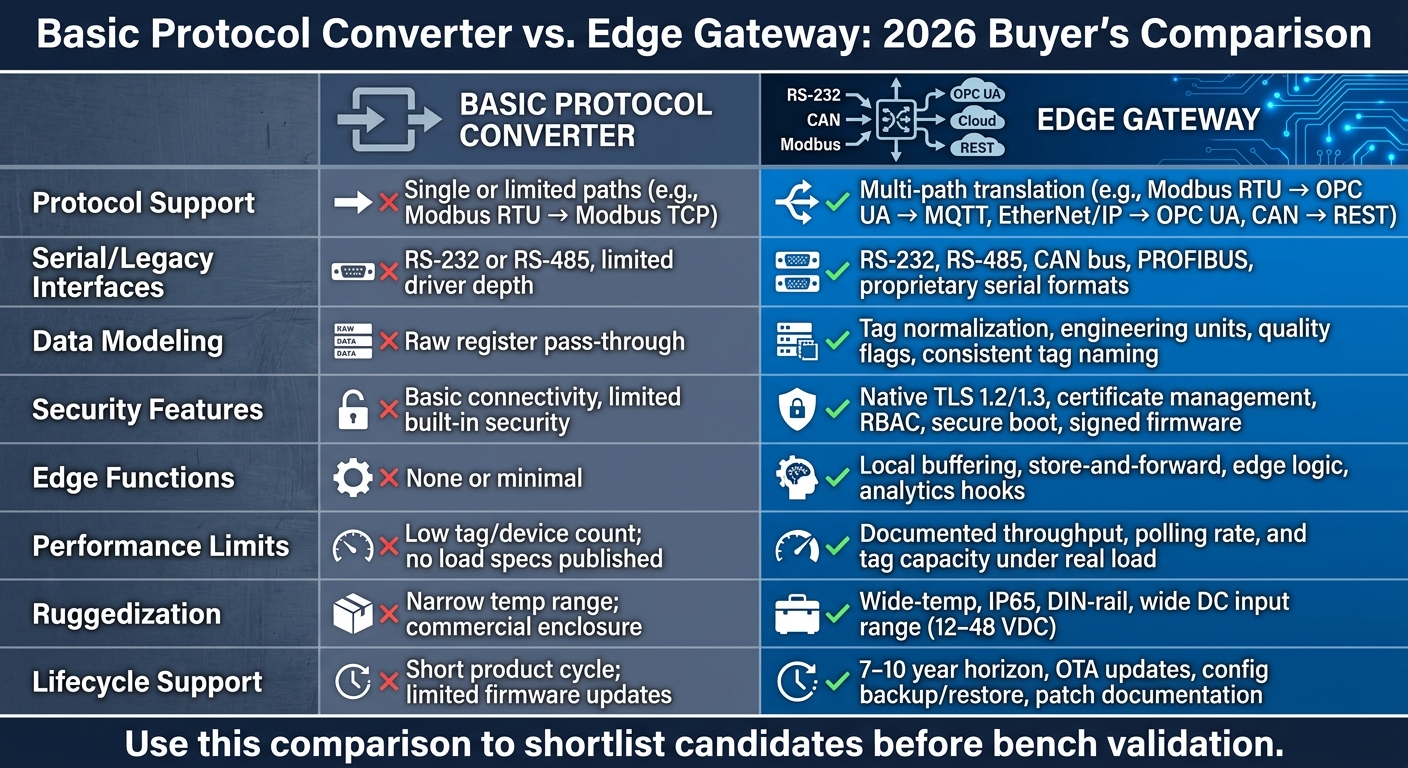
Basic Protocol Converter vs. Edge Gateway: 2026 Buyer's Comparison
Before you place an order, make sure the gateway fits your plant’s protocols, data model, security needs, and physical setup. That’s the best way to catch the mismatch issues and load limits mentioned earlier.
Protocol, interface, and data-model checklist
Start with a clear map of your current asset stack. Write down every PLC, sensor, drive, and HMI, along with its model, firmware version, physical port type (RS-232, RS-485, Ethernet), and native protocol. Then list every upstream system that needs the data, such as SCADA, MES, a historian, or a cloud platform.
Once that map is done, check the exact translation path and where it may hit limits. In brownfield and mixed-vendor plants, this matters a lot. You want to confirm that the gateway can handle your actual register layout, data types, scaling factors, endian settings, multi-register values, and timestamp handling. For older serial gear, verify RS-232 and RS-485 port availability, plus the right baud rate, parity, and stop-bit settings. If your setup includes daisy-chained devices, make sure the gateway stays stable on noisy wiring and can read from multiple devices without falling over.
On the data-model side, check whether the gateway turns raw signals into structured tags with consistent engineering units, timestamps, quality flags, and tag naming before it publishes data to a broker or historian. Normalize tags before publishing.
Security, ruggedization, and lifecycle support checklist
On security, look for TLS 1.2/1.3 encryption, certificate-based authentication, role-based access control, secure boot, and signed firmware updates. If you’re dealing with a fleet rollout, verify automated certificate renewal too. It also helps to confirm that the gateway can sit inside a dedicated plant network zone. And don’t skip the vendor questions: ask about patch cadence and the vulnerability disclosure process.
For hardware, check that the operating range, enclosure rating, and mounting method fit the install site. Confirm DIN-rail or panel-mount support, the industrial DC power input range - typically 12–48 VDC - and humidity, shock, and vibration ratings for plant-floor or outdoor use. On lifecycle support, ask whether the vendor commits to a 7–10 year product support horizon, offers OTA firmware updates, and includes configuration backup and restore tools. That matters most when the gateway is tied to legacy equipment that’s hard to replace.
Comparison table for shortlisting gateway types
If two options make it through the checklist, this table helps separate a basic converter from a full edge gateway. Pay close attention to local buffering - often 24–72 hours - store-and-forward, and edge logic if the gateway needs to keep upstream systems supplied during outages.
| Evaluation criterion | Basic protocol converter | Edge gateway |
|---|---|---|
| Protocol support | Single or limited translation paths (e.g., Modbus RTU → Modbus TCP) | Multi-path translation (e.g., Modbus RTU → OPC UA → MQTT, EtherNet/IP → OPC UA, CAN → REST) |
| Serial/legacy interfaces | RS-232 or RS-485, limited driver depth | RS-232, RS-485, CAN bus, PROFIBUS, and proprietary serial formats |
| Data modeling | Raw register pass-through | Tag normalization, engineering units, quality flags, and consistent tag naming |
| Security features | Basic connectivity and limited built-in security | Native TLS 1.2/1.3, certificate management, RBAC, secure boot, signed firmware |
| Edge functions | None or minimal | Local buffering, store-and-forward, edge logic, analytics hooks |
| Performance limits | Low tag/device count; no load specs published | Documented throughput, polling rate, and tag capacity under real load |
| Ruggedization | Narrow temp range; commercial enclosure | Wide-temp, IP65, DIN-rail, wide DC input range |
| Lifecycle support | Short product cycle; limited firmware updates | 7–10 year horizon, OTA updates, config backup/restore, patch documentation |
Use this filter to narrow the field before bench validation.
Conclusion: How to source for 2026 conditions
In 2026, demand for gateways comes from a few clear pressures: older equipment still in service, step-by-step upgrade plans, mixed-vendor networks, and tougher expectations around data access and security. That’s why gateway selection should be treated as a system-level decision, not a small add-on.
Use the checklist and comparison table above to turn market pressure into a clean RFQ.
Key points to carry into procurement
Never assume compatibility. Check the exact protocol map against the installed base.
Buy for future device counts and data volume, not just today’s line.
Treat security and site ratings as purchase requirements, not post-install fixes.
For related electrical hardware, Electrical Trader can help you source panels, enclosures, power supplies, and legacy switchgear alongside gateway procurement.
Once the shortlist is set, run one representative pilot before committing across the fleet. Document, validate, pilot, deploy.
FAQs
How do I confirm exact protocol compatibility?
Don’t lean on the spec sheet name alone. Go through every device on the link and map each role - controller, device, client, or server - so you can confirm the gateway handles those exact functions.
For BACnet, check the vendor’s PICS to see which objects and BIBBs are supported. For Modbus, verify the register map, confirm whether addressing is zero-based or one-based, and check byte order. After that, use diagnostic tools to send a Who-Is command or read individual registers before full commissioning.
When is an edge gateway worth the extra cost?
An edge gateway is worth the higher upfront cost when you need more than basic protocol conversion. That’s often the case when you need local data processing, stronger reliability, or deeper integration with the rest of your stack.
It starts to make sense when you need real-time local responses, source-level data normalization, or a way to avoid long-term costs tied to proprietary systems. Those costs can creep up over time and often show up as consulting fees, licensing, and vendor lock-in.
What should I test in a pilot before rollout?
Before full rollout, run a small pilot to check hardware performance in day-to-day conditions.
This gives you a chance to spot issues early, before they turn into expensive headaches.
- Verify data accuracy against each device’s local display.
- Use diagnostic tools to confirm clean signal transmission.
- Test under different load conditions and required response windows.
- Cross-check sensor readings with manual measurements for 30 days before automation.