5 Steps to Retrofit Legacy Equipment for IoT
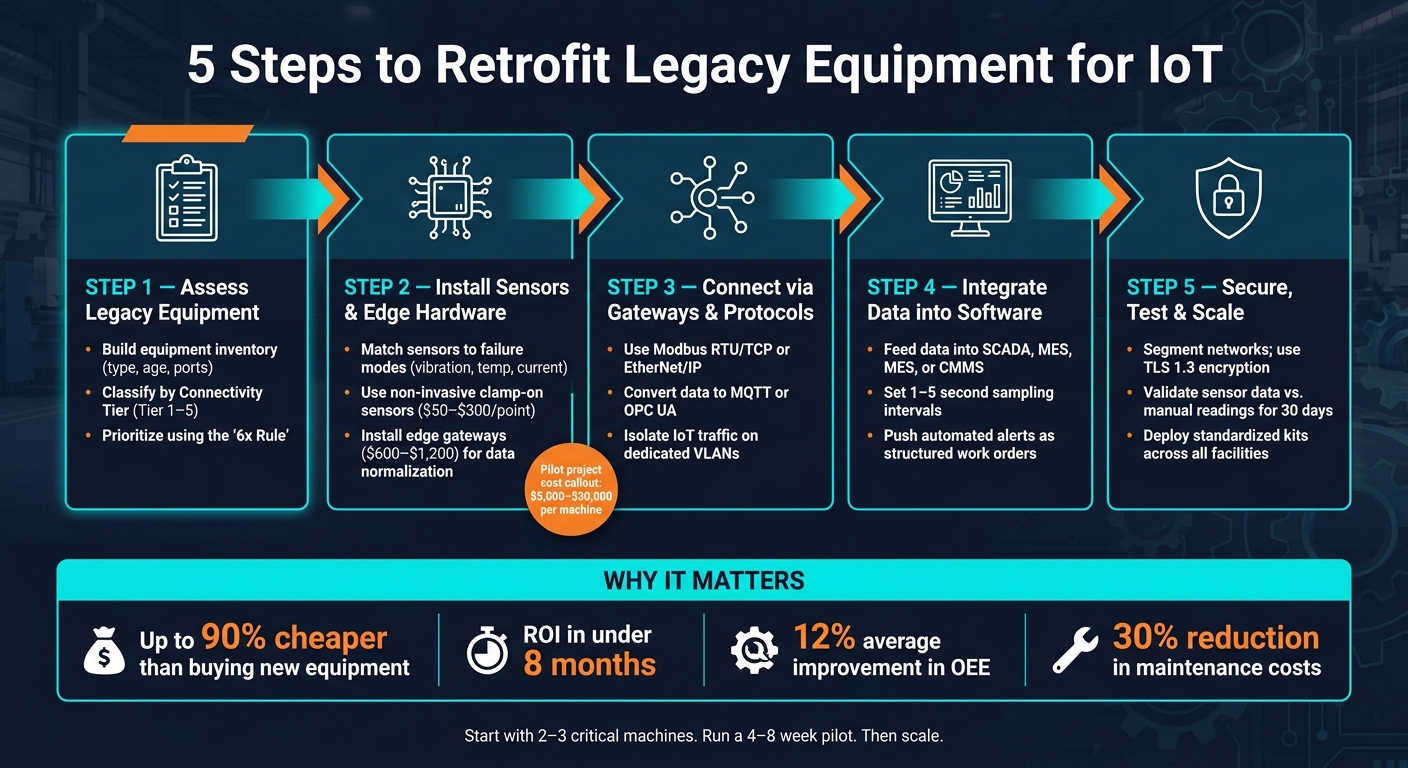
Retrofitting older machines for IoT can save you money, improve efficiency, and reduce downtime - without replacing costly equipment. Here's how to do it:
- Evaluate Your Equipment: Create an inventory, check communication ports, and prioritize machines that will yield the most value from IoT upgrades.
- Install Sensors and Edge Devices: Use sensors for key metrics like vibration or temperature. Add gateways to translate data into usable formats.
- Connect Machines to Networks: Use existing communication protocols (like Modbus) or digital inputs. Secure data with encryption and VLANs.
- Integrate Data into Software: Link IoT data to SCADA, MES, or maintenance systems for real-time insights and actionable alerts.
- Secure and Scale: Protect networks with segmentation, test accuracy, and roll out upgrades across facilities using standardized kits.
Why it matters: Retrofitting costs up to 90% less than buying new equipment and pays for itself in under 8 months. Plus, it can boost equipment efficiency by 12% and cut maintenance costs by 30%. Start small - focus on 2–3 critical machines and expand once results are clear.
5 Steps to Retrofit Legacy Equipment for IoT
Retrofit Legacy Machines for Real Time Monitoring
Step 1: Assess Legacy Equipment and IoT Readiness
Before diving into sensor installation or gateway setup, take a step back and assess your legacy equipment. Skipping this step is one of the biggest reasons IoT retrofit projects either blow through budgets or get stuck halfway through. This initial evaluation sets the stage for a smoother process, ensuring every move you make is based on solid, reliable information.
Inventory Equipment and Interfaces
The first task? Build a detailed inventory of your equipment. For every machine, note down the basics: type, manufacturer, age, and where it’s located on the shop floor. But don’t stop there - pay special attention to communication ports. These ports are the key to figuring out your connectivity strategy.
You’ll also need to identify the communication protocol in use. For older facilities, common protocols include Modbus RTU, PROFIBUS, DeviceNet, or EtherNet/IP. If the machine doesn’t have standard communication ports, open up the control cabinet. Look for discrete I/O signals like 24V relay outputs or indicator lights - these can still provide valuable data.
To make things clearer, here’s a quick guide to categorizing machines based on their connectivity tier. This classification will help shape your retrofit strategy:
| Connectivity Tier | Equipment Age / Example | Interface Type | Retrofit Strategy |
|---|---|---|---|
| Tier 5: Fully Connected | 2018+ (e.g., Siemens S7-1500) | Native OPC-UA, Ethernet | Direct Protocol Extraction |
| Tier 4: Network-Ready | 2008–2018 (e.g., Fanuc 30i) | Ethernet; proprietary protocols | Protocol-Specific Gateway |
| Tier 3: Serial/Fieldbus | 1995–2008 (e.g., AB SLC 500) | RS-232/485, Modbus RTU, PROFIBUS | Serial-to-Ethernet Gateway |
| Tier 2: Closed Controller | 1985–1995 (e.g., Mazak T-Plus) | No standard comms; 24V I/O | External I/O Tapping |
| Tier 1: No Controller | Pre-1985 (relay logic) | Hard-wired relay logic | Full Retrofit Sensor Suite |
Once your inventory is complete, it’s time to figure out which machines to tackle first.
Identify Use Cases and Prioritize Equipment
Start with the machines where data will deliver the most immediate value. Think predictive maintenance, energy monitoring, or production tracking - these are often the quickest wins.
A good rule of thumb? Use the "6x Rule" to prioritize. Focus on machines that are under 15 years old, have a replacement cost that’s at least six times the retrofit cost, and experience more than 10 hours of unplanned downtime per month. With unplanned downtime costing U.S. manufacturers around $50 billion annually, bottleneck machines - those that can bring the entire line to a halt - should be your top priority. After that, look at safety-critical equipment and high energy consumers.
"Legacy machines aren't the problem - they're the opportunity. Most enterprise manufacturers already have the physical infrastructure they need to compete. What's missing is connectivity." - CYB Software
Once you’ve prioritized your machines, the next step is to gather the right documentation and establish performance baselines.
Gather Documentation and Set Baselines
Collect all relevant documents for the machines you’re retrofitting - wiring diagrams, control panel schedules, and breaker or transformer nameplates. Keep in mind that many older machines (40% to 50%) might not have complete electrical or control documentation. Be prepared to fill in the gaps, and make sure to allocate enough time for this task.
With the documentation in hand, it’s time to measure your starting point. Record key metrics like downtime hours, energy usage in kWh, and how much time operators spend collecting data manually.
"If you can't measure it, you can't fix it. Retrofitting creates a baseline for data-driven decisions." - IndustryX.ai
Step 2: Select and Install IoT Sensors and Edge Hardware
After creating an inventory of your equipment, the next step is to choose reliable IoT sensors and edge hardware. These components are critical for ensuring accurate data collection and long-term system durability.
Choose Sensors for Key Measurements
When selecting sensors, focus on potential failure modes rather than just listing equipment. Consider what could go wrong with each machine. For instance:
- A motor with worn bearings needs a vibration sensor.
- A pump prone to overheating requires temperature monitoring.
- An older compressor benefits from current tracking to detect load irregularities early.
Opt for non-invasive sensors, like clamp-on current transformers (CTs), to avoid downtime or voiding warranties. For vibration monitoring, bolt-on sensors are ideal - look for IP67-rated models that can handle harsh environments.
Here’s a quick cost breakdown to help with budgeting:
| Sensor Type | Typical Cost (per point) | Common Use Case |
|---|---|---|
| Vibration Sensors (e.g., Ifm, Banner Engineering) | $150–$300 | Bearings, rotating equipment |
| Current Transformers (e.g., CR Magnetics) | $50–$150 | Machine state, energy monitoring |
| Temperature Sensors – RTD/Thermocouple | $50–$200 | Gearboxes, motor windings |
Important installation tip: Always bolt or screw vibration sensors directly to the machine housing. Adhesive mounts can dampen signals and fail under high temperatures, leading to inaccurate or missed readings.
Install Edge Gateways for Data Collection
Edge gateways play a crucial role in converting raw sensor data into formats like MQTT or OPC UA, which are compatible with cloud platforms and SCADA systems.
When choosing a gateway, ensure it has the right physical interfaces for your equipment. Common requirements include:
- RS-232/RS-485 ports for older PLCs
- Isolated digital I/O
- Standard Ethernet ports
Brands like Advantech, Moxa, and WAGO are popular in industrial environments for their reliability. Look for gateways priced between $600 and $1,200 that offer store-and-forward functionality to ensure uninterrupted data capture.
"If the edge layer cannot normalize naming, timestamp source, data quality, and command acknowledgment, sending legacy data to the cloud only amplifies site complexity." - Zed IoT
A properly configured gateway does more than just pass data along - it organizes it. This includes assigning asset IDs, tagging data quality (e.g., good, offline, or invalid), and applying standardized timestamps before transmitting anything to the cloud. Why does this matter? In a typical factory with 100 machines, approximately 200 GB of raw sensor data is generated daily, but only 0.1% of those readings are actionable. Edge normalization prevents your systems from being overwhelmed by unnecessary data.
Address Installation and Power Requirements
To ensure reliable operation, gateways need a dedicated and stable power source. Use separate breakers and appropriately sized transformers to prevent voltage fluctuations and interference. If you're sourcing replacement components, Electrical Trader offers a range of affordable options, both new and used, to fit retrofit budgets.
Proper grounding is also essential. Eliminate ground loops during installation, as they can corrupt sensor signals and damage electronics over time. For RS-485 wiring, always use shielded cables to block interference from nearby motors and maintain data integrity.
Finally, configure gateways for read-only access to legacy PLCs during the initial setup. This precaution protects existing safety logic from accidental write-back commands while the system is still being tested.
Step 3: Connect Equipment Using Gateways and Protocols
Once you've installed sensors and edge hardware, the next step is making sure data flows smoothly from your legacy machines to the systems that need it. This step is crucial for tying your sensor setup to actionable data workflows while keeping the retrofit process efficient. At this point, you'll need to evaluate your existing interfaces, ensure secure data transmission, and confirm that your power and network setups are ready to handle the load.
Use Existing Communication Interfaces
Most older equipment comes equipped with some form of communication port. For many legacy PLCs and drives, Modbus RTU over RS-485 is the go-to interface, while plant-floor networks often support Modbus TCP or EtherNet/IP. As Robert Liao, Technical Support Engineer at Robustel, explains:
"Modbus is the 'Latin' of the industrial world... simple, reliable, and it just works."
If your equipment includes a legacy Ethernet switch, an Ethernet bridge can help you access older Siemens S7 or Rockwell EtherNet/IP networks without needing to modify PLC code. This is especially handy when network constraints make direct gateway integration tricky. For machines without any communication ports, you can still gather data by connecting gateway digital inputs to indicator lights or using clamp-on current sensors as a workaround.
Set Up Secure Data Transmission
Once your gateway starts pulling data from the field, it’s time to send that data upstream in a format your cloud platform or on-premises historian can process. Gateways often convert raw Modbus data into structured JSON using MQTT or rely on OPC UA for more complex data modeling and added security. Here’s a quick comparison of when to use each protocol:
| Protocol | Best For | Security | Bandwidth |
|---|---|---|---|
| MQTT (Sparkplug B) | Lightweight telemetry, cloud uplinks | TLS 1.3, OAuth2 | Low (event-driven) |
| OPC UA | Complex data models, plant historians | Built-in TLS, certificates | Medium |
| Modbus TCP | Field-level polling | None (requires VPN/firewall) | High (polling overhead) |
Securing data transmission is critical. Always encrypt traffic with TLS 1.3 and use X.509 certificate-based authentication for added protection instead of relying on static passwords. For sensitive telemetry, encapsulate data in a VPN tunnel - WireGuard is a great choice for its low overhead and modern cryptography. Be cautious not to poll legacy PLCs too frequently; overly aggressive polling (e.g., under 100ms) can overload older controllers. Stick to the manufacturer's recommended polling rates to avoid crashes.
Check Power and Network Infrastructure
Before launching your system, ensure your electrical panel can handle the extra load from gateways, switches, and wireless access points. Voltage stability is key - fluctuations can lead to corrupted data or unexpected hardware resets. Double-check that your breakers are properly sized and that auxiliary transformers are installed to isolate IoT hardware from high-draw equipment on the same circuit. If you need additional capacity or replacement components, Electrical Trader offers a range of new and used breakers and transformers suitable for retrofit projects.
On the networking side, set up a dedicated VLAN for IoT gateways. This isolates them from both the corporate IT network and the core OT control network, aligning with the IEC 62443 "zones and conduits" model. This segmentation minimizes risks if a device is compromised and simplifies traffic monitoring and troubleshooting as your deployment grows.
sbb-itb-501186b
Step 4: Connect IoT Data to Software and Workflows
Once your gateways are transmitting clean, organized data, the next step is turning raw telemetry into insights that your team can act on. Data sitting in a historian isn't helpful by itself - it needs to integrate with the tools your operations and maintenance teams use daily. This step builds on the solid hardware and secure data transfer processes you've already established.
Connect Data to SCADA and Maintenance Tools
The best integrations enhance your existing systems. By feeding IoT data into platforms like SCADA, MES, or historians via OPC UA or MQTT protocols, you can gain real-time visibility into equipment conditions without altering the underlying control logic.
For predictive maintenance, align sensor data with asset health indicators to track critical parameters. Here's a quick guide to what to monitor and the algorithms that can help:
| Parameter | What to Monitor | Useful Algorithms |
|---|---|---|
| Vibration | Peak-to-peak, RMS, Crest Factor | FFT, Wavelet Transform |
| Temperature | Rate of change, absolute thresholds | Linear Regression, Moving Average |
| Pressure | Spikes, gradual decay (leaks) | Anomaly Detection, EWMA |
| Current | Load signatures, inrush current | Pattern Matching, Neural Networks |
Once integrated, ensuring the quality and proper storage of this data is critical.
Set Data Collection and Storage Parameters
Getting your sampling intervals right is essential. Polling too frequently wastes bandwidth and can overwhelm older controllers, while polling too slowly risks missing rapid changes. For most condition monitoring scenarios, a 1–5 second interval works well. Use higher-frequency sampling (sub-second) for edge-level FFT processing on vibration data. In these cases, the gateway processes the data locally and sends only the summarized results upstream.
Each data point should include a UTC timestamp, a quality flag (good, offline, or invalid), and a unique asset ID. Organize data by asset class, ID, and timestamp to streamline downstream analytics and machine learning workflows. Additionally, make sure to label scheduled maintenance events in your dataset to avoid confusing AI models.
Link IoT Alerts to Maintenance Workflows
Michael Labhart, Director of Smart Operations at Schneider Electric, emphasizes this point:
"Merely dashboarding problems doesn't appear to work because maintenance teams rarely have time to check isolated screens. Instead, integrate IoT platforms directly into the CMMS."
Set up your IoT platform or gateway to push alerts - such as high vibration, excessive temperature, or abnormal current - straight into your CMMS or EAM system as structured work orders. These work orders should include key details like the sensor reading, fault code, and timestamp, giving technicians the context they need to act effectively.
For example, in late 2025, a mid-sized beverage plant in Ohio installed wireless vibration sensors and an Advantech edge gateway for $4,200. The system flagged high vibration on "Labeller B", caused by a loose motor mount. A quick 20-minute repair during lunch prevented a $15,000 failure and two days of downtime, resulting in a 6% quarterly improvement in OEE. Systems like these, which integrate IoT data with CMMS workflows, often report a 295% ROI over three years.
Step 5: Secure, Test, and Scale the Deployment
This step ensures your IoT retrofit is not only functional but also secure, reliable, and scalable. Skipping it could expose your operational technology networks to security threats or create inconsistencies when scaling across multiple facilities.
Put Cybersecurity Measures in Place
When it comes to IoT retrofits, the biggest threat isn’t hardware failure - it’s an unsecured network. A vulnerable network can give malicious actors access to critical systems like PLCs. To prevent this, begin by setting up network segmentation with dedicated VLANs. This builds on the isolation established in Step 3, ensuring that industrial traffic remains protected from outside threats.
Another key step is configuring edge gateways to operate in read-only mode during the rollout. In this mode, gateways can only extract data from machines without sending control commands back. This minimizes the risk of compromised gateways interfering with machine logic or safety. Strengthen these measures further with modern encryption protocols like TLS 1.3, secure VPN tunnels for remote access, and access controls such as multi-factor authentication.
| Security Measure | Implementation | Impact |
|---|---|---|
| Network Segmentation | Separate VLANs/Subnets | Prevents threats from spreading |
| Read-Only Gateway Mode | Configure at gateway level | Blocks unauthorized write-back commands |
| Encryption | TLS 1.3 & VPN Tunnels | Protects data from interception |
| Access Control | 2FA & Role-Based Access | Limits who can alter device settings |
| Secure Boot | Root of Trust chips | Blocks malicious firmware |
Don’t forget to update all default credentials (like "admin/admin") immediately and schedule quarterly updates for all gateway and sensor firmware.
Test and Validate Retrofits
Before fully relying on your digital dashboard, verify that the data being collected is accurate. For the first 30 days post-installation, cross-check IoT sensor readings against manual measurements, such as handheld gauges or inspection logs. If any discrepancies arise, recalibrate the sensors before integrating their data into automated systems.
Signal integrity is another critical area to test. Use shielded cables for serial connections to prevent ground loops and ensure clean signal baselines. Running a pilot on a single production line for 4–8 weeks is a smart way to catch and fix issues early, ensuring quality assurance throughout the deployment process.
Standardize and Scale Retrofits
Once you’ve confirmed security and data accuracy, the next step is to replicate your success across multiple locations. Create a standardized kit that includes a pre-configured gateway, a defined sensor set, and a consistent data tagging schema (e.g., plant1/press-line/press-04/vibration). This approach simplifies scaling, speeds up data analysis, and ensures uniformity across facilities.
Make sure to plan for any additional panel capacity required for new installations. If you need extra breakers, terminal blocks, or other components, consider sourcing them from Electrical Trader, which offers both new and used industrial-grade parts at competitive prices. This can be especially helpful when scaling on a tight budget.
"Real-time control stays local. Analytics and visibility are added alongside it, not embedded into it." - Calvin Hamus, Digital Factory Consultant, SkyIO
Conclusion: Key Takeaways for IoT Retrofitting
IoT retrofits don’t require a massive budget or shutting down production. A focused pilot project usually costs between $5,000 and $30,000 per machine and often pays for itself in less than 8 months.
By following the five steps outlined earlier - assessing readiness, installing sensors and edge hardware, establishing connectivity, integrating data into workflows, and securing and scaling the deployment - you can ensure a smooth and efficient transition from installation to data integration.
"The majority of value creation in Industry 4.0 will come from upgrading existing assets rather than replacing them." - McKinsey & Company
To get started, focus on 2–3 critical machines. Run a 4–8 week pilot program, validating sensor data with manual checks to confirm accuracy. Once the return on investment is clear, scale the project. Many factories that follow this step-by-step approach report an average 12% improvement in OEE and a 30% reduction in maintenance costs.
For sourcing components like vibration sensors, current transducers, edge gateways, or even panel items such as breakers and terminal blocks, platforms like Electrical Trader offer a wide range of industrial-grade parts compatible with legacy systems.
Take the time to plan thoroughly, source reliable components, validate your setup, and scale systematically. The technology works, the steps are repeatable, and the results speak for themselves.
FAQs
How do I choose which machines to retrofit first?
To kick things off, perform a detailed audit of your production floor to pinpoint bottlenecks where better visibility could make the most difference. Pay close attention to machines that are essential for production, incur high maintenance costs, or experience frequent downtime. Here's a handy guideline to help: the 6x Rule of Thumb. If a machine is less than 15 years old, costs six times more to replace than to retrofit, and has over 10 hours of downtime each month, it’s likely a prime candidate for improvement.
What’s the simplest way to get data from a machine with no comms port?
The simplest way to gather data is by using external sensors that monitor physical factors like vibration, temperature, or current without interfering with the equipment. For instance, CT clamps are a great choice - they clip around power cables to measure current without needing to cut wires or shut down operations. Other useful tools include photo-eyes for tracking motion or counting cycles and limit switches for detecting machine states. These sensors then link to an edge gateway, enabling seamless data transmission and visualization.
How can I retrofit IoT without risking PLC safety or cybersecurity?
To retrofit legacy equipment for IoT while keeping safety a priority, it's best to stick with non-invasive methods that keep control systems separate from the internet. A smart approach is using an industrial IoT gateway, which pulls data securely without interfering with the PLC's main functions.
Here are some key practices to follow:
- Network Segmentation: Place IoT devices on their own VLAN to keep them isolated from critical systems.
- Read-Only Access: Configure gateways to only read data, ensuring no unauthorized commands can be sent to the equipment.
- Non-Invasive Sensing: Use tools like current transformers to gather data without making any changes to the PLC's logic.
These steps help maintain the integrity and safety of your legacy systems while enabling IoT capabilities.