

5 Criteria for Choosing Protocol Gateways
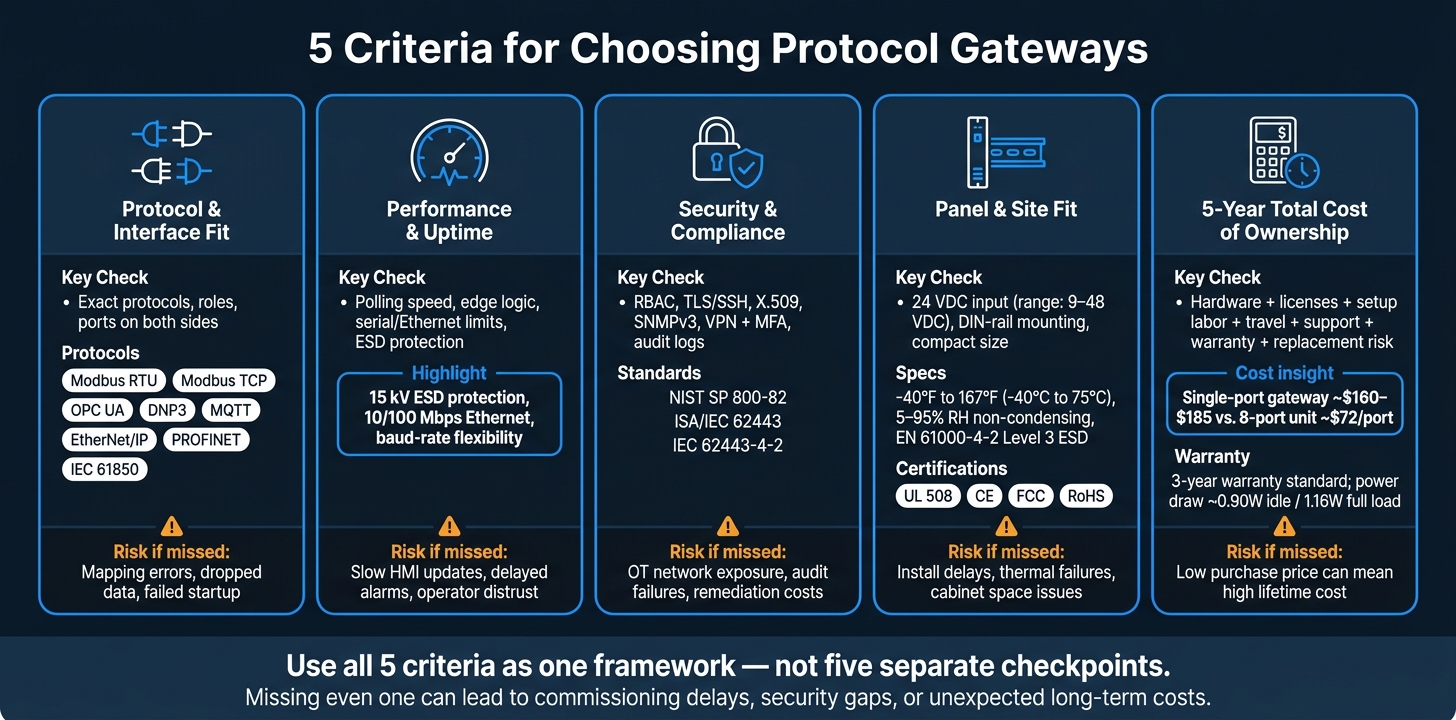
If I were choosing a protocol gateway today, I’d judge it on five things first: protocol fit, data speed, security, panel fit, and 5-year cost. Miss one, and the problems often show up later as slow HMI screens, bad alarms, missing historian data, or extra labor during startup.
Here’s the short version:
- Protocol and interface fit: I’d confirm the exact protocols, roles, and ports on both sides, not just the protocol names.
- Performance and uptime: I’d check polling speed, local logic, serial/Ethernet limits, and protection against electrical noise.
- Security and compliance: I’d look for RBAC, TLS/SSH, X.509, SNMPv3, VPN with MFA, audit logs, and vendor hardening docs.
- Panel and site fit: I’d verify 24 VDC, DIN-rail or panel mounting, temperature range, humidity range, and EMC/ESD ratings.
- Total cost over 5 years: I’d include hardware, licenses, setup labor, travel, support, warranty, and replacement risk - not just the purchase price.
A protocol gateway does more than pass traffic. It translates data between systems like Modbus RTU, Modbus TCP, OPC UA, DNP3, MQTT, EtherNet/IP, PROFINET, and IEC 61850 so old and new equipment can work together without a full rip-and-replace project.
That’s the core idea: if you match the gateway to the job at the protocol, security, and installation level up front, you cut startup issues and lower long-term cost.
5 Criteria for Choosing Protocol Gateways: Quick Comparison Guide
How to select the right gateway #Anybus

sbb-itb-501186b
Quick Comparison
| What I’d check | What it means in plain English | Why it matters |
|---|---|---|
| Protocol fit | Does it speak the right protocols, roles, and serial/Ethernet interfaces? | Bad fit can lead to mapping errors, dropped data, or failed startup |
| Performance | Can it move data fast enough and keep local actions working? | Slow polling and delayed alarms hurt trust in the system |
| Security | Does it lock down management access and log changes? | Gateways often sit between OT and IT, so weak controls add risk |
| Panel fit | Will it fit the cabinet, power supply, and site conditions? | Heat, space, and power issues often cause install delays |
| 5-year cost | What will it cost to buy, set up, support, and keep in service? | A lower price at purchase can still mean a higher total spend |
I’d use these five checks as one buying framework, not five separate tasks.
Why Protocol Gateway Selection Matters in U.S. Industrial Projects
A bad gateway pick usually doesn't fail on day one. It tends to show up little by little: slow HMI updates, polling errors, delayed alarms, and gaps in historian data. After a while, those issues chip away at operator trust and push teams into constant reactive troubleshooting.
Compatibility problems often show up during commissioning. A gateway may pass basic traffic just fine, then stumble when it has to move more complex protocol objects or event records between protocols. One example is bridging IEC 61850 relays to a DNP3-based SCADA system. That kind of mismatch may stay hidden until commissioning - or worse, until after a fault event, when you need clean fault records for root-cause analysis.
Cybersecurity matters too. Gateways sit between OT devices and higher-level networks, which makes them a common entry point for attacks. If a gateway ships with default credentials, lacks role-based access control, or allows unencrypted management access, it can expose PLCs, protection relays, and meters to the broader network.
In U.S. industrial panels, 24 VDC control power is the norm. So a gateway with 24 VDC input and DIN-rail mounting usually fits standard panel layouts and helps avoid extra hardware.
And price? That's only part of the picture. A lower upfront cost can lead to a higher lifetime cost if the gateway takes more engineering time, has weak diagnostics, or needs to be replaced early. That's why the five selection criteria below matter.
1. Protocol and Interface Compatibility
Start by listing every PLC, drive, meter, relay, and controller on both sides of the link. Then map the protocols and interfaces each one uses. In many plants, that means a mix of Modbus RTU over RS-485, older serial links like RS-232 to legacy PLCs, and newer Ethernet gear running EtherNet/IP or PROFINET. On the SCADA side, the upstream protocols you’ll usually see are Modbus TCP, OPC UA, and MQTT.
Don’t stop at the protocol name in the spec sheet. You need to check whether the gateway supports the exact role you need - controller or device, client or server - and whether it can handle any vendor-specific extensions. That part trips people up all the time. For example, an Allen-Bradley MicroLogix using DF1 needs different handling than a standard Modbus RTU device. If the gateway doesn’t account for that, you can end up with mis-mapped tags or dropped data.
After protocol support, check the physical layer too. RS-485 works for long multidrop serial runs. RS-232 works only for short point-to-point links. If you need more than that, you’re in Ethernet territory. In that case, a gateway with dual Ethernet ports helps for network segmentation or daisy-chaining. Fiber SFP support also matters for long runs in high-EMI areas.
For utility and switchgear jobs, make sure the gateway also supports IEC 61850 and DNP3. Those protocols carry time-stamped event records and sequence-of-events data that Modbus conversion can’t preserve. If that timing data gets lost during protocol conversion, post-fault analysis gets a lot harder.
If you’re sourcing mixed-brand gear through Electrical Trader, stage and test one unit from each vendor before rollout. Small differences like default baud rates, byte order, or non-standard function codes are common. They’re also easy to miss until something fails in the field.
Once the protocols and interfaces line up, the next step is figuring out whether the gateway can move data fast enough for the job.
2. Performance and Real-Time Reliability
After protocol support, the next filter is speed. Performance matters because slow polling, delayed alarms, or dropped updates can throw operations off track. You also want enough processing headroom for complex conversions and local control.
One feature to put near the top of the list is edge logic. This lets a gateway trigger a digital output straight from a digital input condition, without sending the decision through a controller or cloud system. That local decision-making helps keep critical actions running even when upstream communications bog down. It also cuts latency in time-sensitive applications.
On the serial side, pick a gateway with a baud-rate range broad enough to handle older serial devices. For Ethernet, look for 10/100 Mbps with Auto MDI/MDIX for standard SCADA traffic.
It also makes sense to include port-level 15 kV ESD protection. In noisy industrial panels, that extra layer can help preserve uptime.
After performance, evaluate security and compliance.
3. Security and Compliance Features
Gateways sit between OT and IT networks. If management is weak, field devices can be exposed from both directions. So gateway hardening isn't something to deal with later. It needs to be part of procurement from day one.
A lot of industrial protocols make this more urgent. Modbus TCP, for example, has no native authentication, encryption, or authorization. That means the gateway has to make up for those gaps with added controls.
At a minimum, ask for:
- RBAC
- TLS or SSH for management
- Certificate-based authentication (X.509)
- SNMPv3
- VPN access protected by MFA
- No direct internet exposure
Of course, controls on paper don't mean much if no one can prove they're in place. They should be documented, logged, and simple to check during review.
Logging matters just as much as access control. Audit teams and SIEM tools need usable records, not vague event summaries. Log login attempts, configuration changes, firmware updates, and access denials. Include account names and IP address details so teams can trace what happened and who did it.
For U.S. projects, point vendors to NIST SP 800-82 and ISA/IEC 62443, along with any sector-specific requirements.
You should also ask for hardening guides, firmware update policies, vulnerability-response timelines, and documented IEC 62443-4-2 alignment. If a vendor can't provide that material, treat the gap as a cost and schedule risk. Weak security evidence tends to show up later as extra engineering work, audit friction, and remediation costs, and those belong in your total cost calculation.
Once security is covered, check whether the gateway fits the panel, power, and environment.
4. Environmental Ruggedness and Installation Fit
After security, make sure the gateway fits the cabinet, power supply, and site conditions. Heat inside the cabinet, tight panel space, and power limits can rule out a gateway long before commissioning. And when thermal, power, or mounting fit is off, the problem shows up as a commissioning delay, not just a minor hardware hassle.
Start with the site specs. The gateway should support an operating range of -40°F to 167°F (-40°C to 75°C), a storage range of -40°F to 185°F (-40°C to 85°C), and humidity from 5% to 95% RH (non-condensing). For panel handling and discharge, check for EMC protection such as EN 61000-4-2 Level 3 ESD immunity.
Then compare the unit’s physical and power requirements against the panel layout. A gateway with 35 mm DIN-rail mounting is easier to place in many control cabinets. In dense panels, compact units as small as 3.9 in. × 2.7 in. × 0.9 in. (100 mm × 69 mm × 22 mm) can make the difference between a clean install and a cramped one. It also helps to favor fanless designs, since they cut maintenance and reduce dust ingress. On the power side, a 9 VDC to 48 VDC input range works with more panel supplies and can save you from adding extra converters.
For U.S. control panels, check for UL 508 along with CE, FCC, and RoHS markings.
After physical fit, check management, scalability, and lifecycle cost.
5. Management, Scalability, and Total Cost of Ownership
Configuration work and future growth shape lifecycle cost.
Remote configuration cuts travel time and makes multi-site rollout easier. If a gateway supports web-based setup or SSH, technicians can change settings without going to the panel. Add DHCP and DNS support, and rolling out new units across a multi-site network gets a lot easier because IP assignment and device naming are simpler to handle. For multi-site operations, look for multi-subnet communication support, which helps teams manage devices across different subnets without extra infrastructure. This matters most in multi-site plants where technicians need fast remote access.
Port density also changes the math. A single-port gateway costs about $160 to $185, while an 8-port unit drops to about $72 per port. If you're adding production lines or moving more legacy serial devices into an Ethernet-based system, that gap adds up fast. After cost per port, check how many systems the gateway can handle at the same time.
You also want enough concurrent TCP sessions so multiple systems can access the gateway without slowdowns or traffic jams.
For long-term cost planning, warranty length, low power use, and clear status LEDs can trim service time and operating cost. A 3-year warranty is common on industrial-grade gateways. Power use is also low, at about 0.90 W with no load and 1.16 W at full load. Clear power, link, and TX/RX LEDs make local troubleshooting faster when something goes wrong.
Use these points to compare gateways side by side in the table below.
Protocol Coverage and Interface Comparison Table
Use the table below to compare gateway profiles against the five criteria above at a glance.
| Capability | Serial-to-Ethernet Modbus Gateway | Multi-Protocol PLC Gateway | IIoT Edge Gateway |
|---|---|---|---|
| Southbound protocols | Modbus RTU, DF1, BACnet MS/TP | Modbus RTU, Profibus DP, DeviceNet, CANopen | Modbus RTU, CANopen, raw CAN |
| Industrial Ethernet | Modbus TCP, BACnet/IP | Modbus TCP, EtherNet/IP, PROFINET | Modbus TCP, EtherNet/IP |
| Serial interfaces | Multiple RS-485 ports plus RS-232; 2-wire/4-wire support | Isolated RS-485 and RS-232 with full handshaking | RS-485 and CAN options, depending on model |
| Ethernet interfaces | Dual 10/100 LAN for IT/OT separation | Dual 10/100 LAN with VLAN support | Ethernet plus optional cellular/Wi-Fi |
| CAN support | None | CANopen | Raw CAN and CANopen |
| Northbound integration | OPC UA Server, Modbus TCP, SNMP | OPC UA Server/Client, MQTT, REST API | MQTT (Sparkplug B), REST API, HTTPS |
| Typical use case | Power meters, legacy PLCs, BAS integration | Brownfield retrofit, multi-vendor PLC networks | Cloud monitoring, distributed generation |
Note: Industrial-grade models across all three profiles typically support -40°F to 167°F (-40°C to 75°C) and carry UL/cUL, FCC, CE, and IEC 60068 certifications.
The table makes the tradeoffs pretty clear. Each profile lines up with a different protocol mix, deployment setup, and upstream data path.
For serial-to-Ethernet jobs, the first profile is usually the cleanest choice. It works well for legacy PLCs, power meters, and BAS devices when you want to keep site changes to a minimum.
For brownfield retrofits, the multi-protocol PLC gateway tends to make more sense. It can bridge mixed PLC networks and push data up to SCADA without forcing a full controls overhaul.
For IIoT edge rollouts, the third profile leans more toward cloud-connected use cases. Sparkplug B adds auto-discovery and state handling on top of standard MQTT, which is one reason many U.S. integrators pair it with platforms like Ignition or AWS IoT.
One last thing: check if OPC UA and MQTT come as add-on licenses. That extra cost can add up fast in multi-site deployments.
How Protocol Gateways Fit Into Larger Electrical Equipment Projects
Once you've picked a gateway based on compatibility, performance, security, ruggedness, and cost, the next step is figuring out where it belongs in the larger electrical system. A protocol gateway has to fit the full electrical stack it connects to, not just a single device.
Switchgear, breakers, drives, meters, and power quality analyzers often speak different protocols. That means one gateway may need to normalize Modbus, IEC 61850, EtherNet/IP, PROFINET, and Modbus TCP into OPC UA or MQTT. When that happens, operators can see breaker status, transformer temperatures, drive speed and torque, and harmonic distortion data in one dashboard.
This setup is especially useful in brownfield retrofits. Instead of replacing a working 1980s switchgear lineup, you can connect a gateway to its existing RS-485 Modbus port, read trip events and load data, and publish that data to a modern plant historian. You get better visibility without a capital-heavy equipment swap. That's the reality in many facilities: old and new gear side by side. And that's exactly why gateway placement and protocol mapping matter at the system level.
On large sites, the next call is how many gateways to deploy and where they should sit. A hierarchical architecture often works well:
- Put one gateway near the main switchgear room
- Place another at the motor control center (MCC)
- Add a third at the transformer yard
Each gateway can feed data to a central SCADA server over Ethernet, with data grouped by feeder, building, or asset area. If the gateways support MQTT, they can also send selected data to cloud platforms for fleet-level analytics while keeping protection-critical data local.
For breakers, transformers, meters, and power quality devices, Electrical Trader can help source compatible equipment. Just verify the communications port first so it can connect to the gateway.
Conclusion
Choosing a protocol gateway shapes how your systems communicate, how well your OT environment is protected, and how easy future upgrades will be. The five criteria covered here - protocol and interface compatibility, performance and real-time reliability, security and compliance, environmental ruggedness, and total cost of ownership - need to be weighed together. Looking at just one of them isn’t enough. The right choice is the one that balances all five at the same time.
Use these criteria as a single framework, not as separate checkpoints. Plan for the protocols you need today, but leave room for expansion later.
Weak access controls or unsigned firmware can create long-term OT risk, especially in settings where IEC 62443 or NERC CIP alignment is required. And if the gateway will sit in a harsh panel, hardware rated for −40°F to 167°F (−40°C to 75°C) with strong EMC immunity is a safer bet. Those two areas have a direct effect on day-one reliability and commissioning risk.
Before you commit, build a 5-year total cost estimate that includes hardware, licensing, integration labor, and maintenance. A unit with a higher upfront price but proven reliability can end up costing less over its service life.
For broader electrical projects, it also makes sense to source the gateway alongside the rest of the equipment stack. Electrical Trader offers a centralized marketplace for new and used industrial electrical components, helping you source gateways with compatible equipment.
FAQs
How do I know which gateway type fits my site?
Start with a facility walk-through. Identify every energy-producing and energy-consuming device, and note each device’s native protocol, such as Modbus RTU/TCP, BACnet, DNP3, IEC 61850, or EtherNet/IP.
Next, group the equipment by connectivity tier. Older serial devices may need serial-to-Ethernet gateways. Network-ready assets may need protocol-specific options instead.
It also helps to confirm that the hardware matches your site’s needs in a few plain, practical areas:
- Voltage
- Available space
- Mounting
- Site conditions
- Edge logic
- Security
That step can save a lot of pain later, especially when something looks fine on paper but doesn’t fit the panel, the network, or the room it has to live in.
When is a low-cost gateway more expensive?
A low-cost gateway can end up costing more once you look at the total cost of ownership, not just the sticker price.
That’s where things often get messy. A proprietary system can lock you into a single ecosystem, and the extra costs start piling up: consultant fees, driver licenses, vendor dependence, and later add-ons for edge logic, protocol support, or legacy system integration.
What should I test before buying multiple units?
Before you buy multiple units, start with a small pilot rollout. It’s a simple way to make sure the hardware fits your day-to-day needs and does what you need it to do in practice, not just on paper.
Also, double-check the gateway settings. Compare each data point against the device’s local display to make sure everything lines up. Then use diagnostic tools to confirm the data is coming through cleanly. It also helps to test the system under different load conditions so you can confirm it performs safely and as expected before you move to full deployment.