How Protocol Gateways Improve Energy Efficiency
Protocol gateways help cut energy waste by turning isolated device data into usable control data. If your meters, drives, relays, UPS units, or generators use different protocols, a gateway lets your BMS, SCADA, DCIM, or EPMS read them in one place. That makes it easier to spot idle loads, trim peak demand, fix poor power factor, and react before wasted energy turns into higher utility costs.
I’d boil the article down like this:
- Gateways do not save energy on their own. They let software see data that was stuck in separate systems.
- The main savings usually come from three use cases: after-hours load checks, demand-limit control, and power-factor monitoring.
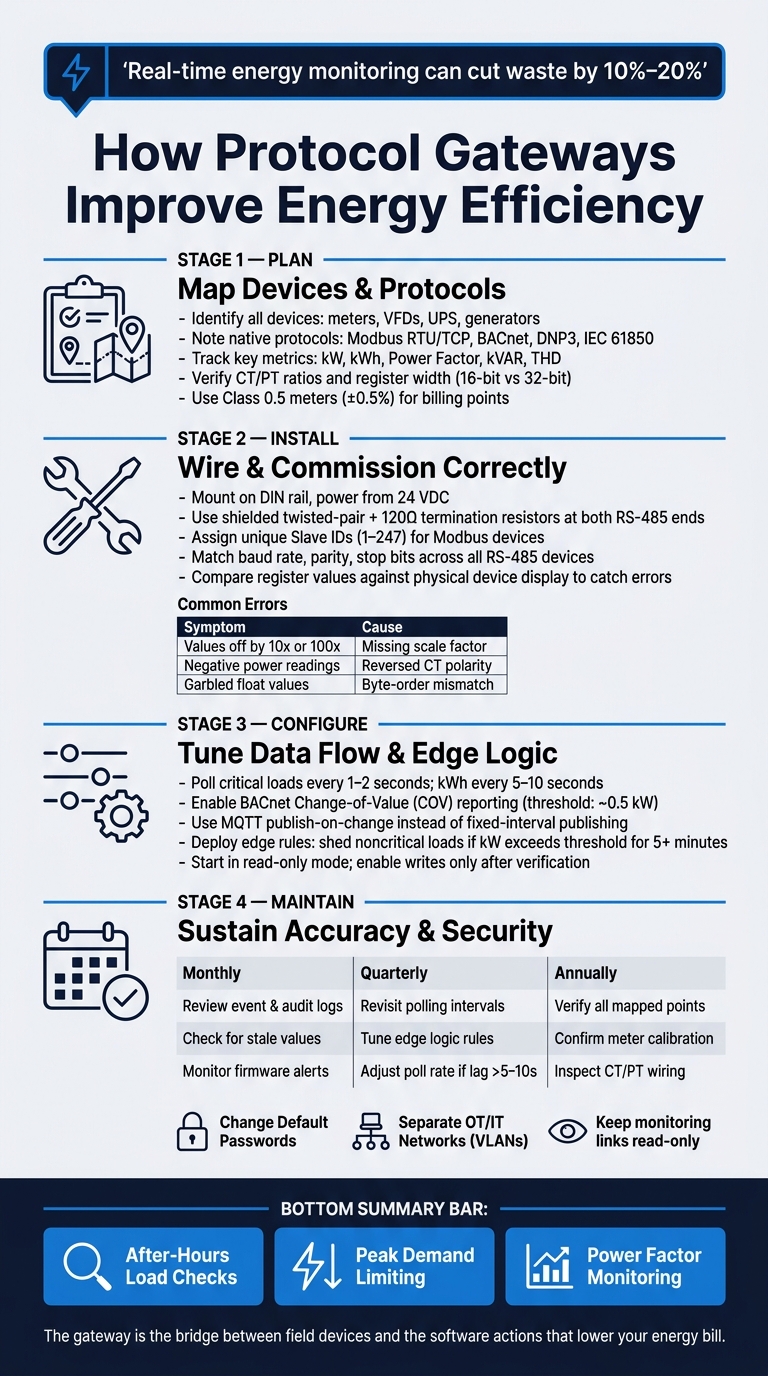
- Planning matters first: map devices, protocols, registers, CT/PT ratios, meter accuracy, and timestamps before setup.
- Installation mistakes can ruin the data: bad RS-485 termination, wrong baud/parity, address offsets, reversed CT polarity, and byte-order mismatches are common.
- Setup matters just as much as wiring: scale values correctly, normalize points, slow polling where possible, and use COV or publish-on-change to cut traffic.
- Edge logic can trim demand charges: local rules can shed noncritical loads when kW stays above a set limit for several minutes.
- Maintenance is part of the savings: review logs monthly, tune polling quarterly, and verify points and meters yearly.
- Security protects both control and data quality: change default passwords, disable weak services, separate networks, and keep links read-only unless writes are needed.
One stat stands out: real-time energy monitoring can cut waste by 10% to 20%. In plain terms, the gateway is the bridge between field devices and the software actions that can lower your bill.
This article shows how I’d think about the job from start to finish: plan the points, wire it right, verify the reads, tune the data flow, use edge rules with care, and keep checking accuracy over time.
How Protocol Gateways Improve Energy Efficiency: From Planning to Savings
Protocol Gateways - Industrial and Building Automation Solutions
sbb-itb-501186b
Plan the Gateway Integration Before Configuration
Before you configure a gateway, map out the devices, protocols, and energy points it needs to expose. That data will feed both control and billing, so getting the plan right up front saves a lot of cleanup later.
Map Devices, Protocols, and Energy Data Points
Start with a walk-through of the facility. List every device that produces or uses energy data: dedicated power meters, power monitoring relays, VFDs with built-in energy counters, UPS systems, backup generators, and environmental sensors. For each one, note the native protocol - Modbus RTU/TCP, BACnet, DNP3, IEC 61850, or EtherNet/IP - and verify the exact registers or objects tied to each metric.
Track these metrics:
| Parameter | Unit | Why It Matters |
|---|---|---|
| Real Power | kW | Real-time demand management and peak shaving |
| Active Energy | kWh | Billing verification and carbon accounting |
| Power Factor | Ratio | Identifies reactive power waste and utility penalty risk |
| Reactive Power | kVAR | Needed for sizing capacitor banks |
| Harmonics (THD) | % | Prevents equipment overheating and energy loss |
| Timestamps | ISO/UTC | Correlates energy spikes with production events |
Two hardware details derail a lot of projects: CT/PT ratios and register width. Check that the current transformer secondary rating matches the meter input spec - usually 1 A or 5 A. Also verify whether energy accumulators use 16-bit or 32-bit registers. If the meter is meant for billing, use Class 0.5 meters (±0.5%) or better. PLC analog inputs are not billing-grade.
Choose Gateway Features That Affect Efficiency
Once the data points are mapped, choose gateway functions that support control, not just protocol translation. The features that matter most here are protocol support, polling limits, edge logic, and security.
| Feature | Typical Options | Effect on Efficiency & Network |
|---|---|---|
| Protocol Support | Modbus, BACnet, DNP3, IEC 61850 | Determines ability to integrate legacy vs. modern assets |
| Polling Limits | 100 ms to 5-second intervals | High frequency improves demand control but can overload serial networks |
| Edge Logic | Threshold checks, local filtering | Enables local load shedding and reduces upstream data flow |
| Data Mapping | Manual mapping vs. tag import | Tag import reduces scaling errors that distort analytics |
| Security | HTTPS, SSH, VPN, BACnet/SC | Blocks unauthorized setpoint changes that could spike energy use |
Edge logic deserves extra attention. A gateway with local computing can react to a demand threshold without waiting for a round trip to the BMS. That’s the difference between a basic protocol converter and a true edge gateway.
Source Supporting Electrical Hardware for a Safe U.S. Installation
Before you buy anything, confirm that the supporting hardware matches the project requirements. Review voltage, CT ratings, protocol compatibility, panel space, enclosure or environmental rating, and UL/CSA/BTL compliance before purchase. Think of each hardware choice as part of accurate energy data and safe commissioning - not as a separate buying task.
With the data points and hardware mapped out, the next step is installation and commissioning.
Install and Commission the Gateway
Wire Power, Serial, and Ethernet Connections Correctly
Start with the device map from the planning step and match every wire, address, and protocol to the right device. Industrial gateways are usually mounted on DIN rail inside the panel. Power the gateway from 24 VDC and mount it on DIN rail inside the panel.
For RS-485 serial protocols like Modbus RTU or BACnet MS/TP, use shielded twisted-pair cable and install 120-ohm termination resistors at both ends of the RS-485 daisy chain. If you skip termination, things can go sideways fast. You may see intermittent packet drops, signal reflection, and distorted demand data caused by poor termination or bad addressing.
For BACnet/IP or Modbus TCP, use CAT5e or CAT6 cable and assign static IP addresses to the gateway and any fixed Ethernet devices.
If the gateway bridges RS-485 to Ethernet, check that the hardware includes electrical isolation between those networks. That extra separation helps protect sensitive equipment.
Set Communication Parameters and Discover Devices
Before commissioning, make sure every device on the RS-485 bus uses the same baud rate, parity, and stop bits. Common defaults are 9,600 or 19,200 baud, with even parity or no parity. If those settings don’t line up, some devices may not respond the way they should.
For Modbus, each device must have its own Slave ID from 1 to 247. For BACnet MS/TP, MAC addresses must be unique on the MS/TP trunk. The Max_Master property should also be set higher than the highest MAC address on that trunk so token passing stays efficient.
If the gateway and the BMS are on different subnets, set up a BACnet Broadcast Management Device (BBMD) so device discovery can work across those subnet boundaries.
Once the settings are in place, check each point against the device’s local display before you load it into the BMS. Tools like CAS Modbus Scanner or CAS BACnet Explorer let you run a "Who-Is" command or read individual registers directly. Use a diagnostic tool to confirm reads before BMS cutover.
Catch Commissioning Errors That Distort Energy Data
Bad data doesn’t always scream for attention. A meter reading 725 instead of 72.5 can look plausible at a glance, yet still wreck downstream demand calculations.
The safest move is simple: compare the register value in your diagnostic tool with the value shown on the physical device display. If they don’t match, check for an off-by-one address offset. In many cases, subtracting 1 from the register address fixes the issue because some manufacturers use 1-based numbering while gateways expect 0-based offsets.
If 32-bit floating-point energy values look garbled, test all four byte-order permutations in the gateway setup. That’s often where the problem hides.
Commissioning issues usually show up in a few familiar ways:
| Commissioning Pitfall | Likely Cause | Impact on Energy Data |
|---|---|---|
| Garbled or out-of-scale values | Byte order (endianness) mismatch on 32-bit floats | Inaccurate power and energy readings |
| All values show 0 or -1 | Wrong register address or off-by-one error | No data collection or incorrect mapping |
| Values off by factor of 10 or 100 | Missing or incorrect scale factor | Demand calculations and billing data are corrupted |
| Intermittent timeouts | Missing 120-ohm termination or duplicate MAC IDs | Gaps in energy trends and data loss |
| Negative power readings | Reversed CT polarity at the meter | Distorted totals and incorrect demand response signals |
| Mismatched timestamps | Gateway and BMS clocks not synchronized | Trend logs are misaligned; interval energy data is unreliable |
Once reads are stable, move to point mapping and polling setup.
Configure the Gateway to Lower Energy Use
Map and Normalize Meter and Control Data
The next step is turning stable reads into points the system can use. That means applying the right scale factor so the BMS sees engineering units like kW, kWh, volts, and amps.
Here’s how common BACnet objects line up with Modbus register types for energy points:
| BACnet Object | Modbus Equivalent | Typical Energy Data Point |
|---|---|---|
| Analog Input (AI) | Holding Register (Read) | Voltage, Amperage, kW |
| Analog Output (AO) | Holding Register (Write) | VFD Speed Reference, Setpoints |
| Binary Input (BI) | Coil (Read) | Motor Status, Fault Alarms |
| Accumulator | Input Register | Cumulative Energy (kWh) |
It also helps to keep naming consistent from the start. Clear tag names, or a framework like Project Haystack, make points easier to read and manage as the system expands across feeders, panels, and major loads. If names get messy early, troubleshooting later becomes a headache.
Tune Polling Intervals, Change-of-Value Reporting, and Upstream Data Flow
Polling too often can clog RS-485 traffic and slow device response. A better approach is to poll critical loads every 1–2 seconds and cumulative kWh every 5–10 seconds. On BACnet networks, turn on Change-of-Value (COV) reporting for each mapped object instead of leaning on nonstop polling. With COV, the gateway sends updates only when a value moves past a set threshold, such as 0.5 kW.
| Configuration Parameter | Typical Value Range | Energy & Efficiency Impact |
|---|---|---|
| Polling Interval | 1s (critical) to 60s (stable) | Reduces device CPU load and network congestion |
| COV Increment | 0.1 to 1.0 units | Limits upstream traffic to meaningful changes only |
| Deadband / Threshold | 0.5% to 5% of range | Filters electrical noise; prevents unnecessary data transmission |
| Forwarding Rate | Seconds to minutes | High frequency for alerts; batching for trend data saves bandwidth |
If the gateway sends data upstream through MQTT, use a publish-on-change model instead of fixed-interval publishing. That keeps traffic focused on what changed, not on sending the same number over and over.
Once that traffic is trimmed down, those same points can do more than report data. They can support local control.
Use Edge Logic for Demand Control and Load Management
When the data flow is lean, the gateway can start acting on demand at the edge. One of the clearest ways it cuts energy costs is through on-device automation rules that run without waiting for a trip to the BMS or the cloud. That matters most during demand spikes, when a delayed response can mean extra peak demand charges.
A good place to start is a rule that sheds nonessential loads when active power demand stays above a set kW threshold for more than 5 minutes. Edge rules can also shift noncritical loads based on production status or utility rate signals. Some gateways support Node-RED flows or local Python scripts for this kind of dynamic decision-making.
Before turning on any write-enabled points, spell out which system owns each command. Use BACnet write priorities so the gateway’s automation doesn’t clash with manual overrides from the BMS operator. Start in read-only mode, confirm that everything behaves as expected, and only then allow writes.
Maintain Accuracy, Security, and Long-Term Savings
After commissioning, the job isn't done. You still need to maintain the gateway so accuracy, security, and cost savings don't slowly slip away.
Secure the Gateway and Monitor Energy Performance
Weak gateway security can wipe out energy savings. Loose access control, stale mappings, and meter drift all chip away at energy control. Change default passwords, turn off Telnet and FTP, and separate OT from IT with VLANs and a DMZ. If remote access runs over cellular or public networks, use an encrypted tunnel like OpenVPN or IPsec.
Use BACnet/SC where it's supported. Keep monitoring links read-only so no one makes unintended writes.
It also helps to keep alarms active for over-demand, low power factor, and after-hours load spikes.
Security controls do more than block bad access. They also help protect data quality.
Review Firmware, Mappings, and Meter Accuracy on a Schedule
Gateway mappings and readings can drift over time. Point mappings should be checked against the source device, and 16-bit energy accumulators can roll over without warning if nobody is watching . A simple review schedule helps catch problems early:
- Monthly: Review event, audit, and firmware logs for failures or unauthorized access. Check for stale or "out of service" values in the management system .
- Quarterly: Revisit polling intervals and edge logic rules. If data lags by 5–10 seconds, cut the point count or increase the poll rate.
- Annually: Verify each mapped point against the field device. Confirm meter calibration and inspect CT/PT wiring for any changes made during maintenance .
Use Class 0.5 meters or better for billing points.
Troubleshoot Bad Readings, Latency, and Connectivity Problems
If readings start to drift before the next scheduled review, start here.
Most problems come back to the same handful of causes. Wrong values can hide waste and throw off demand control. Negative power values usually mean a Current Transformer (CT) is installed backward . Garbled float values usually point to a byte-order mismatch. In that case, switch between big-endian and little-endian settings in the driver until the numbers match the meter display. Readings of -1 or 65,535 usually mean a 0-based vs. 1-based register mismatch .
| Symptom | Likely Cause | Quick Check |
|---|---|---|
| Negative power values | Reversed CT | Check CT orientation and phase arrows |
| Garbled float values | Byte-order mismatch | Toggle ABCD, BADC, CDAB, or DCBA word order in driver settings |
| Values of -1 or 65,535 | 0-based/1-based register mismatch | Verify 0-based vs. 1-based addressing |
| Intermittent communication timeouts | Missing RS-485 termination | Install 120Ω, 0.5W resistors at both ends of the bus |
| Data stops updating | kWh accumulator rollover | Switch to 32-bit or 64-bit registers for cumulative energy |
| Unstable IP connection | IP conflict or subnet mismatch | Verify gateway IP, subnet mask, and default gateway address |
If writes fail, check write authority and priority conflicts first. Forward gateway audit logs to a SIEM so anomalies show up fast instead of sitting there until the next scheduled review.
FAQs
How do protocol gateways reduce energy waste?
Protocol gateways cut energy waste by linking separate industrial and building systems and translating their data into one shared view. For facility managers, that means real-time visibility across HVAC, lighting, and power systems instead of piecing things together from disconnected tools.
With that shared view, teams can trigger automated energy-saving actions, balance electrical loads, spot inefficient equipment, and support predictive maintenance by flagging unusual energy draw before it turns into extra consumption.
Which devices should connect to a gateway first?
Connect serial field devices first, like energy meters, VFDs, and sensors, using the gateway’s RS-485 or serial ports. When you wire the terminals, match the polarity the right way: A to A and B to B. If the device sits at the end of the bus, add a 120-ohm termination resistor.
Once those field devices are connected securely, connect the gateway to your Ethernet network.
When should a gateway remain read-only?
A gateway should stay read-only when point ownership needs to be clear and locked down in a multi-protocol system.
Before you map any data, decide which system owns commands, setpoints, alarms, and schedules. That one step can save you from stale values, write conflicts, and scaling errors that show up when people treat a gateway like a native controller.