

Modbus RTU vs TCP: Conversion
If you need Ethernet access to a serial Modbus device, I’d usually keep the RTU device and add a gateway. The data points stay the same. What changes is the path: RTU uses RS-232/RS-485, while TCP uses Ethernet and port 502.
Here’s the short version:
- Modbus RTU runs on serial wiring and uses slave IDs 1–247
- Modbus TCP runs on Ethernet and uses an IP address + Unit ID
- A protocol-aware gateway converts requests between the two
- Serial tunneling is not the same thing as Modbus conversion
- RTU can run about 4,000 ft at 9,600 baud
- Ethernet copper links top out at 328 ft (100 m) per segment
- TCP allows more than one client, but the serial side still has to process requests one at a time
If I were making the call, I’d look at three things first:
- Wiring: Is the RS-485 cable still good?
- Bus size: Are several RTU devices on one serial line?
- Downtime: Do you want to avoid register remapping and device replacement?
Bottom line: if the serial device still works and the register map is already in place, a gateway is often the simpler path. If it’s one device, Ethernet is already nearby, and you want to phase out serial wiring, moving to native TCP may make more sense.
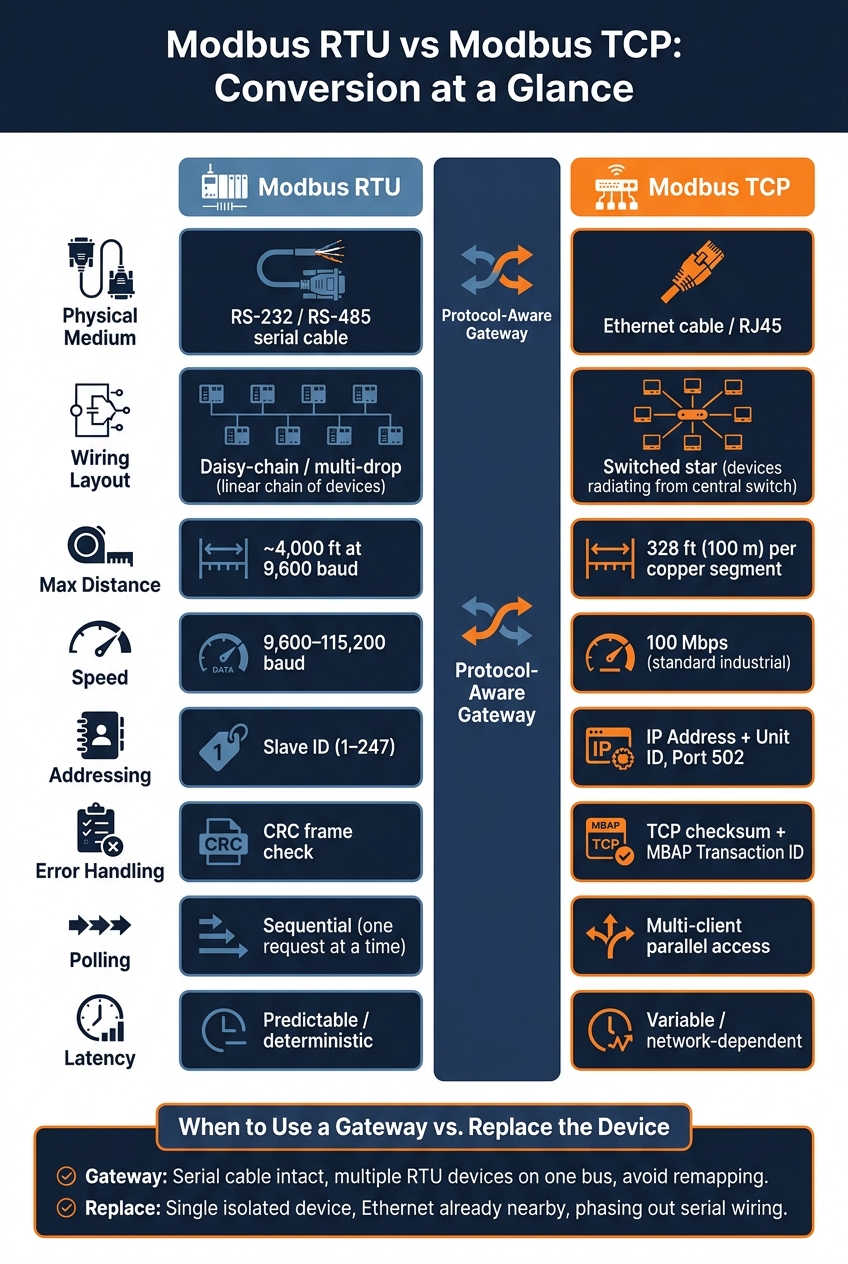
Modbus RTU vs TCP: Key Differences at a Glance
Modbus RTU vs Modbus TCP IP Explained - What’s the Difference and How to Choose the Right Protocol
sbb-itb-501186b
Quick Comparison
| Criteria | Modbus RTU | Modbus TCP |
|---|---|---|
| Media | RS-232 / RS-485 | Ethernet |
| Topology | Daisy-chain / multi-drop | Switched star |
| Distance | ~4,000 ft at 9,600 baud | 328 ft per copper segment |
| Addressing | Slave ID | IP address + Unit ID |
| Error check | CRC | TCP checksum + MBAP transaction match |
| Polling | Sequential | Can support more than one client |
| Conversion need | Native serial | Needs gateway for RTU devices |
I see this topic as less about protocol theory and more about a simple field choice: bridge the serial gear you already have, or replace it with Ethernet-native hardware.
RTU vs TCP: A Direct Comparison for Conversion Work
When you're planning a gateway setup, these are the differences that shape the job:
| Feature | Modbus RTU | Modbus TCP |
|---|---|---|
| Physical Medium | RS-485 / RS-232 serial | Ethernet (copper or fiber) |
| Wiring Layout | Daisy-chain / multi-drop | Switched star |
| Max Distance | ~4,000 ft at 9,600 baud | 328 ft (100 m) per copper segment |
| Speed | 9,600 to 115,200 baud | 100 Mbps (standard industrial) |
| Addressing | Slave ID (1–247) | IP address + Unit ID; port 502 is the default Modbus TCP port |
| Error Handling | CRC frame check | TCP checksum; MBAP Transaction ID matches request/response |
| Throughput | Lower, sequential polling | Higher, parallel client access |
| Latency | Predictable, deterministic | Variable, network-dependent |
| Scalability | Depends on segment loading and wiring | Depends on switch capacity and network design |
| Legacy Integration | Direct fit for older serial gear | Requires gateway or device replacement |
Wiring and Network Layout
RTU runs over RS-485 in a daisy-chain or multi-drop layout. In plain English, that means one cable run links devices one after another. It’s simple, but it also means the whole segment depends on clean serial wiring.
RS-485 can reach about 4,000 ft at 9,600 baud, but that number only holds up when grounding, shielding, and termination are done right. Skip those details, and things can get messy fast.
TCP works differently. It uses a switched star layout, with each device home-running back to a central switch. A copper Ethernet segment tops out at 328 ft (100 m) before another switch is needed. That one change in layout often decides how the conversion should be handled, which is why the next step is picking the right gateway behavior.
Latency, Timing, and Throughput
RTU polling is sequential and timing-sensitive. One request goes out, one response comes back, then the next device gets its turn. That makes timing more predictable, but it also means polling slows down as you add more devices.
TCP, on the other hand, commonly runs at 100 Mbps in industrial networks and allows multi-client access. So more than one system can talk to the same device at the same time. That can boost throughput, but there’s a tradeoff: shared network traffic can add latency. If the application is time-sensitive, that detail matters.
Addressing and Error Handling
RTU uses slave addresses 1 through 247, and every frame includes a CRC check. Frame boundaries are set by silent intervals on the line, which is one of those serial details that sounds small until it causes a headache.
TCP uses IP addressing, while the gateway relies on the Unit ID to reach the RTU device behind it. That Unit ID sits inside the MBAP header and tells the gateway which RTU slave should receive the request.
The gateway also has to handle error translation. If the serial side detects a CRC error, the gateway needs to turn that into a Modbus exception code the TCP client can read. If Unit IDs or exception mapping are off, the link breaks. At that point, the next issue is simple: does the gateway translate Modbus traffic, or does it just pass serial data through?
How RTU-to-TCP Conversion Works
A protocol-aware gateway translates Modbus TCP to Modbus RTU. It receives the TCP request, converts it for the serial side, and then sends the response back to the TCP client. That sounds simple on paper, but this difference becomes a BIG deal when one serial bus has to handle requests from more than one TCP client.
Protocol-Aware Conversion vs Serial Tunneling
Not every serial-to-Ethernet device actually translates Modbus. Some devices only wrap serial bytes inside Ethernet packets. That is serial tunneling.
The gap between the two approaches matters. A protocol-aware gateway can map Unit IDs and queue requests, which lets multiple TCP clients share one RTU bus without stepping on each other. A tunneling device, on the other hand, just passes data through. It does not manage the conversation.
Unit ID Mapping and Multi-Client Access
This is where things get practical. The main test is whether the gateway can route each request to the right RTU slave when several clients are using the same serial bus. To do that, the gateway uses the Unit ID to reach the correct device and must coordinate requests so they do not collide on the serial line.
Serial tunneling can move traffic from one side to the other, but it does not arbitrate bus access.
When a Gateway Is the Right Fix
Once you know the protocol gap, the next call is simple: bridge it or replace the device.
A gateway makes sense when the serial device still works fine but doesn't have native Ethernet. In that case, you don't need to rip out gear that's still doing its job.
A common example is an RTU device that still runs well but now needs to send data to an Ethernet SCADA system. The gateway links the RS-485 bus to the plant network.
Keeping the original device can also preserve the existing register map. That's a big deal if you want to avoid extra setup work. Many industrial gateways are panel-mount units rated for 14°F to 158°F, 10–40 VDC, or 19–28 VAC.
How to Choose: Keep RTU with a Gateway or Replace the Device
This choice usually comes down to disruption, cabling, and bus size. Put plainly: what already works, and how much are you willing to change?
Is the serial cable still in good shape? Is Ethernet already available where the device sits? Is the device part of a larger RTU bus? And how much downtime or reprogramming can the system handle?
| Factor | Keep RTU + Gateway | Replace with Native TCP Device |
|---|---|---|
| Serial cable condition | Existing RS-485 cable is intact | Cable is damaged or must be replaced |
| Ethernet availability | Ethernet is not already at the device | Ethernet is already nearby |
| Number of RTU devices | Multiple devices share one bus | One isolated device |
| Logic changes | Avoid re-mapping and reprogramming | New device may require mapping and logic updates |
| Upfront cost | Lower; basic gateways cost less than device replacement | Higher hardware and installation effort |
If the serial cable is still good and more than one RTU device shares the same bus, a gateway is usually the simpler option with less disruption.
If the device stands alone and Ethernet is already close by, replacement may be the cleaner long-term move.
That brings you to the final decision: keep RTU behind a gateway, or move to native TCP.
Conclusion: Picking the Right Path Between RTU, TCP, and Conversion
Modbus RTU works best for legacy serial devices. Modbus TCP is the better fit for Ethernet-based systems. In conversion work, the main call is pretty simple: keep a working RTU device, or swap it for equipment with native TCP. In the field, that choice usually comes down to wiring, latency, and how addresses are handled.
If a serial device still works but doesn’t have native Ethernet access, a gateway is often the simplest route. A gateway bridges Modbus RTU and Modbus TCP so older equipment can communicate over Ethernet.
For new and used industrial electrical parts, Electrical Trader is a useful sourcing option.
Choose conversion when it helps you keep a working RTU device. Go with native TCP when the network upgrade already makes sense.
FAQs
Do I need a gateway or a new TCP device?
No. If your device already supports Modbus TCP, it's already ready for the network and can connect straight to your Ethernet network with standard cabling.
A gateway usually comes into play only when you need to connect older serial devices that use Modbus RTU to Ethernet-based systems, or when you need to translate between protocols that don't match.
Will one gateway work with multiple RTU slaves?
Yes. A single gateway can support multiple Modbus RTU slaves on the same RS-485 serial bus, as long as each device has its own slave ID.
The gateway acts as the bridge between those serial devices and Ethernet-based systems. For stable operation, use proper RS-485 termination with 120-ohm resistors at both ends.
How do I know if a device supports true Modbus conversion?
Don’t stop at the protocol name on the spec sheet. Make sure the gateway supports the exact role you need, such as client, server, controller, or device.
You should also check the manufacturer’s register mapping, especially the difference between zero-based and one-based addressing. That small detail can throw things off fast.
Before commissioning, use a Modbus scanner to test the connection. Run a Who-Is command or read individual registers to confirm the data is coming through as expected.