EMS Training: BACnet and Modbus Basics
Understanding BACnet and Modbus is essential for professionals working with Energy Management Systems (EMS). These communication protocols enable seamless interaction between devices like HVAC systems, power meters, and lighting controls. While BACnet excels in complex, scalable building automation, Modbus is favored for straightforward industrial data collection. Knowing their differences is key to effective EMS integration.
Key Takeaways:
- BACnet: Object-oriented, peer-to-peer communication, supports automatic device discovery, and includes built-in security (BACnet/SC).
- Modbus: Register-based, master-slave structure, requires manual setup, and lacks native security features.
Quick Overview:
- BACnet is ideal for large-scale, multi-vendor systems requiring high-level automation.
- Modbus is better suited for simpler setups, like connecting meters and sensors.
Both protocols are indispensable for optimizing EMS performance, but each has unique strengths depending on the application.
BACnet Protocol Basics for EMS
BACnet Core Components
BACnet creates a standardized framework where devices like temperature sensors, fan motors, and lighting relays are treated as objects with specific properties. This standardization enables seamless communication between devices from different manufacturers. For example, an Analog Input (AI) might represent a temperature sensor reading, while a Binary Output (BO) could control a fan. Essentially, this object-oriented setup acts as a universal language for building automation.
The protocol includes 60 standard object types, such as Schedule Objects for automating HVAC operations and Trend Log Objects for tracking historical energy data. To simplify integration, BACnet Interoperability Building Blocks (BIBBs) group communication services into categories like Data Sharing, Alarm Management, and Trending. This helps integrators confirm device compatibility before installation. BACnet also uses a Priority Array with 16 levels to handle command conflicts. For instance, fire safety systems (Priority 1–2) will always override less critical commands, like energy-saving adjustments (Priority 10).
Automatic device discovery is another key feature, using Who-Is and I-Am services to identify connected devices without manual setup. BACnet/IP relies on UDP port 47808 (0xBAC0) for transmitting data. Together, these components enable the real-time control and monitoring that energy management systems (EMS) depend on.
How BACnet Works in EMS
With these core components, BACnet powers the real-time functionality of an EMS. For example, an EMS can use ReadProperty services to gather temperature data from multiple zones and send WriteProperty commands to adjust HVAC settings based on occupancy schedules. To reduce network traffic, the SubscribeCOV (Change of Value) service updates the system only when values change, avoiding constant device polling.
For energy monitoring, Trend Log objects continuously record metrics like power usage from electrical panels and HVAC systems. This data helps facility managers identify inefficiencies and optimize energy use. The interactions between devices are governed by ASHRAE Standard 135, a detailed document spanning over 1,200 pages, ensuring consistent performance across equipment from various manufacturers. Before purchasing BACnet devices, contractors should always review the vendor's Protocol Implementation Conformance Statement (PICS) to confirm which objects and BIBBs are supported.
"The genius of the BACnet object model is that it abstracts every device into a standardized object, making complex building systems interoperable." – Olivier Hersent, CEO, Actility
sbb-itb-501186b
Modbus Protocol Basics for EMS
Modbus Core Features
Modbus relies on a register-based setup divided into four main tables: Coils for read/write bits, Discrete Inputs for read-only bits, Holding Registers for read/write 16-bit words, and Input Registers for read-only 16-bit words. This straightforward structure makes it easy to integrate into field devices.
The protocol follows a master-slave communication model. Here, a single master device - such as a SCADA system or HMI - initiates all communication. The slave devices, which could include sensors, controllers, or actuators, respond to these requests. Each slave has a unique address ranging from 1 to 247, while address 0 is reserved for broadcast messages.
There are three main Modbus versions:
- Modbus RTU: Uses 8-bit binary coding over serial connections like RS-485 or RS-232. It's the most commonly used version for field devices.
- Modbus ASCII: Converts each byte into two human-readable characters, but this process slows performance by about 50% compared to RTU.
- Modbus TCP/IP: Encapsulates the protocol into Ethernet packets, eliminating the need for CRC error checks since TCP handles data integrity.
Serial connections typically operate at a standard speed of 9,600 baud, while TCP/IP can achieve speeds up to 15 times faster than RTU at the same baud rate. These features make Modbus a reliable choice for real-time operations in EMS.
How Modbus Works in EMS
Modbus plays a vital role in enabling real-time control in EMS applications. For example, specific function codes allow targeted operations: Function code 03 reads power consumption data from Holding Registers in an electrical panel, while Function code 06 updates temperature setpoints in an HVAC unit's register. This request-response mechanism ensures the master device maintains control, while slave devices handle monitoring and control tasks efficiently.
RS-485 wiring is often used to connect multiple devices on a single serial bus, supporting up to 32 nodes over distances of up to 4,000 feet without needing repeaters. For more extensive plant-wide monitoring, Modbus TCP/IP connects modern PLCs and cloud-based analytics platforms. It supports multiple simultaneous connections using Transaction Identifiers.
To avoid issues with multi-register value interpretation, it's crucial to document the 32-bit data "endianness" (or byte order). This ensures consistent readings across devices, especially when integrating equipment from different manufacturers. Such attention to detail prevents miscommunication and ensures seamless operation across diverse systems.
AIRAH Technology Talk: BACnet network and Modbus protocol introduction

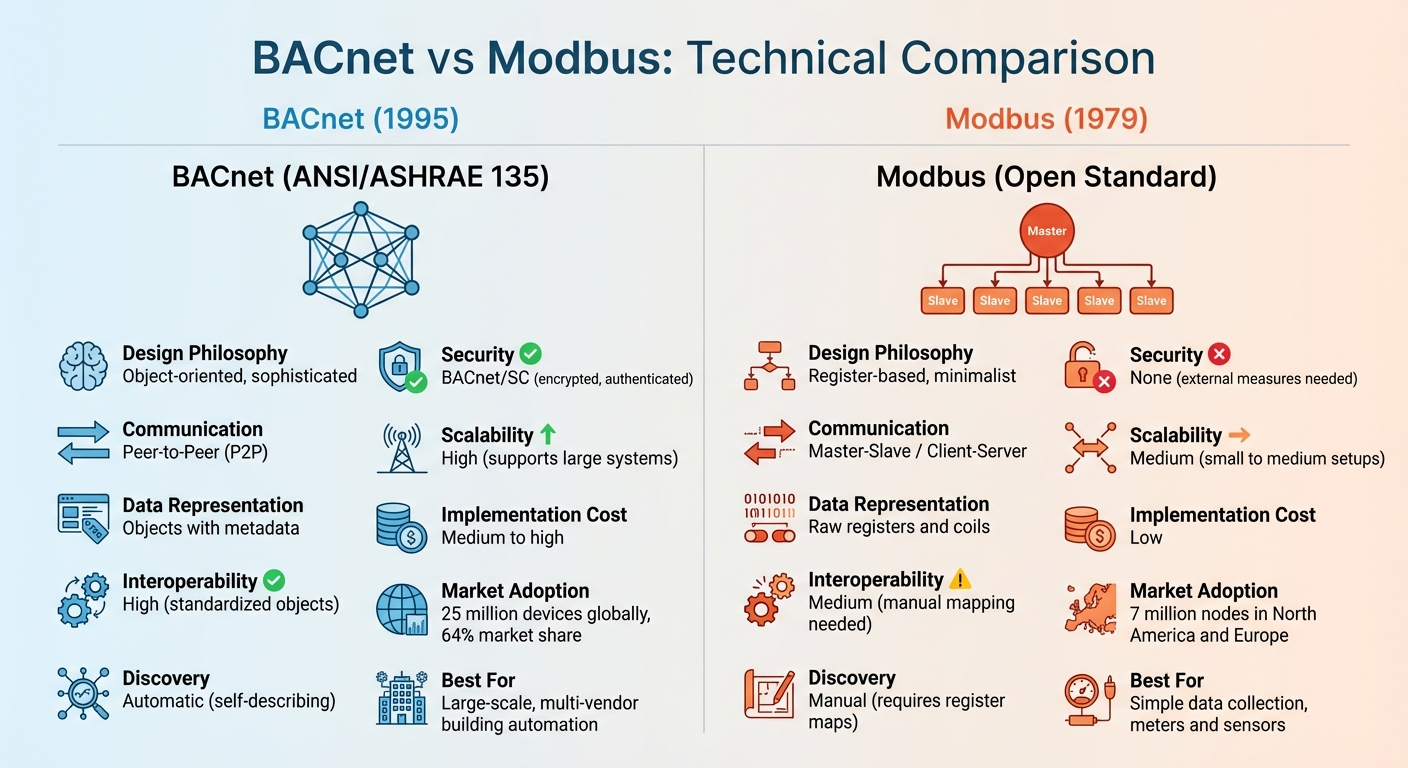
BACnet vs Modbus: Technical Comparison
BACnet vs Modbus Protocol Comparison for Energy Management Systems
When deciding between BACnet and Modbus for your Energy Management System (EMS), the choice largely depends on your system's complexity and specific requirements. BACnet, introduced in 1995, is designed for sophisticated building systems with a peer-to-peer communication model. On the other hand, Modbus, dating back to 1979, follows a simpler master-slave structure, making it ideal for straightforward data collection tasks.
One of the major technical distinctions lies in how these protocols handle data. BACnet uses standardized objects like "Analog Input" or "Schedule", complete with metadata such as units, status, and other properties. Modbus, however, relies on numerical registers and coils, which lack built-in metadata. Another advantage of BACnet is its automatic device discovery feature, facilitated by "Who-Is" and "I-Am" services, which simplifies setup and reduces configuration errors. In contrast, Modbus requires manual mapping of registers, which can be more labor-intensive.
Security is another area where the two protocols differ. BACnet incorporates BACnet Secure Connect (BACnet/SC) for encryption and authentication, while Modbus does not include native security features, relying instead on external protections like VPNs. The following table highlights these and other differences.
Protocol Comparison Table
| Feature | BACnet (ANSI/ASHRAE 135) | Modbus (Open Standard) |
|---|---|---|
| Design Philosophy | Object-oriented, sophisticated | Register-based, minimalist |
| Communication | Peer-to-Peer (P2P) | Master–Slave / Client–Server |
| Data Representation | Objects with metadata | Raw registers and coils |
| Interoperability | High (standardized objects) | Medium (manual mapping needed) |
| Discovery | Automatic (self-describing) | Manual (requires register maps) |
| Security | BACnet/SC (encrypted, authenticated) | None (external measures needed) |
| Scalability | High (supports large systems) | Medium (small to medium setups) |
| Implementation Cost | Medium to high | Low |
The adoption numbers further illustrate their use cases. BACnet dominates the building automation sector, with over 25 million devices deployed globally and a 64% market share among users and suppliers. Modbus, meanwhile, remains a strong contender in industrial applications, with over 7 million nodes in use across North America and Europe.
EMS Integration Methods for BACnet and Modbus
Network Configuration Steps
Setting up BACnet and Modbus networks involves specific steps to ensure proper communication. For BACnet MS/TP, each device needs a unique Device Instance ID and MAC address, along with a defined baud rate - commonly 19,200 or 38,400. For BACnet/IP, assign a unique IP address, subnet mask, and gateway, and configure the UDP port (default is 47808). After adjusting communication settings on BACnet controllers, a power cycle is necessary for the changes to take effect.
With Modbus RTU (serial), configuration includes assigning a unique slave address, baud rate, parity, stop bits, and data bits. For Modbus TCP, you’ll need to set a unique IP address and specify the communication port (default is 502). RS‑485 networks require shielded twisted pair cables (24 AWG, 100‑ohm) for stable communication.
Both Modbus RTU and BACnet MS/TP networks should use a daisy‑chain topology to avoid communication issues. At the end of the RS‑485 trunk, install a 120‑ohm end‑of‑line (EOL) resistor to prevent signal reflection. Maintain the cable shield across the network but ground it only at the controller to avoid ground loops. A standard RS‑485 network can support up to 32 devices per segment, with a maximum cable length of 1,200 meters (approximately 3,937 feet).
One key difference between the two protocols is data point mapping. BACnet simplifies this process with automatic network discovery, reducing manual errors. On the other hand, Modbus requires a "Register Map" to manually address each data point. If Modbus readings seem incorrect, check the byte order (MSB vs. LSB), as this can vary by manufacturer.
Following these steps ensures reliable EMS integration, laying the groundwork for practical applications.
Common EMS Integration Examples
In HVAC systems, EMS integration often involves points like Discharge Air Setpoint (read/write), Supply Fan Enable (read/write), Discharge Air Temperature (read), and VFD Feedback Speed (read). These allow the EMS to monitor and control airflow, temperature, and equipment performance across various zones.
For energy monitoring, Modbus typically connects power meters and variable frequency drives (VFDs) to the EMS. Since Modbus organizes devices as memory registers, use the manufacturer's register list to locate voltage, current, or power consumption data. Hardware gateways can then translate these raw Modbus registers into BACnet objects, making them accessible to the building management system. Additionally, when deploying BACnet/IP across multiple subnets, BACnet/IP Broadcast Management Devices (BBMDs) are necessary to handle broadcast traffic between network segments.
Troubleshooting and Maintenance Guidelines
Diagnostic Tools and Techniques
When troubleshooting, start by checking the physical layer. For BACnet MS/TP wiring, disconnect the end-of-line resistors and measure the voltage between the lines. If the voltage is lower than the minimum level expected from a single device, there’s likely a wiring issue. To pinpoint the fault, split the communication line and measure voltage on each side - whichever section shows lower voltage contains the problem.
For BACnet/IP and Modbus TCP traffic, Wireshark is the go-to tool for packet-level analysis. For discovering BACnet devices, tools like YABE (Yet Another BACnet Explorer) help you browse objects and check responses to Who-Is/I-Am services. For serial diagnostics, USB-to-RS485 converters paired with tools like BACspy or terminal emulators (e.g., PuTTY, HyperTerminal) allow you to analyze raw hex data on MS/TP or Modbus RTU lines.
Some problems have clear patterns. Garbled Modbus values often mean mismatched settings for baud rate, parity, or stop bits. Bad frames may indicate electrical noise or missing 120Ω termination resistors. In BACnet systems, unreachable "phantom" devices are often caused by outdated programming or duplicate device instance numbers. If Modbus values seem incorrect, check the byte order - different manufacturers may use different formats.
"If [a] device is being constantly polled for updates, it's generating data on the network, and consuming CPU cycles. Now assume you have hundreds of similar sensors all generating a constant stream of data across a network with limited bandwidth. The traffic adds up fast." - Ryan LaFlamme, Content Manager, Optigo Networks
These diagnostic techniques, aligned with earlier integration steps, are essential for keeping communication smooth and reliable across network devices.
Maintaining System Reliability
Troubleshooting lays the groundwork for proactive maintenance. Regular communication tests can help sustain system reliability. Periodically perform Who-Is/I-Am and Read/WriteProperty tests to ensure devices remain responsive, especially after updates or network expansions. Opt for BTL-certified devices (tested by BACnet Testing Laboratories) to ensure compliance with standards and reduce integration challenges.
For RS-485 networks, physical layer maintenance is crucial. Double-check wiring polarity and proper placement of termination resistors. To prevent ground loops, ground either one power supply in an MS/TP network or all devices consistently. Keep Modbus cable lengths within 1,200 meters (about 3,937 feet) when operating at 9,600 baud.
To reduce network congestion, replace frequent Read requests with Change of Value (COV) subscriptions, which only send updates when values change. Limit BACnet MS/TP lines to 60 devices or fewer to avoid overloading. For Modbus RTU, ensure the 3.5-character silent interval between frames is maintained - at 9,600 baud, this equates to about 3.65 milliseconds.
If using gateways for BACnet–Modbus integration, regularly review data mapping to confirm that Modbus registers correctly translate to BACnet objects and scaling factors are accurate. Check whether the manufacturer uses zero-based or one-based addressing to avoid off-by-one errors. Schedule firmware updates through remote management platforms to address protocol vulnerabilities and enhance device compatibility. Keep detailed records of device IDs, network settings, register maps, and wiring layouts to streamline troubleshooting and avoid configuration conflicts.
Conclusion
In energy management systems (EMS), BACnet and Modbus serve distinct but complementary roles. BACnet facilitates high-level automation for systems like HVAC, lighting, and controls, while Modbus focuses on gathering field-level data from meters, sensors, and drives. Together, they form the backbone of modern EMS, but their differences underscore the need for specialized training to ensure smooth integration.
One key distinction lies in how each protocol handles data. BACnet's object-oriented design allows devices to self-describe their functions, making integration more intuitive. Modbus, on the other hand, relies on external documentation to interpret its registers, requiring a more hands-on approach to troubleshooting. To bridge these differences, professionals must master gateway configuration and data mapping, addressing both physical and logical protocol conversions. Training on specific nuances - like zero-based versus one-based addressing, baud rate synchronization, and polling speed adjustments - can prevent network failures and enhance system reliability.
"Understanding the intricacies of BACnet and Modbus will enhance engineering professionals' ability to design, implement, and troubleshoot complex automation systems." - Shreyas Sharma, Technical Contributor, Wevolver
As building automation increasingly integrates with IT networks, comprehensive training becomes indispensable. It not only strengthens security and optimizes performance but also equips professionals to tackle the unique challenges of protocol integration. A well-structured training program ensures that engineers can manage these complexities effectively, maintaining the reliability and efficiency of EMS operations.
FAQs
When should I choose BACnet vs Modbus for an EMS project?
When working on EMS projects that involve integrating multiple building subsystems - like HVAC, lighting, or security - BACnet is the go-to choice. It’s an open standard specifically designed for building automation, known for its ability to scale and work seamlessly across various systems.
On the other hand, Modbus is better suited for simpler setups or industrial environments, especially those involving PLCs or sensors. Its straightforward protocol shines in legacy systems or scenarios where ease of use and reliability are the main priorities.
Do I need a gateway to connect Modbus devices to a BACnet EMS?
Yes, a gateway is typically required to connect Modbus devices to a BACnet EMS. Acting as a protocol translator, the gateway allows these two distinct networks to communicate effectively. This ensures smooth integration and the proper operation of the EMS.
What are the fastest checks when BACnet or Modbus data looks wrong?
When troubleshooting, start with the basics. Check communication parameters like baud rate, MAC addresses, and device instances to ensure they're correctly configured. Don't forget to verify wiring polarity - it’s a common source of issues. Next, review error counters such as UART or CRC errors, as they can point to underlying problems. Lastly, confirm that termination and biasing resistors are properly installed. These simple checks can quickly uncover common issues in BACnet or Modbus data communication.