

Industrial Protocol Compatibility: Buyer Guide
Buy the wrong protocol, and a low-cost part can turn into a four-figure or five-figure integration problem fast. From what I see in this guide, the buying decision comes down to six checks: protocol variant, device role, profile support, firmware, network media, and topology.
If I were screening equipment for a U.S. plant, I’d keep this simple:
- For legacy serial systems: look first at Modbus RTU or PROFIBUS
- For mixed-brand Ethernet systems: start with Modbus TCP, PROFINET, or EtherNet/IP
- For high-speed motion: focus on EtherCAT
- For plant-to-SCADA, MES, historian, or cloud data: use OPC UA
- For compact machines and mobile equipment: check CANopen, DeviceNet, or J1939
Just as important, protocol support alone does not mean the device will work. A unit can support EtherNet/IP and still fail your job if it’s only an adapter when you need a scanner. The same issue shows up with PROFINET roles, CIP profiles, GSDML/EDS files, register maps, and node IDs.
Industrial Communication Protocols: A Practical Guide to Modbus, EtherNet/IP and Profibus|July 2025
sbb-itb-501186b
Quick Comparison
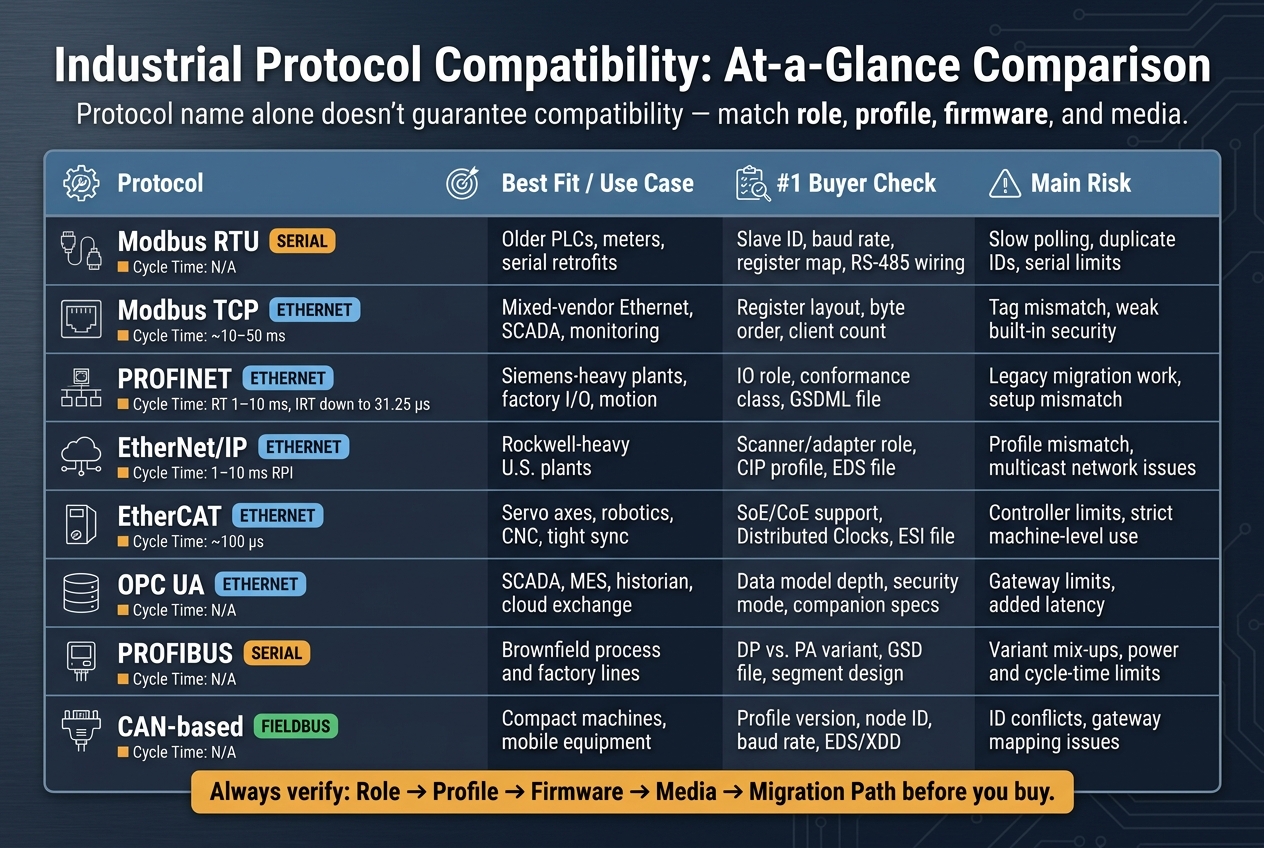
Industrial Protocol Compatibility Guide: 8 Protocols Compared
| Protocol | Best fit | Main buyer check | Main risk |
|---|---|---|---|
| Modbus RTU | Older PLCs, meters, serial retrofits | Slave ID, baud rate, register map, RS-485 wiring | Slow polling, duplicate IDs, serial limits |
| Modbus TCP | Mixed-vendor Ethernet, SCADA, monitoring | Register layout, byte order, client count | Tag mismatch, weak built-in security |
| PROFINET | Siemens-heavy plants, factory I/O, motion | IO role, conformance class, GSDML | Legacy migration work, setup mismatch |
| EtherNet/IP | Rockwell-heavy U.S. plants | Scanner/adapter role, CIP profile, EDS | Profile mismatch, multicast network issues |
| EtherCAT | Servo axes, robotics, CNC, tight sync | SoE/CoE support, Distributed Clocks, ESI | Controller limits, strict machine-level use |
| OPC UA | SCADA, MES, historian, cloud exchange | Data model depth, security mode, companion specs | Gateway limits, added latency |
| PROFIBUS | Brownfield process and factory lines | DP vs. PA, GSD, segment design | Variant mix-ups, power and cycle-time limits |
| CAN-based networks | Compact machines, mobile equipment | Profile version, node ID, baud rate, EDS/XDD | ID conflicts, gateway mapping issues |
The short version: match the exact role, file set, wiring, and firmware before you buy. If any of that is missing, I’d treat the listing as a risk until the seller proves otherwise.
1. Modbus RTU
Ecosystem Fit
Modbus RTU is a common retrofit pick because it lines up with older PLCs, RTUs, meters, and controllers that still run on serial networks. A lot of U.S. OEMs still ship field devices with Modbus RTU as the default, with Ethernet sold as an extra. That makes life easier if the register map and wiring line up with the system already in place.
Register Map and Function Codes
Check the shared function codes, register ranges, data types, units, and scaling before you buy. If those don’t match, you can end up with bad readings and not notice right away.
The function codes you’ll usually run into are:
- 03 (Read Holding Registers)
- 04 (Read Input Registers)
- 06 (Write Single Register)
- 16 (Write Multiple Registers)
Some lower-cost instruments support only part of that set, which can throw off your control logic. If you’re buying used or surplus equipment on Electrical Trader, check the firmware revision against the manufacturer’s current datasheet.
Media and Topology
Modbus RTU runs on an RS-485 daisy-chain bus. Use 120 Ω termination at both ends. Don’t use star wiring; it can cause reflections.
Typical guidance puts the limit at 3,300 ft (1,000 m) at 19,200 bps and 32 stations total. If you need longer runs or more nodes, you’ll usually have to lower the baud rate or add repeaters. That slows polling and cuts how fast the PLC gets updated values.
Retrofit Risk
The main retrofit problems in a Modbus RTU job are duplicate slave IDs, slow polling, and spotty documentation. New devices should let you change the slave ID so each address is set before installation. On a busy RS-485 segment, every added node increases total polling time, so check the current transaction load at your chosen baud rate before you buy.
Keep RS-485 away from power conductors, and use proper shielding and grounding. If a device can’t match the current slave ID plan, polling load, and register map, skip it.
If serial limits or polling speed become an issue, compare this older option with Modbus TCP next.
2. Modbus TCP
Ecosystem Fit
Modbus TCP keeps the Modbus register model, but it runs over Ethernet on TCP port 502. In practice, that means it drops into standard plant networks without much drama: managed switches, Cat5e/Cat6 cabling, and VLANs all fit the job. It also works well as a neutral baseline in mixed-brand systems.
That makes Modbus TCP a good fit for brownfield upgrades and mixed-vendor plants. But it’s not the right tool for motion-heavy systems.
Use it for supervisory data, energy monitoring, and light control. If you need hard real-time motion or synchronized I/O, go with EtherCAT or PROFINET IRT instead.
The tradeoff is simple: the protocol itself stays easy, so more of the risk moves to the register map. In plain English, profile checks and data-format checks matter just as much as basic protocol support.
Device Profile Support
Modbus TCP has no native device profiles, so interoperability depends on the vendor’s register map. Before you buy, get the full Modbus communication manual, not just the quick-start sheet, and check a few things:
- Supported function codes, especially FC3 and FC4
- 0-based or 1-based addressing
- 32-bit and IEEE 754 byte order
- Maximum TCP client count
Miss one of these details and things can go sideways fast. A device may “support Modbus TCP” on paper, but if the byte order or addressing is off, your data can still come in wrong.
Media and Topology
Modbus TCP runs on standard Ethernet. For most jobs, use 100BASE-TX or 1000BASE-T over Cat5e/Cat6 with RJ45 connectors. For long runs or areas with high EMI, fiber through SFP ports is the safer pick. In rough settings, spec M12 connectors and IP-rated switches.
Star topology through a managed switch is the most common and dependable layout. Some devices also offer dual-port pass-through for linear daisy-chain wiring. That can save cable, but it adds a weak link: one dead device can cut off communication to everything downstream.
And wiring isn’t always the part that bites you. During migration, RTU and TCP versions often differ in register layout and polling behavior, which can turn a “simple” swap into a cleanup job.
Retrofit Risk
RTU and TCP versions of the same device may use different registers, and that can break SCADA tags and historian mappings. Polling logic changes too. TCP allows faster, concurrent requests, so copying old serial timing settings can overload devices or create traffic you don’t need.
Ethernet also brings cybersecurity exposure. Standard Modbus TCP has no built-in encryption or authentication. Put devices on dedicated VLANs, block port 502 at the firewall, and use VPNs for remote access.
If you’re buying used equipment through Electrical Trader, verify the firmware version, confirm factory reset access, and make sure the full register map is available before commissioning.
If you need deterministic, profile-driven Ethernet instead of best-effort polling, compare this with PROFINET next.
3. PROFINET
Ecosystem Fit
PROFINET is one of the most common industrial Ethernet protocols in factory automation, especially in plants that already run Siemens PLCs, drives, remote I/O, or safety gear. PI reported 69.3 million PROFINET devices installed worldwide by the end of 2023, with 10.6 million shipped in that year alone.
Before you buy, check whether your controllers, HMIs, sensors, actuators, and engineering software support PROFINET out of the box or through approved gateways. Native support usually means less setup work. On the flip side, mismatched roles or profiles can add time, cost, and a few nasty surprises.
Device Profile Support
“PROFINET-compatible” sounds good, but it doesn’t tell you enough.
What matters is whether the device supports the exact role your application needs: IO-Device, IO-Controller, or IO-Supervisor. It also needs the right device profile. Wrong role, wrong job. The device should match the needed conformance class too. CC-A covers basic Ethernet, while CC-C supports synchronous traffic for tighter timing. A device can connect and still fall short where performance matters.
Always ask for the GSDML file before purchase. This is the device description file your engineering software uses for setup, and it matters even more when you’re buying used equipment.
Once the role and profile line up, move on to cabling and topology.
Media and Topology
PROFINET supports both copper and fiber. Common topologies include line, star, tree, and ring. Many devices also come with built-in two-port switches, which makes daisy-chaining easier when the plant layout fits that approach.
Ring topology is worth calling out when uptime matters. It’s a standard PROFINET option and often shows up in systems where redundancy is a must and downtime is expensive. The basic rule is pretty simple:
- Use copper for short runs
- Use fiber where EMI is a concern
- Use ring when you need redundancy
Retrofit Risk
Adding PROFINET to an older facility is rarely plug-and-play. Legacy PLCs, switches, and field devices often need updates or gateways. In most cases, the safer path is a staged migration. That means bringing in new PROFINET devices alongside older fieldbus equipment and using GSD/GSDML-based tools, instead of trying to swap everything at once.
If you’re buying a used PROFINET device on Electrical Trader, verify the firmware, GSDML file, conformance class, and IO role before you commit.
If your plant leans more toward Rockwell or needs closer EtherNet/IP alignment, compare that protocol next.
4. EtherNet/IP
Ecosystem Fit
EtherNet/IP carries the Common Industrial Protocol (CIP) over standard IEEE 802.3 Ethernet through TCP and UDP.
In U.S. plants, it's most common where Rockwell Automation / Allen-Bradley controllers, drives, or safety gear are already on the floor. If a plant is heavily built around Rockwell, EtherNet/IP is often the default path. If the setup leans Siemens or puts a big focus on motion control, you may need gateways or even a different protocol. It can work across single machines, full production lines, and plant networks.
That said, platform fit only gets you so far. The exact CIP profile and device role still decide whether a device will work as expected.
Device Profile Support
Check the exact CIP profile, the device role, and the EDS. The protocol name by itself doesn't prove interoperability. The profile and role do. Even under the same CIP profile, vendors may expose different object sets.
Before you buy, confirm whether the device is an adapter or a scanner. Also check whether an EDS (Electronic Data Sheet) is available, since tools like Rockwell's Studio 5000 use it to identify and configure the device.
When reviewing listings on Electrical Trader, look for:
- ODVA conformance
- The exact profile supported
- The device role
- EDS availability
Media and Topology
EtherNet/IP can run over copper or fiber, using RJ-45 or industrial fiber connectors. The most common topologies are star, linear, and Device Level Ring (DLR). Use DLR when you need device-level redundancy.
On managed switches, turn on IGMP snooping for multicast I/O traffic. It's also smart to use VLANs so control traffic stays separate from general IT traffic.
This choice gets even more important in retrofit jobs. Old devices, switches, and controllers don't always line up neatly with a new network layout, and that's where small design calls can turn into big headaches.
Retrofit Risk
Moving from DeviceNet, ControlNet, or PROFIBUS to EtherNet/IP often means gateway modules or controller changes. In most cases, a phased migration is the lower-risk route. That means keeping legacy fieldbus segments running through gateway modules while new EtherNet/IP segments come online.
If you're buying retrofit hardware on Electrical Trader, put extra attention on controllers, drives, and gateways that support both protocols. Also check for vendor migration guides and current firmware support.
If your application needs tighter deterministic timing, compare this with EtherCAT next.
5. EtherCAT
Ecosystem Fit
Where PROFINET and EtherNet/IP often handle plant-wide control, EtherCAT tends to be the go-to pick at the machine level for synchronized motion. It's a hard real-time network built for servo axes, robotics, CNC machines, and semiconductor tools that need sub-100 µs cycles and sub-1 µs jitter.
That makes EtherCAT a strong fit for self-contained, high-performance machines where tight timing across many axes is the whole game. Beckhoff, Omron, and many CODESYS-based controllers support EtherCAT well. And if your plant already runs PROFINET or EtherNet/IP at a higher level, EtherCAT can still fit neatly as the motion network inside the machine.
Device Profile Support
Start with the profile: CoE, SoE, or FoE. For motion use, look for SoE and Distributed Clocks if you need tight axis synchronization. For drives, make sure the device supports CiA 402 and the operating modes your application calls for.
Also ask for the ESI (EtherCAT Slave Information) XML file. Your engineering software uses it to set up the device, so this isn't a nice-to-have. It's part of the job.
If you're checking listings on Electrical Trader, verify a few things before buying used drives or I/O modules:
- Firmware version
- ESI file availability
- ETG conformance documentation
Older firmware can block the motion modes you need, and that can turn a good deal into a headache fast.
Media and Topology
EtherCAT runs on standard Cat 5e or Cat 6 copper cabling with RJ-45 connectors. It also doesn't need Ethernet switches for line or daisy-chain layouts. Each copper segment is usually limited to 100 m between devices.
If you're dealing with heavy EMI or longer runs, fiber can help. One more thing: keep the EtherCAT segment separate from the office LAN, SCADA, and general plant Ethernet. Mixing them may look neat on paper, but it's often asking for trouble.
Retrofit Risk
Bringing EtherCAT into a site that already runs PROFIBUS, DeviceNet, or CANopen can get messy. A lot of devices depend on proprietary EtherCAT slave controller chips, which makes retrofits harder. And if your current PLC doesn't support EtherCAT out of the box, you'll likely need a controller upgrade or a gateway. That means more cost, more setup work, and more things that can go sideways.
The safer move is usually to keep EtherCAT inside new motion machines. Leave legacy fieldbus segments alone, and use gateways only when you have no other clean option.
For supervisory data exchange outside the motion loop, compare OPC UA next.
6. OPC UA
Ecosystem Fit
If EtherCAT and PROFINET handle machine control, OPC UA handles data exchange above the control layer. It acts as a vendor-neutral interoperability layer for moving data between controllers, SCADA, MES, historians, and cloud systems. Its IEC 62541 standard can help cut vendor lock-in in mixed-brand setups.
So the buying question usually isn't just can it connect? It's how much of the data model it exposes.
Information Model Support
OPC UA uses structured information models for variables, alarms, events, methods, and device structure. These are often extended through companion specifications. For example, OPC UA for Devices standardizes drive data such as speed, torque, alarms, and health. Common companion specs include PackML, EUROMAP 77, and IO-Link.
When reviewing listings on Electrical Trader, check the datasheet or user manual for:
- the OPC UA version
- supported companion specs
- security modes such as sign/encrypt
- limits on tag counts or subscription rates
Also look at implementation depth. Vendor support can vary a lot.
Media and Topology
OPC UA runs over Ethernet/TCP/IP in client-server or pub-sub modes. Use client-server for configuration and diagnostics. Use pub-sub for repeated data exchange.
For larger deployments across multiple lines or sites, a tiered architecture often makes sense. Local OPC UA servers can aggregate machine-level data, then pass it to plant-level or enterprise servers. It also helps to segment the network and protect OT traffic with firewall rules. One thing people sometimes miss: security features add CPU load, so embedded hardware needs enough headroom.
Once transport is sorted out, the tougher issue is usually what legacy gear can actually expose through OPC UA.
Retrofit Risk
Retrofitting OPC UA into Modbus, PROFIBUS, or CAN plants usually means adding gateways. That can add latency, extra setup work, and limits in the data model. In PROFIBUS I/O retrofits, gateways often pass basic variables but leave out alarm detail and diagnostics.
One documented retrofit path uses an interoperability layer that needs no changes to the legacy device while mapping field data into an ISA-95-based information model. That's a lower-disruption option worth asking vendors about before you commit to a full hardware swap.
A smart way to handle it is simple: pilot one line first, verify data and latency, then roll in native OPC UA hardware where the math works.
7. PROFIBUS
After the Ethernet protocols above, PROFIBUS is the legacy fieldbus buyers still run into most often in brownfield plants.
Ecosystem Fit
PROFIBUS still has a clear place when a plant needs to replace or extend older fieldbus segments without touching the entire control setup. It is widely installed across plants built or upgraded from the 1990s through the 2010s, and it comes in two main variants: PROFIBUS DP for fast factory I/O and PROFIBUS PA for process instrumentation in hazardous areas.
DP is a strong match for plants already built around Siemens, ABB, or similar PLC ecosystems, along with distributed I/O cabinets and drives on production lines. PA fits chemical, oil and gas, or water and wastewater treatment sites where instruments need bus power and intrinsic safety. That matters even more when replacing the current wiring would cost a lot or trigger recertification.
Before buying used hardware on Electrical Trader, make sure you confirm the exact variant: DP or PA. Mixing those up can turn a low-cost buy into an expensive problem.
Device Profile Support
PROFIBUS uses GSD files and device profiles such as PA profiles and PROFIdrive to define device behavior and interoperability.
Before you buy, check a few things in plain terms:
- Load the GSD into your configuration tool
- Confirm firmware support for the profile revision
- Verify I/O size limits
- Match the segment baud rate
For used gear, also confirm that the GSD is still available from the vendor or a trusted library.
Media and Topology
PROFIBUS DP and PROFIBUS PA use different physical layers, and confusing them is one of the most common costly mistakes.
| PROFIBUS DP | PROFIBUS PA | |
|---|---|---|
| Physical layer | RS-485 over shielded twisted pair | MBP / IEC 61158-2 over shielded twisted pair |
| Baud rate | 9.6 kbit/s to 12 Mbit/s | Fixed at 31.25 kbit/s |
| Bus power | No | Yes |
| Intrinsic safety | No | Yes |
| Max segment length | Varies with baud rate | About 1,900 m (6,200 ft) |
| Typical topology | Linear bus (daisy-chain) | Bus, star, or ring via couplers, field junction boxes, or barriers |
PA segments are usually tied back to a DP backbone through a DP/PA coupler or link device. If you're planning a PA installation or expansion, include those parts in the budget from the start.
Retrofit Risk
A PROFIBUS retrofit is not just a parts swap. Think of it as a segment design check where node count, cycle time, power budget, and profile compatibility all need to line up.
On DP segments, adding more nodes can stretch cycle time and push the network toward its cable-length or node-count limits. On PA segments, each added instrument has to stay within the coupler's power and safety budget.
Profile and GSD mismatches are another common risk. Older controllers may not recognize newer profile revisions, and very old devices may not include the diagnostics features that current asset-management tools expect. For used components, verify the exact model number, firmware revision, and GSD file availability before purchase. If the application is critical, bench-test the device on a lab segment first.
If you still need smaller machine-level networks, compare PROFIBUS with CAN-based systems next.
8. CAN-Based Industrial Networks
Like PROFIBUS, CAN-based networks still matter most in brownfield plants, compact machines, and mobile equipment.
CAN is a low-bandwidth industrial fieldbus used in automation, mobile machinery, and embedded systems. In U.S. plants today, the three variants you'll run into most often are CANopen, DeviceNet, and SAE J1939.
Ecosystem Fit
Each variant tends to stay in its own lane. DeviceNet, defined by ODVA, is a legacy Rockwell fieldbus that shows up often in Allen-Bradley/Rockwell Automation installations. In many of those setups, it runs alongside EtherNet/IP: DeviceNet handles field I/O and drives at the device level, while EtherNet/IP carries controller-to-controller and HMI traffic.
CANopen is a good match for compact machinery, packaging lines, and robotics, where deterministic, real-time control matters more than bandwidth. J1939 is the standard for heavy-duty vehicles and mobile equipment such as generators, cranes, and agricultural machinery. In those systems, an engine ECU or genset controller may report speed, temperature, and fault codes to a supervisory system.
In greenfield factory automation in the U.S., CAN-based networks are usually more of a niche pick. They still make sense in cost-sensitive, embedded, or mobile applications where simple cabling and rugged real-time performance matter more than Ethernet speed.
That’s why profile and node-ID checks matter as much as the protocol name.
Device Profile Support
CAN-based protocols use standard profiles to define how devices of the same type behave. That’s what makes multi-vendor integration possible.
For CANopen, the main profiles are:
- CiA 301
- CiA 402 for drives and motion control
- CiA 401 for generic I/O
- CiA 406 for encoders
A vendor datasheet may say a device is CiA 402 compliant. That tells you it uses standard control words and parameter sets. For DeviceNet, check for ODVA conformance testing, since ODVA keeps a device listing you can review before buying. For J1939, confirm which Parameter Group Numbers (PGNs) the device supports, because those define the data the unit actually broadcasts.
Before buying used CAN-based equipment through a marketplace like Electrical Trader, ask for the device’s EDS/XDD file. For CANopen, also verify the object dictionary. Then compare that information against the relevant CiA or ODVA profile. If the file is missing, or the profile version is old, expect custom engineering work during integration.
Media and Topology
CAN uses a two-wire differential pair (CAN_H and CAN_L) plus ground, with termination resistors - usually 120 Ω - at both ends of a linear bus. CAN speed and cable length trade off directly.
Typical CANopen limits are about 20 m at 1 Mbit/s, 100 m at 500 kbit/s, 250 m at 250 kbit/s, and 500 m at 125 kbit/s.
Star topologies can cause signal reflections, so they should be avoided. Keep the main trunk continuous, and keep stubs as short as possible. DeviceNet also adds powered trunk cabling with defined thick and thin cable types, plus limits on total current draw. That needs to be part of the wiring plan from day one.
Retrofit Risk
The three main buyer risks in a CAN retrofit are node-ID conflicts, gateway mapping, and profile mismatch.
When you move from a native DeviceNet master to an EtherNet/IP–DeviceNet gateway, I/O assembly mappings and diagnostic access can change in ways that aren’t obvious at first. That can lead to intermittent faults. Node-ID conflicts are another common problem. CANopen and DeviceNet both rely on unique node IDs, so adding devices without a full network audit can bring duplicate IDs and hard-to-trace faults to the surface.
Older devices can also use earlier profile versions or vendor-specific extensions that newer masters don’t handle cleanly. Before any retrofit, do a full network audit. Document every node ID, baud rate, cable length, and profile version. Lab-test gateways with your actual devices before cutover. A phased migration is usually the safer path, especially when critical CAN segments need to stay on native masters until gateway behavior has been checked.
Use the next checklist to verify node IDs, baud rate, profile version, cable length, and gateway role before you buy.
What to Check Before You Buy
Use this checklist to screen any listing before you buy. The protocol name by itself isn't enough. Firmware, data structure, media, and the migration path still decide whether a device will work in your setup. It helps to look at each listing through the same retrofit, multi-vendor, and new-install lens covered above so you can judge how much integration work you're signing up for.
Device Profile and Firmware
Start by confirming the exact model, firmware, and stack version. That step matters more than many buyers expect. Features like diagnostics, parameterization, time sync, redundant network modes, or OPC UA security policies can depend on a minimum firmware version or a licensed option.
Ask for the current GSDML, EDS, or equivalent file and match it to the hardware revision. If those files aren't available, plan for extra commissioning time. That's often where a "good deal" starts to get expensive.
| Protocol | Profile or Certification to Confirm | Configuration File Needed | Common Firmware Trap |
|---|---|---|---|
| Modbus RTU/TCP | Supported function codes and register map | None standard; request vendor register map | Serial-to-Ethernet migration usually needs a gateway |
| PROFINET | Certified profile and supported services | GSDML file | Redundancy functions may require firmware or option licensing |
| EtherNet/IP | ODVA certification, assembly instance, I/O size | EDS file | Different assembly instances can break PLC tag mapping |
| EtherCAT | Slave profile, distributed clocks support | ESI/XML file | Older ESI revisions may not load correctly in the master tool |
| OPC UA | Information model, security policy, user authentication | Configuration export | Embedded and gateway-based servers can require different integration steps |
| CANopen / DeviceNet | Supported profile version and addressing range | EDS/XDD file | Older profile versions may not match newer master behavior |
Network Media and Topology
Once firmware and config files check out, move to physical compatibility. This is one of the most common retrofit failure points, and it's usually avoidable. A connector mismatch, wrong cable type, or topology conflict can stop a project cold.
Match the connector type, cable standard, segment length, and topology to the installed plant. For ring topologies, Rockwell's DLR guidance recommends limiting a device-level ring to 50 nodes or fewer.
| Protocol | Typical Media | Connector | Topology Support | Notes |
|---|---|---|---|---|
| Modbus RTU | RS-485 twisted pair | Screw terminals | Daisy-chain bus | Verify end termination |
| PROFIBUS DP | RS-485 shielded cable | DB9 or M12 | Linear bus | Termination required at both ends |
| PROFINET | Industrial Ethernet | RJ45 or M12 D-coded | Line, star, or ring (MRP) | Confirm managed switch support for ring |
| EtherNet/IP | Industrial Ethernet | RJ45 or M12 D-coded | Star; ring via DLR | Check switch support and node limits |
| EtherCAT | Industrial Ethernet | RJ45 | Line or line-with-branch | Avoid star wiring on EtherCAT unless the device explicitly supports it |
| CAN-based networks | CAN differential pair | Vendor-specific | Linear bus | Star wiring can cause reflections |
Legacy Support and Retrofit Path
If the device clears the file and wiring checks, the last issue is how it fits into the current control system. Before buying replacement gear for an existing line, map the full migration path. Don't stop at "it uses the same protocol." That's only part of the story.
Check whether the device can talk natively to the current PLC and HMI, or whether you'll need a gateway. Also see if the vendor offers migration tools or drop-in replacement units. Those details can save a lot of setup time.
Use this simple triage for every listing:
- Drop-in compatible: protocol, profile, media, addressing, and firmware all match.
- Compatible with changes: a gateway, cable change, firmware update, or PLC change is needed.
- Not a fit: the physical layer or control architecture does not match.
When buying used equipment on Electrical Trader, ask for photos of the nameplate, terminal block, firmware screen, and configuration files. If revision data is missing, expect extra commissioning work.
Pros and Cons by Buyer Scenario
Once you've gone through the compatibility checks, use this section to sort the short list by project type. The table below ranks each protocol by fit, not by technical prestige.
| Protocol | Key Pros | Key Cons | Best Buyer Fit |
|---|---|---|---|
| Modbus RTU | Simple, low cost, common in legacy devices | No determinism, no structured data model, no built-in security | Brownfield retrofit of older serial devices; basic monitoring |
| Modbus TCP | Easy multi-vendor integration, broad gateway support, familiar register model | Not hard real-time (10–50 ms typical cycle), limited diagnostics, no native semantic layer | Multi-vendor environments needing simple data access over Ethernet |
| PROFINET | Strong real-time performance (RT: 1–10 ms; IRT: down to 31.25 µs), broad device ecosystem, PROFIBUS migration path | Configuration complexity, Siemens-heavy engineering workflow | Siemens-based or European discrete/process lines; real-time control and motion |
| EtherNet/IP | Widely adopted in North American manufacturing, reliable PLC and drive I/O performance (1–10 ms RPI), strong Rockwell ecosystem | Multi-vendor integration can be complex; often tied to Rockwell-specific profiles | Rockwell-centric North American plants; discrete manufacturing and drive control |
| EtherCAT | Hard real-time determinism (~100 µs cycle times), ideal for synchronized multi-axis motion | Less common in process plants; topology is strict; specialized knowledge required | Machine builders and high-axis motion applications where timing is critical |
| OPC UA | Best for multi-vendor data access, IT/OT integration, and long-term interoperability; strong security model | Not a deterministic control protocol by default; embedded vs. gateway implementations differ | Supervisory integration, IIoT, and enterprise data access layered over existing control networks |
| PROFIBUS | Large installed base in process automation; proven in legacy environments | Increasing obsolescence pressure; weaker diagnostics than Ethernet successors | Keeping existing process lines running; staged migration to PROFINET using proxies |
| CAN-based (CANopen) | Robust real-time on short runs, low cost, strong in mobile and embedded machinery | Limited bandwidth, limited data modeling, not suited for large-scale plant networks | Embedded systems, mobile equipment, and compact machine control |
Use the checklist first. Then use this table to rank what's left.
A simple way to think about it:
- Legacy-only projects usually point to Modbus RTU or PROFIBUS
- Modernization projects usually point to OPC UA at the supervisory layer, plus PROFINET, EtherNet/IP, or EtherCAT at the control layer based on timing needs
When no protocol fits cleanly, gateways are the fallback. They can keep old assets in service, which is often the whole point of a retrofit. But that tradeoff comes with extra mapping, added latency, and one more failure point to manage.
For multi-year projects, Ethernet-based protocols are usually the safer long-term pick.
Conclusion
A protocol name is just the first filter. Use the same retrofit, multi-vendor, and new-install lens from the introduction: compatibility depends on the exact device role, supported profile, firmware revision, media, and migration path. Two devices can share a protocol and still fail if the controller, profile, or firmware doesn’t line up.
And this isn’t a small mistake. Extra engineering time and downtime can blow past the cost of the equipment itself. In plain terms: checking the details before you order is almost always cheaper than fixing a mismatch after the equipment shows up on-site.
If you’re browsing listings for controllers, drives, I/O modules, gateways, or meters on a marketplace like Electrical Trader, use this final screen as a simple go/no-go check before you ask for a quote. Ask for the loaded firmware and the GSDML or EDS file.
| Check | Must-Match | Nice-to-Have |
|---|---|---|
| Protocol & role | Exact variant (e.g., Modbus RTU vs. TCP; PROFINET RT vs. IRT) and device role (master/slave, scanner/adapter, client/server) match your existing system | Supports multiple protocol roles for flexibility |
| Device profile / function set | Required profiles, function codes, or CIP objects supported natively - no custom mapping needed | Extended or optional profile support for future expansion |
| Firmware version | Protocol features active at the firmware revision currently loaded, not just available | Clear firmware update path and vendor release notes |
| Network media & connectors | Interface type (RS-485, RJ45 copper, fiber SFP, M12) and topology (star, ring, line) match plant standards | Supports redundancy protocols (MRP, Device Level Ring) |
Start with the must-match items. If anything is unknown or doesn’t match, stop there. Use the nice-to-have column only when you’re choosing between options that already fit.
FAQs
How do I know if a device role matches my system?
Don’t rely on the protocol name alone in the spec sheet. Check that the gateway or device supports the exact role your setup needs, such as client, server, controller, or device.
Before commissioning, test it with diagnostic tools like a Modbus scanner or BACnet explorer. That lets you confirm the direction of communication and the actual data flow, whether that means sending a Who-Is command or reading individual registers.
When is a gateway worth using in a retrofit?
A gateway makes sense in a retrofit when you need to link legacy equipment with modern Ethernet-based systems without tearing everything out and starting over.
It’s a good fit when serial devices like PLCs or power meters still do their job well but don’t have built-in Ethernet ports. In that case, a gateway can help you get visibility into trip events and load data, support SCADA or cloud integration, cut downtime, avoid expensive rewiring, and keep existing logic or register maps in place.
Which protocol is best for my plant?
The best protocol comes down to your use case, the devices you need to connect, and the level of speed and reliability you expect. A good starting point is to map each device and note its native communication interface. That saves a lot of friction later.
Here’s the short version:
- Modbus: simple and widely supported for meters, VFDs, and sensors
- BACnet: common for HVAC and building automation
- EtherCAT: best for high-speed motion control and robotics
- OPC UA: a strong fit for SCADA, IT, and cloud integration
- MQTT: suited for lightweight, real-time IoT telemetry