

UPS Room Conditions: Heat, Dust, Moisture
A UPS can fail early even when the electrical design is right. If the room is too hot, dusty, or damp, runtime drops, parts run hotter, and batteries wear out long before they should.
Here’s the short version:
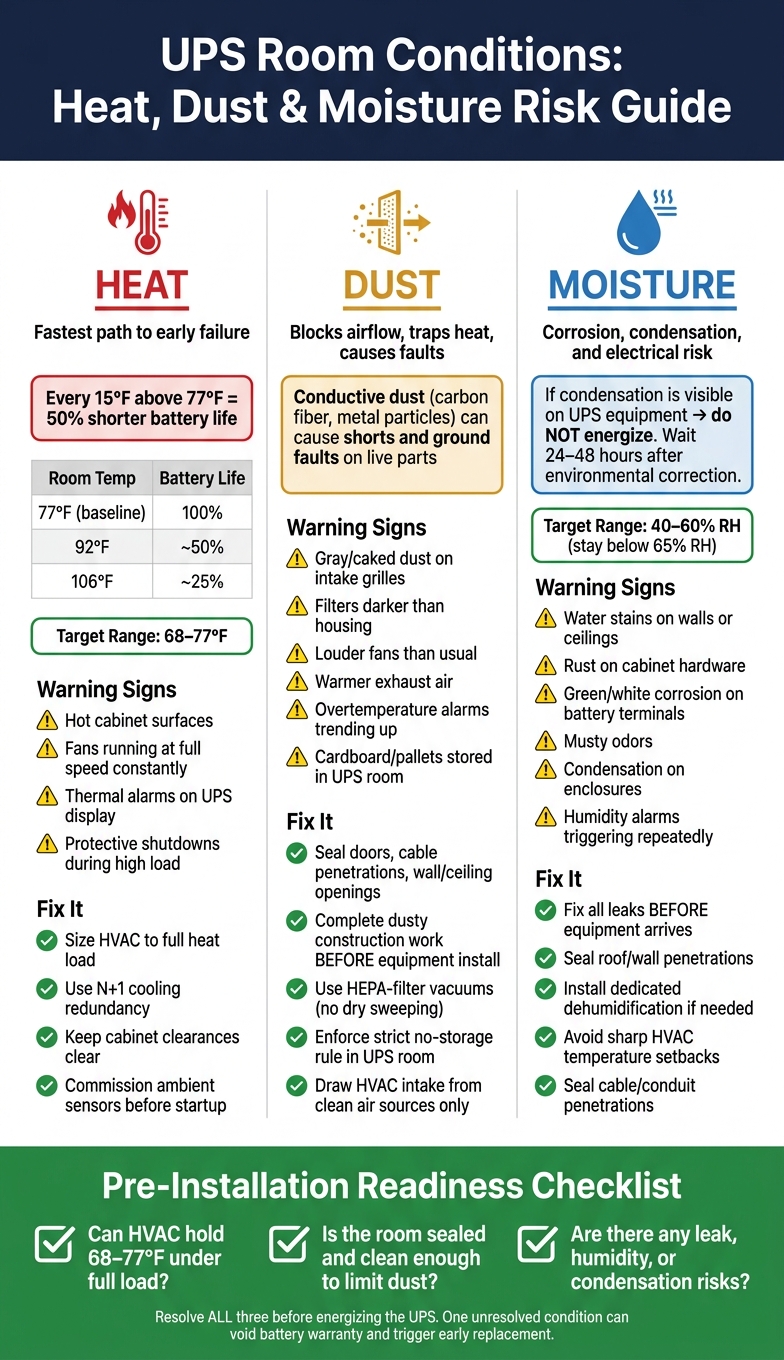
- Heat does the most damage fastest. VRLA batteries are rated at 77°F, and every 15°F above 77°F can cut battery life by 50%.
- Dust blocks airflow and traps heat. It can also lead to faults if particles settle on live parts.
- Moisture brings corrosion and condensation risk. Water leaks, high humidity, and dew point problems can lead to shorts, tracking, and startup delays.
- Most room targets are simple: keep battery spaces near 68–77°F and humidity around 40%–60% RH, with no condensation.
- Fix room problems before install, not after. One HVAC issue alone can turn into early battery replacement and unplanned costs. In one 02/2025 case, that bill went over $4,000.
If I were checking a UPS room before install, I’d focus on three things first:
- Can the HVAC hold temperature under load?
- Is the room sealed and clean enough to limit dust?
- Are there any leak, humidity, or condensation risks?
This article walks through those risks, the warning signs, and the setup checks I’d want done before the UPS goes live.
UPS Room Conditions: Heat, Dust & Moisture Risk Guide
UPS Maintenance (How to maintain a UPS battery)
sbb-itb-501186b
Heat: The Fastest Way to Shorten UPS and Battery Life
Heat is usually the first thing that sets the limit in a UPS room. In many cases, the batteries call the shots, which means room temperature has to stay inside the manufacturer's range - most often 68–77°F. That target, along with the airflow path, should be locked in before the equipment shows up.
How High Temperature Damages Batteries and Internal Components
In VRLA batteries, heat speeds up corrosion, dries out the electrolyte, and increases internal resistance. That’s the sneaky part: a battery may still pass routine tests while delivering less runtime during an actual outage.
Across many manufacturers, one rule comes up again and again: every 15°F above 77°F cuts VRLA battery life by about 50%.
| Ambient Room Temperature | Approximate VRLA Battery Life |
|---|---|
| 77°F (rated baseline) | 100% of design life |
| 92°F | ~50% of design life |
| 106°F | ~25% of design life |
Lithium-ion batteries handle heat better than VRLA, but they’re not immune to it. If they spend long periods near the top of their allowed range, service life still drops. Many manufacturers only back the full 10–12 year life within a tighter temperature band, often around 64–82°F.
Heat also wears down UPS electronics. Inverters, chargers, and capacitors all age faster when the room runs hot. Electrolytic capacitors used in DC-link circuits are a clear example: higher temperature means shorter service life. So this isn’t just a battery problem. A hot room chips away at the life of the whole UPS system.
Warning Signs of a Hot UPS Room
Some signs are easy to spot. Cabinet surfaces that feel hot, exhaust air that stays very warm, and fans running flat-out all the time usually mean the UPS is working harder than it should just to dump heat. That can lead to derating, earlier battery replacement, and less runtime when the power goes out.
Thermal alarms on the UPS display or in the building management system (BMS) are another red flag. If you see protective shutdowns - mainly during high-load periods - the UPS may be shielding itself from internal overheating.
Early VRLA failure often comes back to one basic issue: excess room heat.
How to Control Temperature and Airflow During Planning
Start by sizing HVAC around the heat load from the UPS, charger, and nearby equipment. Then lay out supply and return air so cool air gets to the intakes and hot air doesn’t loop back into the equipment.
A few basics matter here:
- Keep the manufacturer’s required cabinet clearances.
- Don’t block intake or exhaust vents with cable trays, stored items, or nearby gear.
- Use N+1 cooling in critical rooms so one HVAC failure doesn’t overheat the UPS.
Before startup, commission the ambient sensors and thermal alarms. Put calibrated sensors near UPS air intakes, confirm that HVAC can hold the target range under load, and make sure thermal alarms are tied into the BMS.
Once temperature is under control, the next room risks to check are dust and moisture.
Dust: Airflow Restriction, Contamination, and Overheating
Once room temperature is under control, dust becomes the next big airflow problem. In industrial plants, warehouses, and active construction sites, airborne particulate is common. UPS cooling fans pull that dust straight into grilles and fan intakes.
How Dust Buildup Affects UPS Cooling and Internal Reliability
After it gets inside, dust settles on heat sinks, power modules, capacitors, and circuit boards. That layer acts like a thermal insulator, trapping heat around parts that need to stay cool. At the same time, clogged filters and blocked intakes cut airflow. Fans may spin harder, but they move less air, so internal temperatures go up.
Heat isn't the only issue. Dust also creates a contamination risk. In places like steel plants, mines, aluminum factories, or sites that use carbon fiber, airborne particles can be slightly conductive. If that dust lands on live parts, it can form conductive paths that lead to shorts, ground faults, or nuisance trips. Even normal dust can turn into trouble when humidity enters the picture. Moisture-absorbing particles can form electrolyte films that weaken insulation and trigger intermittent faults that are hard to pin down.
Warning Signs of Dust-Related UPS Room Problems
The first warning sign is often right in front of you: gray or caked dust on intake grilles, fan guards, and cabinet tops shows that particulate is getting into the system. If filters look much darker than the housing, they're past due for replacement and already choking airflow. You may also notice fans getting louder than usual, exhaust air feeling warmer, or overtemperature alarms starting to trend upward. Those are all signs the cooling system is under pressure from dust load.
There's also one indirect sign people miss all the time: cardboard boxes, pallets, or spare parts stored inside the UPS room. Those items shed fibrous dust and debris that clog heat sinks and block airflow around cabinets. When a UPS room turns into a storage area, the equipment inside slowly loses the clean air it needs.
Setup Controls to Keep Dust Out of the UPS Room
The best way to control dust is to deal with it during room design, not after buildup starts. Sealed or gasketed doors, closed cable penetrations, and properly sealed wall and ceiling openings help make sure air comes in only through planned, filtered paths. Where ventilation is needed, HVAC intakes should draw from clean air sources, not loading docks, production floors, or outdoor spots exposed to process exhaust.
During construction, dusty work such as cutting, grinding, and drywall finishing should be finished before UPS equipment is installed. Temporary covers should stay over grilles and cabinet openings until major dust-producing work is done. Once the room is in use, a strict no-storage rule and a set cleaning schedule help keep dust from piling up. Use HEPA-filter vacuums on floors and horizontal surfaces instead of dry sweeping, which just throws dust back into the air. Next, moisture brings corrosion and condensation risks.
Moisture: Corrosion, Condensation, and Electrical Risk
Moisture can damage UPS equipment long before any fault shows up. The trouble often starts at cabinets, wall penetrations, and floor penetrations.
How Humidity and Condensation Harm UPS Equipment
Moisture harms UPS equipment in two main ways. First, liquid water from roof leaks, pipe leaks, sprinkler discharge, floor washdowns, or groundwater intrusion can trigger immediate short circuits and ground faults. Second, high humidity and condensation can corrode battery terminals and bus connections, wear down insulation, and leave conductive films that create fault paths on bus supports and circuit boards.
Condensation is a big risk because it forms when equipment surfaces fall below the room’s dew point. That often happens after HVAC changes or sharp temperature swings. The room should stay within the manufacturer’s non-condensing humidity range. When moisture collects on terminals or circuit boards, insulation resistance drops, leakage current goes up, and surface tracking can start. That’s when a conductive film spreads across insulating surfaces and creates a fault path.
Eaton reports that if dew point temperatures are approached or visible condensation is observed on UPS equipment, startup and commissioning should not proceed; 24–48 hours of drying time and environmental correction are advised before energizing.
Warning Signs of Moisture Exposure
If moisture has already made its way into the room, the signs are often easy to spot once you know where to look. Watch for water stains on walls or ceilings, damp or slick floors, visible drips, rust on cabinet hardware, visible condensation on enclosures, and green or white corrosion on battery terminals or bus connections. Warped labels, musty odors, and staining around cable penetrations or wall openings also point to moisture that has been around for some time.
Nearby drains, roof penetrations, plumbing, or exterior walls can hint at a repeat moisture problem. If the room has environmental monitoring, humidity alarms or repeated environmental alerts should be treated as early warnings, not background noise.
Controls for Leak Prevention and Humidity Management
The best move is to keep the UPS room away from roof drains, domestic water lines, chilled-water piping, and washdown areas. If the room location can’t change, fix known roof or pipe leaks before the equipment arrives. It’s much harder to deal with water problems once the gear is installed and energized.
Seal roof and wall penetrations, check the building envelope, and plan drainage or leak containment as part of the room design. For humidity, the range most often cited for UPS and battery spaces is 40–60% RH. That stays below the 65% RH point where condensation inside enclosures becomes a concern.
If local conditions keep humidity high, a dedicated dehumidification system is a practical fix. It also helps to avoid sharp temperature setbacks that cool the room air fast enough to push equipment surfaces below the dew point. Seal cable and conduit penetrations through walls and floors so humid outside air doesn’t slip in.
Once the room is in service, inspect terminals and bus connections for discoloration or corrosion. At the same time, confirm that leak sensors and humidity alarms are working as intended. Any sign of water intrusion or unstable humidity should be fixed before installation checks begin.
Site Problems to Fix Before Installation and Key Setup Controls
Pre-Installation Room Issues That Should Not Be Ignored
Once you've identified the three main hazards, use this last check to decide if the room is actually ready for installation. Before anything goes in, make sure the space can control temperature, dust, moisture, and required clearances. A room may look fine at first glance and still hide conditions that cut battery life short, set off alarms, or lead to a fault after startup.
Heat is the first issue to deal with. If the room can't stay within 68–77°F, the batteries begin service under thermal stress. That's a bad way to start. Rooms near construction zones, loading docks, or below-grade walls also need extra attention for dust buildup and water seepage.
Commissioning Checks That Confirm the Room Is Ready
After site issues are fixed, run one last readiness check before energizing the UPS. Before the UPS is cleared for service, confirm that temperature, humidity, clearances, filters, seals, leak control, and monitoring points are all within spec and working as intended.
Here’s the quick summary of the three main hazards, what to watch for, and what to do about them:
| Condition | Warning Signs | Preventive Action |
|---|---|---|
| Heat | Rising room temperature, hot exhaust near intake, undersized HVAC | Size HVAC correctly; verify supply-and-return airflow paths; eliminate hot spots |
| Dust | Visible dust on vents or cable trays, clogged filters, fan alarms | Seal openings; clean the room before equipment arrives; install filtration |
| Moisture | Water stains, rust, condensation on enclosures, musty odors | Fix leaks before installation; control humidity within the recommended non-condensing range; seal penetrations |
This check gives operations a starting point they can measure future readings against. The commissioning review should confirm that room temperature and humidity are within range, all required clearances around the UPS and battery cabinets are in place, filters are installed and not blocked, doors and wall penetrations are sealed, no active leaks or damp surfaces are present, and environmental monitoring points - temperature sensors, humidity alarms, leak detectors - are working and tied into the site monitoring system. If even one item is still unresolved, the room isn't ready for installation.
Conclusion: Control Heat, Dust, and Moisture Before the UPS Goes Live
Room conditions shape uptime, runtime, and battery life before the UPS is ever turned on. Problems with heat, dust, or moisture are usually far less expensive to fix during planning than after batteries, fans, or power electronics have already been damaged. If the room passes these checks, the UPS can go live with less risk.
FAQs
What room temperature is too hot for a UPS?
Most standard UPS systems run in a 32°F to 104°F range. But here’s the catch: that upper end is too hot for steady, long-term use.
Once temperatures climb past 77°F to 86°F, batteries start wearing out faster, and performance begins to slip.
For the best battery life, keep the room between 68°F and 77°F. A simple rule of thumb: for every 18°F above 68°F, battery service life can be cut in half.
How often should a UPS room be checked for dust?
Check the UPS room on a routine basis for dust. If the area gets dusty, inspect the air filters and replace them when needed. Also keep vents clear so cooling keeps working as it should.
For preventive maintenance, monthly inspections are recommended. In dusty locations, that should include cleaning or replacing dust filters to stop buildup.
What humidity level is safe for a UPS room?
Keep relative humidity below 60% to slow insulation wear and reduce corrosion risk. Once humidity climbs past 60%, the risk starts to go up. And at very high humidity - around 85% RH and above - the problem gets much worse.
If your site stays humid most of the time, add moisture protection. Good options include tropicalization or conformal coating, plus sealed, properly rated enclosures. Even with those steps in place, you should still aim to stay under 60% RH.