UPS Systems in Harsh Environments: Tips
Operating a UPS system under harsh conditions? Here's what you need to know: extreme temperatures, high humidity, dust, and corrosive elements can drastically reduce performance and lifespan. For example, a 10°C (18°F) increase above 68°F can cut battery life in half, while exposure to freezing temperatures can cause batteries to lose over 50% of their runtime.
Key Takeaways:
- Temperature Control: Maintain 68°F–77°F for optimal battery life. Use industrial-grade UPS systems for extreme ranges (-22°F to 149°F).
- Humidity & Dust: High-humidity areas require conformal-coated circuit boards; dusty locations need replaceable filters.
- Proper Installation: Ensure sufficient ventilation, secure cable routing, and dedicated space for maintenance.
- Rugged Features: Choose IP65-rated enclosures for wet/outdoor areas, and lithium-ion batteries for longer life and better temperature tolerance.
- Regular Maintenance: Inspect daily, replace filters, test batteries, and schedule biannual preventive checks.
Protecting UPS systems in challenging environments starts with thorough site assessments, selecting the right equipment, and consistent upkeep. Following these steps minimizes failures, reduces downtime, and ensures safety.
UPS and Power Considerations for Harsh Environments
sbb-itb-501186b
Site Assessment Checklist Before Installation
Taking time to assess the site thoroughly before installation can help avoid costly mistakes and equipment failures. Always rely on actual measurements and observations rather than solely trusting blueprints or descriptions.
Check Environmental Conditions
Start by documenting the site's operational temperature range. Most standard UPS systems are designed to function between 32°F and 104°F (0°C to 40°C). If temperatures at the site fall outside this range, consider industrial-grade UPS units that can handle temperatures from -22°F to 149°F (-30°C to +65°C).
"A standard off-the-shelf on-line UPS having a UL or ETL Listing for operation over a 0°C to 40°C temperature range... could result in the UPS having a reduced reliability and life span, or in an outright failure [if used outside those limits]"
- Michael A. Stout, V.P. Engineering at Falcon Electric
Next, measure humidity and check for moisture. Sites with high humidity levels may require UPS units with a conformal coating (also known as tropicalization) applied to circuit boards. This coating helps maintain insulation resistance and protects against corrosion.
Inspect the area for dust, debris, or chemical vapors that could clog vents or damage internal components. In dusty environments, choose UPS units with replaceable dust filters. Be on the lookout for potential physical hazards such as vibrations from nearby machinery, direct sunlight exposure, or pests that might interfere with the equipment.
Review Location and Space Requirements
Ensure the installation site provides enough clearance for proper ventilation. Ventilation openings on the front, sides, and rear of the unit must remain unobstructed. Poor airflow can lead to overheating or even fire risks. For larger industrial systems, a dedicated temperature-controlled battery room is often necessary, ideally maintained between 68°F and 77°F (20°C to 25°C), even if the main UPS unit can tolerate a wider range.
Check that there is sufficient space for maintenance access. In cases where the UPS will be installed on a raised floor, use adjustable steel stands that align with the floor level. These stands should support the equipment's weight while allowing for proper cable management.
Finally, consider physical security and accessibility. While it's important to place the UPS in a secure location to prevent unauthorized use - such as cleaning staff plugging in vacuums - it should still be accessible enough for routine maintenance.
Once these environmental and spatial factors are confirmed, move on to address cable routing and electrical risks.
Review Cable Routing and Voltage Drop Risks
After verifying site conditions, assess cable routing and related electrical considerations. Determine cable entry points based on the UPS system size. Smaller systems typically use bottom cable entry, while larger systems often require top cable entry to accommodate thicker power cables. For bottom-entry systems, consider using cable trenches or mounting the UPS on a steel plinth to maintain proper cable bend radius. For top-entry systems, ensure overhead cable containment is in place.
Use radial wiring to connect devices, ensuring each device has its own circuit breaker. KOHLER Uninterruptible Power recommends radial wiring because:
"When connecting to the load, radial wiring, with each device having its own circuit breaker, rather than ring wiring, is recommended. This ensures that a device fault only trips the local breaker, rather than causing power loss over a wider part of the distribution network"
Conduct a site audit to check for power quality issues. Determine if additional protection is needed, such as high-voltage transient protection, lightning protection, or galvanic isolation. Verify that all earthing points are securely connected to protect personnel and equipment. Lastly, plan for an external bypass switch to allow the UPS to be isolated for maintenance without disrupting the power supply to connected devices.
UPS Selection Checklist for Harsh Conditions
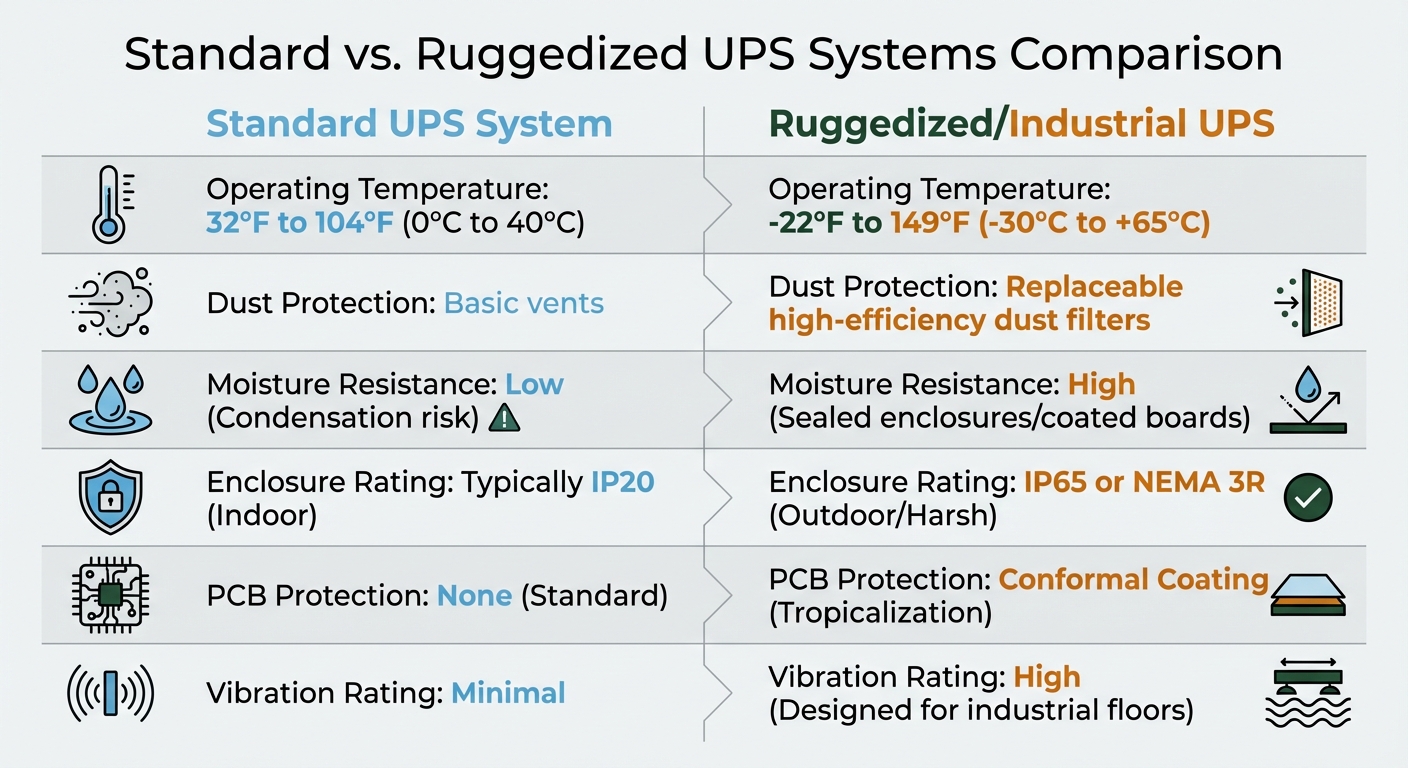
Standard vs Ruggedized UPS Systems: Operating Specifications Comparison
Select Ruggedized UPS Features
Once you've completed your site assessment, the next step is choosing UPS units designed to handle the specific challenges of your environment. The conditions you identified will determine the need for specialized features and operating ranges. For example, conformal coating - also known as tropicalization - is a must in high-humidity or coastal areas. This chemical layer protects printed circuit boards from moisture, salt spray, and corrosive particles. For wet or outdoor environments, look for UPS units with IP65 or NEMA 3R-rated enclosures, which are built to resist water.
If your location has airborne dust or particles, efficient filtration is key. Ruggedized UPS units should include replaceable high-efficiency dust filters to prevent internal clogging and overheating. For environments prone to vibrations - like manufacturing floors or mining sites - choose systems with high vibration ratings to ensure stable internal connections.
Battery type is just as important. Lithium-ion batteries are a strong choice because they last 2–3 times longer and perform better across a wider temperature range compared to standard VRLA batteries. They're also up to 40% lighter than traditional lead-acid batteries. Alternatively, pure lead or gel batteries are great options for handling extreme temperatures.
Match Operating Specifications to Site Conditions
It's essential to align UPS specifications with your site's environmental conditions. Most standard UPS systems are rated for temperatures between 32°F and 104°F (0°C to 40°C). If your site experiences more extreme temperatures, you'll need an industrial-grade UPS designed for a range of -22°F to 149°F (-30°C to +65°C).
"Installing [a standard] UPS in a building without temperature control in the summer in Phoenix would be using the UPS outside of the safety agency's product listing status."
- Michael A. Stout, V.P. Engineering, Falcon Electric
Temperature plays a significant role in battery performance and lifespan. For instance, at 86°F (30°C), batteries designed to last five years may only last 1.5 years. Similarly, at freezing temperatures (32°F or 0°C), the runtime of standard VRLA batteries can drop to less than half their normal capacity. In extreme cold, below -40°F (-40°C), the electrolyte in standard capacitors can freeze and rupture, leading to immediate or eventual failure.
If maintaining ideal battery temperatures (68°F to 77°F or 20°C to 25°C) isn't possible, consider housing the batteries in a separate, temperature-controlled room while allowing the main UPS unit to operate in the harsher environment. Another option is to use 10- or 12-year design life battery blocks, which can reduce the frequency of replacements. These considerations will help you decide between standard and ruggedized UPS systems.
Standard vs. Ruggedized UPS Systems Comparison
| Feature | Standard UPS System | Ruggedized/Industrial UPS |
|---|---|---|
| Operating Temperature | 32°F to 104°F (0°C to 40°C) | -22°F to 149°F (-30°C to +65°C) |
| Dust Protection | Basic vents | Replaceable high-efficiency dust filters |
| Moisture Resistance | Low (Condensation risk) | High (Sealed enclosures/coated boards) |
| Enclosure Rating | Typically IP20 (Indoor) | IP65 or NEMA 3R (Outdoor/Harsh) |
| PCB Protection | None (Standard) | Conformal Coating (Tropicalization) |
| Vibration Rating | Minimal | High (Designed for industrial floors) |
Installation Checklist
Provide Adequate Ventilation and Safety Measures
Make sure that the front, side, and rear ventilation openings remain unobstructed. Blocking these vents can lead to overheating, especially in challenging environments. Avoid stacking items on top of the unit, as this can trap heat and interfere with proper cooling.
For optimal performance, keep the ambient temperature for UPS electronics and batteries between 68°F and 77°F (20°C to 25°C). In harsher conditions, temperature control becomes even more critical. Here's why: every 10°C (18°F) increase above 20°C (68°F) cuts battery service life in half.
"A general rule to remember is that for every 10°C above the ambient temperature of 20°C the life of uninterruptible power supply batteries will be reduced by 50 percent."
- Kohler Uninterruptible Power
In areas prone to high heat, consider housing batteries in a dedicated, temperature-controlled room. This setup protects the most sensitive components and avoids the need to cool the entire installation space. Additionally, cooling fans in these systems typically last 5 to 7 years under normal conditions, but their lifespan can be shorter in harsher environments. To avoid downtime, plan to replace cooling fans every five years.
Once ventilation and cooling are under control, move on to securing proper cable routing.
Size and Route Cables Correctly
For smaller to medium UPS systems, use bottom cable entry for AC and battery cables. Larger systems generally require top cable entry. The choice of routing depends on cable size and the bend radius required for larger power cables.
- Bottom-entry systems: Use a cable trench or mount the UPS on a steel plinth to maintain the proper bend radius.
- Top-entry systems: Install an overhead cable containment system.
If you're working in a raised-floor computer area, mount the UPS and battery equipment on adjustable steel stands that are flush with the floor. This ensures the setup can handle the weight and accommodate cabling needs.
Before powering up, double-check all connections. Loose connections are a common cause of sparking, charring, and even fires after installation. Have a licensed electrician inspect and tighten both internal and external connections. When wiring equipment to the load, use radial wiring with individual circuit breakers for each device. This prevents a single fault from disrupting the entire network.
After verifying the cabling, direct your attention to preparing the physical space for installation.
Prepare the Installation Space
Ensure the floor is strong enough to support the heavy UPS and battery sets. These components are extremely heavy, and inadequate floor support can lead to structural damage or safety risks.
"The delivery team will expect a prepared space with a floor fit to safely bear the equipment's weight and located to minimise inconvenience to on-site personnel and business operations."
- Kohler UPS
The installation area should also be secure, dry, and free of dust. If the environment has airborne particles, choose a UPS that can accommodate retrofitted dust filters to prevent internal clogging and cooling issues. Provide enough clearance around the equipment to allow for maintenance and potential system expansion. To prevent unauthorized access, secure the area. Even something as simple as cleaning staff plugging in vacuums could lead to accidental overloading.
For harsher environments where maintaining ideal temperatures is difficult, consider creating a dedicated, temperature-controlled space specifically for batteries, as they are more heat-sensitive than UPS electronics. Finally, ensure all earthing points are properly connected to a well-designed earthing system to protect both personnel and equipment.
Maintenance Checklist
Perform Regular Visual Inspections
Take five minutes each day to walk through the system area. Look at the front panel for alarms, confirm the status LEDs are functioning properly, and make sure vents are clear of any obstructions. If you're in a harsh environment, such as near saltwater or chemicals, be extra cautious about corrosion risks caused by salt spray or contaminants.
Every month, inspect batteries and capacitors more thoroughly. Check batteries for signs of swelling, cracks, leaks, or corrosion around the terminals. For AC/DC capacitors, watch for bulging, leaks, or cracks - these could mean they're close to failing. Pay attention to unusual noises from transformers or fans, and watch for burning smells, which could indicate battery leakage. If the environment is dusty, make it a habit to check and replace air filters as needed. Keep detailed records of everything - alarm codes, environmental readings, and observations - to spot potential problems early.
After these checks, move on to thermal imaging to assess component performance.
Conduct Thermal Imaging and Component Testing
Thermal imaging and functional testing are essential for catching issues that could affect reliability. Use infrared scanning during normal load conditions to find poor connections in power supplies, diodes, capacitors, and inverter gates.
Pay special attention to the exhaust fans using your thermal camera. The back of the UPS should be the hottest spot. If a fan looks cooler than the others, it might not be working properly, which can lead to overheating and shorten battery life - especially if temperatures climb above 122°F (50°C).
Perform annual load tests to ensure input currents are balanced, modules share the load evenly, and voltage waveforms remain stable. Voltage fluctuations like sagging, swelling, or deforming beyond 8% can signal trouble. Battery testing during these checks should identify any voltage inconsistencies between cells or strings that might indicate degradation.
Once testing is complete, set up a regular maintenance schedule to keep everything running smoothly.
Schedule Regular Maintenance Checks
Since battery problems are the leading cause of UPS failures, plan preventative maintenance twice a year for critical systems, especially in harsh conditions. Each visit should include downloading and analyzing alarm and system logs, tightening battery terminal connections, and inspecting cables and distribution boards.
Replace cooling fans and capacitors every five to seven years - or sooner if the environment is particularly demanding. For VRLA batteries, use impedance testing instead of basic voltage checks. Impedance testing gives a more accurate picture of battery health and helps predict when performance is declining. Replace batteries when their capacity drops below 80% of their rated performance.
| Component | Typical Service Life | Impact of Harsh Conditions |
|---|---|---|
| VRLA Battery | 3–5 years | Battery life is cut in half for every 18°F (10°C) rise above 68°F |
| Cooling Fans | 5–7 years | Degrade faster in dusty or high-heat environments |
| AC/DC Capacitors | 5–7 years | May rupture or freeze below -40°F (-40°C) |
| Lithium-ion Battery | Up to 20 years | Needs advanced thermal monitoring |
During these maintenance visits, update firmware as needed to address any system design changes or safety concerns. In industrial settings with high temperatures, ensure battery rooms are temperature-controlled. High ambient temperatures can drastically shorten battery life if they exceed recommended levels.
Compliance and Documentation Checklist
To ensure long-term reliability in tough conditions, it's essential to follow compliance and documentation practices alongside proper installation and maintenance routines.
Verify Certifications for Harsh Environments
Check that your UPS meets IEC 62040 standards and, for harsher settings, IEC 60068 certifications (which cover tests for cold, heat, and shock). For high-risk sites, compliance with regulations like the Offshore Installations Regulation 1995 is required. Additionally, confirm that your documentation clearly specifies the UPS topology - whether it's VFI, VI, or VFD - as this classification impacts both performance and compliance.
Once certifications are verified, organize all compliance details in a systematic, accessible format.
Maintain Installation and Maintenance Records
Keep thorough records of inspections, battery metrics, operational parameters, functional tests, and ventilation checks. Include data like battery cell voltages, impedance, terminal resistance, and ambient airflow temperatures.
"Keep detailed records of all maintenance activities, battery replacements, and performance tests. This history is invaluable for predicting failures and planning replacements."
- Heavy Vehicle Inspection (HVI)
For components with limited lifespans - such as batteries, filter capacitors, cooling fans, and internal RAM batteries - track replacement dates carefully. While industrial UPS systems are designed to last 15 to 20 years, internal parts often need replacing much sooner in harsh conditions. Using digital documentation tools can simplify this process by providing real-time maintenance alerts and creating detailed records for audits. Always keep system diagrams, schematics, and emergency procedures alongside your maintenance logs.
Proper documentation is only part of the equation; training and safety are equally important.
Ensure Proper Training and PPE Usage
Have licensed electricians handle UPS installations and provide operators and contractors with up-to-date training on OEM procedures. This is particularly important in harsh environments, where components may wear out faster and outdated practices can lead to failures.
"Information prescribed in some original equipment manufacturer's (OEM's) standard operating and maintenance instructions... may not be adequate to ensure the continued safe and reliable operation for the intended design life."
Train your team in safe manual handling techniques, as UPS units and batteries can be quite heavy. Always lift with your legs, not your back. For smaller plug-and-play models, have a second person double-check the installation to confirm secure connections and reduce risks like sparking or fires. Lastly, ensure maintenance teams are using the most recent OEM instructions, as outdated guidance has been linked to issues like localized fires and unexpected shutdowns in industrial systems.
Conclusion
Operating a UPS in tough environments requires careful site evaluation, thoughtful equipment selection, proper installation, and consistent maintenance. The checklists provided cover everything from assessing the environment to selecting, installing, and maintaining the UPS, helping to prevent costly system failures.
"While not ideal, UPS systems can be used in harsh environments as long as it is well planned and thought out."
- Daniel Taylor, UPS Systems plc
Managing temperature is especially important. For example, every 18°F rise above 68°F can cut battery life in half. At 86°F, a battery rated for five years might only last 1.5 years. To combat this, consider placing batteries in climate-controlled rooms or opting for lithium-ion batteries, which last 2–3 times longer and help lower both downtime and replacement costs.
From initial site assessments to regular thermal and component inspections, these steps are designed to minimize failures that could halt production or jeopardize safety systems. In high-risk facilities, UPS failures have even caused toxic releases during plant restarts. Remote monitoring tools add another layer of protection, offering early warnings of overheating or component degradation, turning potential emergencies into manageable maintenance tasks.
FAQs
When do I need an industrial-grade UPS instead of a standard one?
When the environment presents tough conditions, like extreme temperatures ranging from -22°F to 149°F, high humidity, dust, or outdoor exposure without climate control, an industrial-grade UPS is the go-to solution. These systems are engineered to deliver dependable performance in critical applications, even in the harshest settings. Built to last, they adhere to strict safety standards and are designed to function over the long haul with minimal upkeep.
What enclosure rating should I choose for outdoor or washdown areas?
When dealing with outdoor or washdown areas, it's important to select enclosures with at least an IP66 rating. This ensures they can withstand strong water jets. For even greater protection, opt for enclosures rated IP67, which are designed to handle temporary immersion in water. Another excellent choice is NEMA Type 4X enclosures. These are built to endure harsh outdoor conditions, providing resistance to rain, dust, and corrosion. Both options are designed to deliver long-lasting performance in tough environments.
How can I monitor battery health without taking the UPS offline?
To keep tabs on your battery's health without powering down the UPS, you can rely on continuous battery monitoring. This process involves tracking key indicators like individual cell voltages, voltage drops across cables, and AC ripple using specialized battery analyzers. By catching potential problems early, these techniques can help you address issues proactively and make your batteries last longer.