UPS Battery Lifecycle: Maintenance to Recycling
A UPS battery can look fine and still fail when you need it. In most sites, the fix is simple: keep batteries near 77°F (25°C), test them on a set schedule, plan replacement before capacity drops below 80%, and document removal and recycling the right way.
If I had to boil the article down, it comes to this:
- Heat cuts battery life fast. For many VRLA batteries, every 15°F (8.3°C) above 77°F can cut service life by 50%.
- Battery type sets the timeline. VRLA often lasts 3–5 years. Lithium-ion often lasts 8–12 years.
- Testing matters more than status lights. A UPS can show normal while runtime has already dropped too far.
- One weak battery can drag down the whole string.
- Replacement should be planned, not rushed. Watch for capacity under 80%, impedance at 130%–150% of baseline, repeat alarms, swelling, leaks, or hot spots.
- Removal and recycling need records. Tape terminals, separate chemistries, use the right shipping path, and keep pickup records, manifests, and recycling certificates.
Here’s the short version of the lifecycle:
- Install and log the battery
- Control room temperature and charging
- Inspect, test, and trend results
- Plan replacement before runtime becomes risky
- Remove, stage, ship, and recycle with paperwork
A quick side-by-side view helps:
| Battery type | Common life range | Main watchouts | Common maintenance focus |
|---|---|---|---|
| VRLA | 3–5 years | Heat, float voltage drift, deep discharge | Visual checks, torque checks, impedance and load testing |
| Flooded lead-acid | Varies by system | Electrolyte level, venting, corrosion | Fluid checks, physical inspection, electrical testing |
| Lithium-ion | 8–12 years | BMS alarms, temperature, shipping rules at end of life | BMS review, alarm review, temperature tracking |
The main point: if I track temperature, charging, test data, and end-of-life signs from day one, I lower outage risk, cut surprise repair costs, and make recycling much easier to handle.
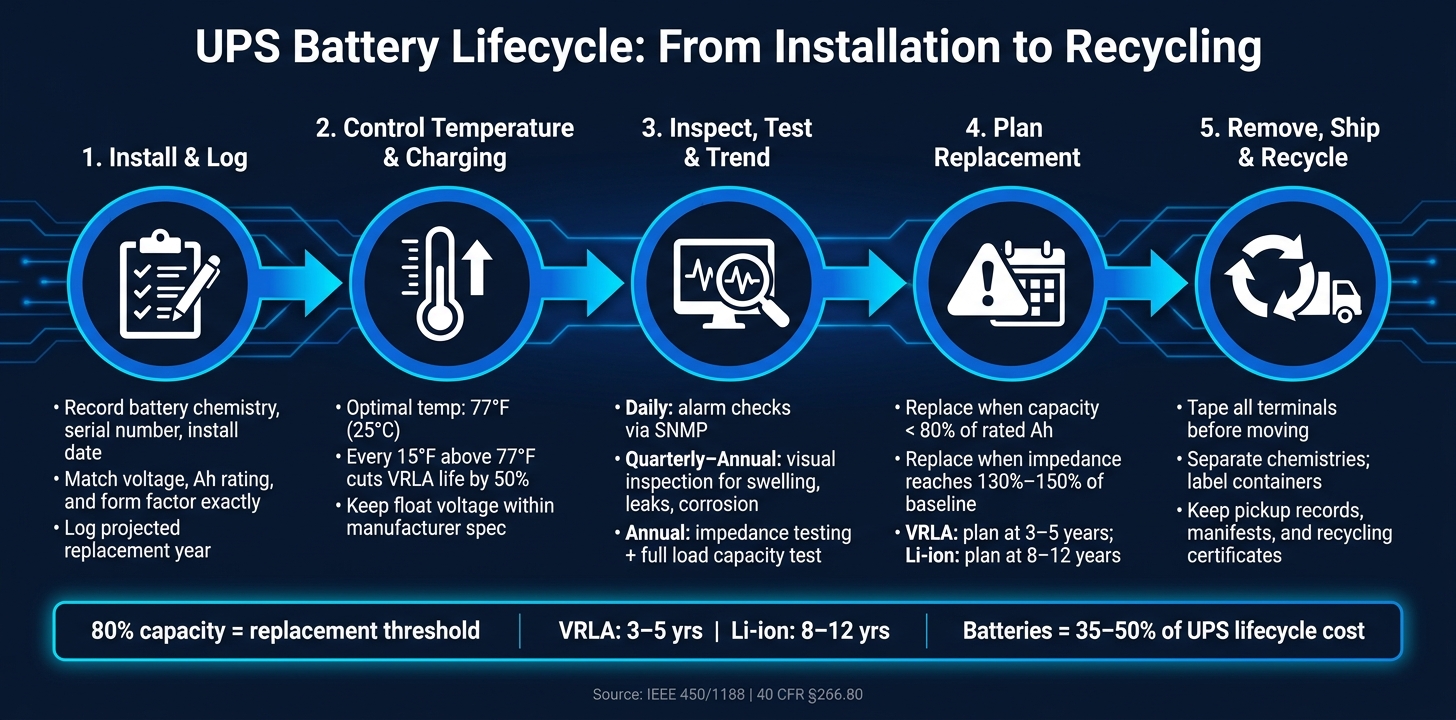
UPS Battery Lifecycle: From Installation to Recycling
Maximizing UPS Battery Lifespan Accurate Checks #upsbattery #batterycapacity #batterylife
sbb-itb-501186b
UPS Battery Fundamentals That Affect Service Life
UPS battery life comes down to a handful of factors: temperature, charging, depth of discharge, load, and how the battery string is set up.
A good rule is to plan replacement when capacity drops to 80% of rated ampere-hours. After that point, wear tends to speed up.
Temperature, Charging, and Depth of Discharge
VRLA batteries are rated at 77°F (25°C), and heat is one of the biggest reasons they wear out sooner. For every 8.3°C (15°F) above 25°C (77°F), service life falls by 50%.
That has a direct effect on maintenance timing and replacement planning. The table below shows how ambient temperature changes expected VRLA lifespan:
| Ambient Temperature | Expected VRLA Lifespan | Assessment |
|---|---|---|
| 68–77°F (20–25°C) | 4–5 years | Optimal - air-conditioned room |
| 86°F (30°C) | 3–4 years | Acceptable |
| 95°F (35°C) | 2–3 years | Critical - shorten maintenance interval |
| 104°F (40°C) | 1.5–2 years | Critical - annual testing required |
Source:
In plain terms, warmer rooms mean shorter battery life and more frequent testing.
Charging matters just as much. Float voltage needs to stay within spec. If it's too high, the battery gets damaged. If it's too low, sulfation can set in. Advanced charging profiles can extend VRLA life compared with constant float.
Depth of discharge also plays a big part. VRLA batteries aren't built for repeated deep discharges, and capacity can fall fast when that happens again and again. If a facility sees more than 10–20 major discharge events per year, cycle wear may drive replacement sooner than calendar age.
String Configuration, Runtime Demand, and Compatibility
A battery string is only as strong as its weakest unit. In practice, one weak battery can drag down the whole UPS.
Load affects runtime in a simple way: less load means more runtime, and more load means less. Cut the connected load by 50%, and available runtime can triple.
When it's time to replace batteries, the match has to be exact. Voltage, amp-hour rating, and form factor all need to line up. If they don't, the result can be undercharging or overcharging.
These are the main drivers that shape what maintenance teams should check next.
Maintenance and Performance Monitoring
Knowing what wears down a UPS battery is only half the battle. The other half is doing the work: checking the system on a set schedule, testing it, and keeping records before one weak cell turns into a failed battery string. That’s how heat, charging drift, and weak cells become things you can track and fix instead of nasty surprises.
Preventive Maintenance Tasks by Battery Type
The right routine depends on the battery chemistry in your system.
VRLA batteries need physical inspections on a quarterly to annual schedule. During each visit, check for swollen or bulging cases, any sign of electrolyte leakage, terminal corrosion, and dust inside the cabinet. Loose connections are one of the main causes of heat buildup and early failure, so terminal link torque checks should be part of every scheduled visit. Keep cabinet airflow open, and record cabinet temperature each time.
Sealed batteries still need routine checks; "maintenance-free" only means no fluid top-off.
Flooded lead-acid (wet-cell) batteries add one more job: checking and refilling electrolyte levels. These larger systems need electrolyte checks and top-offs.
With lithium-ion batteries, most of the inspection work moves from the cabinet to the BMS. These batteries depend on an integrated Battery Management System (BMS) to track cell health and flag faults. Physical checks are less common, but BMS alarms and temperature data still need routine review.
Electrical Testing, Alarms, and Trend Tracking
Visual inspections usually catch problems late. Electrical testing gives you an earlier warning.
Float voltage should be checked against the manufacturer’s specs at every maintenance visit. If voltage drifts too high, the risk of thermal runaway goes up. Another key test is internal impedance testing, which helps spot weak cells before they fail under load.
An annual capacity test under load completes the testing program. It shows whether the battery can still deliver its rated runtime in actual operating conditions. Use that annual test to confirm runtime still matches the load.
Between scheduled visits, SNMP monitoring cards like the APC AP9641 or Vertiv RDU101 can flag higher temperatures or voltage issues in real time. That gives teams time to act before an outage hits.
The table below sums up the core testing schedule:
| Task | Frequency | Method |
|---|---|---|
| Alarm check | Daily / Automatic | LCD display or SNMP monitoring |
| UPS self-test | Weekly / Automatic | Internal UPS software trigger |
| Load & runtime review | Monthly | Manual review of connected load |
| Visual inspection | Quarterly to Annual | Check for swelling, leaks, corrosion, loose terminals |
| Impedance testing | Annual | IEEE 450/1188 electrical testing |
| Capacity test under load | Annual | Discharge test under load |
| Post-replacement UPS recalibration | After each replacement | Full charge/discharge cycle |
Maintenance Records That Support Audits and Budgeting
Good records shift you from reactive maintenance to planned maintenance. They also back up warranty claims and help with compliance audits.
Each battery asset should have a log with the asset location, UPS model, battery chemistry, installation date, serial numbers, all test dates and readings, alarm history, and a projected replacement year. Environmental data matters too. Ambient temperature and cell temperature trends should sit alongside electrical readings, because temperature history has a direct effect on remaining service life estimates.
Battery costs often account for 35% to 50% of long-term UPS lifecycle cost, so tracking labor, disposal fees, and replacement intervals helps with budget forecasting.
Complete records also support EPA compliance. Certificates of recycling and hazardous-waste manifests should stay on file, and in states like Texas, registered recyclers must report disposal volumes to the TCEQ. Keeping those reports tied to your asset log makes it much easier to show compliance if an auditor asks.
When impedance rises or capacity drops, the next move is replacement planning.
Replacement Planning and End-of-Life Decisions
When test data starts moving in the wrong direction, it’s time to stop just watching and start planning for replacement.
Signs a UPS Battery Is Nearing End of Useful Life
A UPS battery shifts from routine monitoring into replacement planning when the warning signs keep stacking up. If impedance climbs, capacity drops, or alarms keep coming back, the battery is no longer in the “wait and see” stage.
Replace a UPS battery when impedance reaches 130%–150% of baseline, capacity falls below 80%, runtime no longer meets the required minutes, or alarms continue. Swelling, corrosion, leaks, and thermal hot spots also point to end of life. For VRLA batteries, plan for replacement at 3–5 years, or earlier if the battery sees 10–20 major discharges per year.
Spot Replacement vs. Full String Replacement
Once replacement is on the table, the next call is simple in theory but tricky in practice: replace one battery or the whole string.
Spot replacement may look cheaper at first. But in many cases, it throws the string out of balance. A new battery paired with older ones can end up as a weak link instead of a fix.
Spot replacement makes sense only when the rest of the string has recent healthy test data and the batteries are still uniform. In most other situations, full string replacement is the safer long-term choice.
| Factor | Spot Replacement | Full String Replacement |
|---|---|---|
| Use when | Healthy, uniform string with recent test data | Aging strings or broader reliability concerns |
| Effect on reliability | Leaves older batteries in service | Restores string uniformity |
| Upfront cost | Lower | Higher |
| Long-term risk | Higher chance of repeat service calls | Lower chance of repeat service calls |
Coordinating Procurement and System Refreshes
Replacement timing shouldn’t happen in a vacuum. It needs to line up with procurement schedules and outage windows.
Battery replacement often overlaps with other infrastructure work, such as UPS units, PDUs, switchgear, backup generators, and cooling systems. Grouping this work into one outage window can cut repeat labor and reduce disruption to operations.
Before ordering, match voltage, capacity, chemistry, and form factor exactly. Also confirm that the charger supports the selected Ah rating. Lead times matter too, especially for larger VRLA or lithium-ion battery banks, so procurement needs to be part of the project schedule well ahead of the planned outage window.
Safe Removal, Recycling, and Final Takeaways
Safe Handling and On-Site Staging Before Shipment
Once replacement is on the calendar, remove the retired string as the last controlled step in the battery lifecycle. Start by confirming the battery chemistry. VRLA, flooded lead-acid, and lithium-ion units each need different handling. Apply LOTO, then verify zero voltage before disconnecting any cables.
Terminal protection is non-negotiable. Tape every terminal with insulating tape before moving batteries off the rack. That simple step helps stop shorts and arcing during handling. If a lead-acid battery is leaking, put on nitrile gloves, neutralize the acid with a baking soda-and-water solution, and place the battery in a sealed bag or rigid container with absorbent material. For lithium-ion batteries, stage them at the carrier’s required shipping-state charge before shipment.
After disconnection, the focus shifts to staging. Store batteries in a cool, dry, ventilated area in rigid, leak-proof, dedicated containers. Don’t mix chemistries on the same pallet. Label each container with the battery chemistry, hazard status, and shipment paperwork.
U.S. Recycling Paths and Compliance Records
After staging, send batteries through the right recycling path.
Lead-acid batteries have a well-known recycling route. Many are excluded from full RCRA hazardous waste rules when delivered to a secondary lead smelter or certified reclamation facility under 40 CFR §266.80. Many retail locations take them at no charge, and in larger volumes they may even carry scrap value.
Lithium-ion batteries are often handled as hazardous waste at end of life. If a lithium-ion pack is damaged, transport rules get stricter. That’s why it makes sense to use a certified recycler with R2v3 or e-Stewards credentials.
| Factor | Lead-Acid (VRLA/Flooded) | Lithium-Ion |
|---|---|---|
| Regulatory path | Often excluded from full RCRA rules when reclaimed under 40 CFR §266.80 | Often hazardous waste; may qualify as Universal Waste in some states |
| Pre-shipment prep | Neutralize leaked acid with baking soda | Discharge to carrier's required shipping state |
| Typical recycling cost | Usually free; may generate scrap value | Varies by recycler |
| Required documentation | Pickup records and Certificate of Recycling | Uniform Hazardous Waste Manifest (EPA Form 8700-22) |
For compliance tracking, keep a full chain of custody. That includes pickup records, notes on battery type and quantity, and Certificates of Recycling. If the shipment falls under full hazardous waste rules, use a Uniform Hazardous Waste Manifest (EPA Form 8700-22). State rules can be tighter than the federal baseline. California and New York are two clear examples, so check local rules before scheduling pickup.
"Recycling activities are documented to support audits, compliance reporting, and asset tracking." - EOLA Power
Conclusion: Core Steps for Managing UPS Batteries from Maintenance to Recycling
Once removal and recycling are done, the lifecycle isn’t fully closed until the records are filed and the replacements are tracked. The process follows a clear path: keep batteries within temperature and charging specs, monitor and test them on a steady schedule, replace them before runtime turns unreliable, and finish with documented, compliant recycling.
Each step supports the next. Good maintenance data makes replacement calls easier. Clean replacement records make recycling and audits much simpler.
For larger infrastructure refreshes, Electrical Trader offers a marketplace for sourcing new and used electrical components and power distribution equipment.
FAQs
How do I know if my UPS battery is failing?
Watch for reduced runtime during outages, frequent battery alerts, persistent alarms, or constant beeping.
Check the battery every 3 to 6 months for swelling, leaks, or corrosion on the terminals. If it feels hotter than usual or starts making odd noises, that's often a sign it's wearing out. And if the battery is 3 to 5 years old or older, it may be time to replace it.
Should I replace one battery or the whole string?
Replace the entire battery string, not just a single battery. These batteries work as one connected set, so one weak cell or unit can drag down the whole backup system.
If you swap out only one battery, you can set off a domino effect. The older batteries may wear out sooner, which can hit system reliability and increase the risk of unplanned downtime. For the best results, replace the full set when it reaches the end of its service life.
What paperwork is needed for UPS battery recycling?
Keep clear records to help with regulatory compliance and cut legal risk. At the bare minimum, save a Certificate of Recycling. It serves as proof that the batteries were disposed of the right way, which matters during audits and for sustainability reporting.
If a third party handles the removal and recycling, the certificate should include the contractor’s name and address, the battery type and quantity, the removal and disposal dates, and the EPA-certified recycling facility.
For shipping, document the battery type and quantity, include the MSDS if required, and label boxes clearly.