How to Size UPS for Critical Infrastructure
When power fails, your infrastructure must stay online. Correctly sizing a UPS (Uninterruptible Power Supply) ensures your critical systems - like hospital equipment, data centers, or industrial machinery - are protected without wasting energy or resources. Here's what you need to know:
- Identify Critical Loads: List equipment that must stay powered during outages. Focus on essential devices like servers, life-support systems, or industrial control panels.
- Calculate Power Needs: Determine total power requirements in Watts (W) and Volt-Amperes (VA). Factor in the power factor (PF) and avoid relying on overestimated nameplate ratings.
- Plan for Growth and Inrush Currents: Add 15–25% capacity for future expansion and startup surges (inrush currents).
- Decide on Runtime: Choose battery runtime based on backup generator start times or operational needs (e.g., 10–30 minutes for most setups).
- Select UPS Type: Match the UPS topology (Standby, Line-Interactive, or Online Double-Conversion) to your equipment sensitivity and power stability needs.
- Account for Redundancy: Use configurations like N+1 to ensure uninterrupted power during failures.
Key Takeaway: Proper UPS sizing avoids overloads, reduces energy waste, and ensures reliability. Aim for 80–90% utilization for efficiency and plan ahead for growth. Keep reading for detailed steps and expert tips.
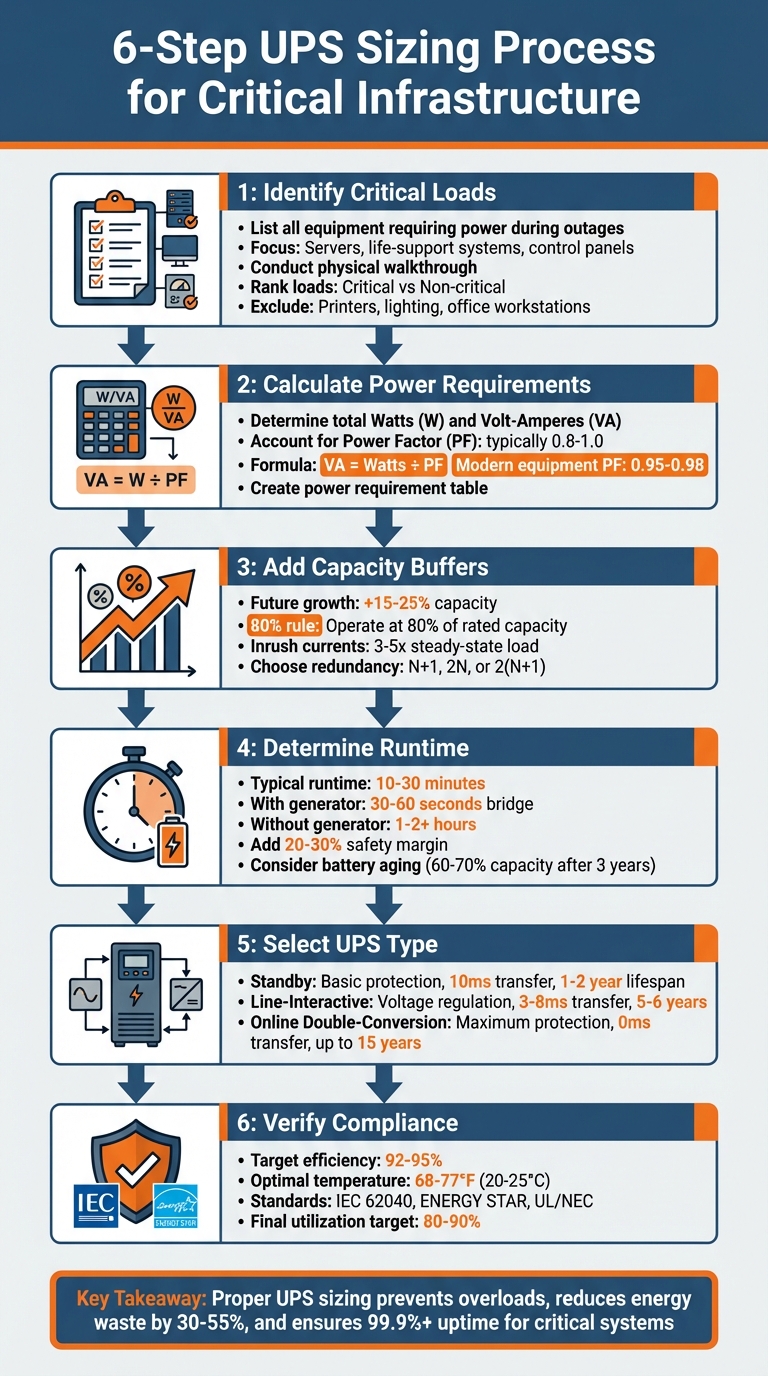
6-Step UPS Sizing Process for Critical Infrastructure
UPS and Battery size calculation | UPS Redundancy
sbb-itb-501186b
Step 1: Identify Critical Loads
Start by pinpointing the equipment that absolutely must stay functional during power outages. These "critical loads" are systems where failure can cause immediate problems - like data loss, equipment damage, safety risks, or operational downtime. The challenge is figuring out what’s essential and what can afford to go offline.
List Equipment and Power Specifications
Conduct a physical walkthrough of your facility and note each device's voltage (V), amperage (A), and power factor (PF). Don’t rely solely on digital inventories - peripherals like monitors, network cards, and external storage devices are often missed. You can usually find this information on the nameplate label located on the back or underside of the equipment.
For specific environments, focus on the following:
- Data centers: Servers and network infrastructure.
- Industrial facilities: PLCs, HMIs, and control panels.
- Healthcare: Life-support and diagnostic systems.
Also, pay attention to devices with fluctuating power demands, like motors, compressors, and laser printers. These can draw 15–20 times their normal current during startup. Keep in mind that manufacturers often overestimate power consumption by about 20% to ensure sufficient supply, so actual usage might be lower than stated. Once you’ve gathered all this data, you’ll have a clear picture of your facility’s power needs.
Rank Loads by Criticality
With your inventory complete, the next step is to rank equipment based on its importance. Divide your list into "Critical" and "Non-critical" categories to avoid oversizing your system. Critical loads are those that absolutely must remain powered, while non-critical ones can safely go offline without disrupting essential operations.
For example, exclude items like laser printers, general lighting, office workstations, and breakroom appliances from your UPS circuit. Including these non-essential devices not only inflates costs but also reduces battery runtime for critical systems. Worse, they can cause inrush-related overloads, forcing the UPS into bypass mode. By focusing on what truly matters, you’ll ensure your UPS system operates efficiently and protects the equipment that’s most important.
Step 2: Calculate Total Power Requirements
Once you've pinpointed your critical loads, the next step is figuring out how much power your UPS needs to supply. This isn't as straightforward as just adding up the wattage - understanding the difference between Watts (W) and Volt-Amperes (VA) is key to getting it right.
Watts measure the "real" or active power your equipment consumes to perform tasks like running processors, powering displays, or spinning drives. Volt-Amperes (VA), on the other hand, represent "apparent" power - essentially, the product of voltage and current in your circuit. While Watts reflect the energy you pay for, VA shows what your wiring and UPS need to handle.
Every UPS has two limits: a kW rating and a kVA rating. If either is exceeded, the UPS will fail. As Robert McFarlane from Shen Milsom & Wilke LLC explains:
"Neither the kW nor the kVA capacity of the UPS can be exceeded or the unit will fail and you won't have power."
For instance, a UPS rated at 1,000 VA might only support 600 W. Trying to run a 900 W server on this UPS would overload it, even though the VA rating appears sufficient.
Understanding Power Factor
The relationship between Watts and VA depends on the power factor (PF), which is the ratio of Watts to VA. A PF of 1.0 means Watts and VA are equal. Most modern IT equipment operates with a PF between 0.95 and 0.98, while older equipment and legacy UPS systems often have much lower PF values, around 0.7 or 0.8.
For example, a legacy UPS rated at 100 kVA with a PF of 0.8 can only handle 80 kW of actual load. In contrast, a modern UPS with a 1.0 PF can fully support 100 kW at the same kVA rating.
"The actual power formula for AC circuits is watts = volts x amps x power factor." - Robert McFarlane, Shen Milsom & Wilke LLC
To convert between Watts and VA, use the formula:
VA = Watts ÷ PF or Watts = VA × PF.
If the PF isn't specified, assume a default value of 0.8. Keep in mind that nameplate ratings often overestimate real-world consumption by about 20%, so your actual load may be lower than your initial calculations.
Build a Power Requirement Table
To get a clear overview of your total power needs, create a table or spreadsheet listing each piece of critical equipment along with its voltage, amperage, power factor, and calculated VA. This will help you determine your total load in both Watts and VA.
Here’s an example for typical data center equipment:
| Equipment Type | Voltage (V) | Amperage (A) | Power Factor | Apparent Power (VA) | Active Power (W) |
|---|---|---|---|---|---|
| Blade Server | 230 | 2.0 | 1.0 | 460 | 460 |
| Standard IT Server | 230 | 1.5 | 0.95 | 345 | 328 |
| Networking Switch | 230 | 0.5 | 0.90 | 115 | 104 |
| Storage Array | 230 | 3.0 | 0.98 | 690 | 676 |
For three-phase loads, calculate apparent power as S = (V₁×I₁) + (V₂×I₂) + (V₃×I₃), ensuring no single phase exceeds one-third of the UPS's total capacity.
Once you've totaled the Watts and VA across all equipment, you'll have the baseline numbers needed to choose your UPS. The next step will involve factoring in growth, inrush currents, and redundancy to finalize the capacity requirements.
Step 3: Add Capacity for Growth, Inrush Currents, and Redundancy
Once you've established your baseline load, it's time to adjust for future needs. This includes planning for growth, handling startup surges, and building redundancy into your system.
Plan for Future Expansion
Think ahead - plan for at least 5 to 10 years of growth. A common industry guideline is to assume 15% growth over five years. For example, if your current load is 50,000 VA, multiplying it by 1.15 gives you 57,500 VA.
Another key principle is the 80% rule, which suggests operating a UPS at around 80% of its rated capacity. This leaves room for peak loads and immediate expansion without risking overload. Using this rule, if your calculated load (including growth) is 57,500 VA, you'd need a UPS rated for at least 71,875 VA (57,500 ÷ 0.80). Michael Ruhe, Product Manager at Mitsubishi Electric Critical Power Solutions, recommends going even further, multiplying the total by 1.2 to 1.25 for extra headroom.
However, don't go overboard. David Wang, P.E., a Power Systems Engineer at CalcPanel, warns:
"20-25% margin is typical. Do not add 50% or more for data center; it leads to oversizing, higher cost, and possibly worse part-load efficiency".
To avoid oversizing from the start, modular UPS systems can be a smart choice. These allow you to add capacity incrementally - such as 5 kVA modules - based on actual demand.
Account for Inrush Currents
Power usage isn't always steady, especially at startup. Inrush current refers to the brief surge of power when equipment powers on. For instance, desktop computers may pull 10–20 amps during startup, even though they only require 2–5 amps during regular operation. Similarly, laser printers and motors without soft-start circuits can draw 15–20 times their normal current.
If inrush currents aren't considered, your UPS might trip to bypass mode or even shut down, despite being correctly sized for steady-state loads. In many cases, inrush current can spike to 3–5 times the steady-state load. For equipment prone to high startup surges, it's wise to add a buffer of 1.25 to 1.5 times the steady-state VA and use staggered startups to reduce strain.
Once you've accounted for growth and inrush demand, the next step is to determine the redundancy configuration needed to maintain power continuity during a UPS failure.
Choose a Redundancy Configuration
Redundancy is all about ensuring your system keeps running even if a UPS unit fails. The term 'N' represents the minimum number of units required to support your total load. Adding redundancy means building extra capacity beyond this minimum.
- N+1 redundancy is the go-to configuration for critical setups. It adds one extra unit, so even if one fails, the remaining units can handle the load.
- 2N (distributed redundancy) takes it a step further, with two completely independent power paths, each capable of supporting 100% of the load. While this removes single points of failure, it also comes with higher costs.
- 2(N+1) combines dual paths with redundant units in each path. This approach is the most reliable but also the most expensive, typically reserved for facilities where downtime is simply not an option.
| Configuration | Reliability | Cost | Best Use Case |
|---|---|---|---|
| N (Capacity) | Low (No redundancy) | Lowest | Non-critical loads where downtime is acceptable |
| N+1 (Parallel) | Medium | Moderate | Small to medium data centers with budget constraints |
| 2N (Distributed) | High | High | Large data centers requiring high availability |
| 2(N+1) (System+System) | Highest | Highest | Mission-critical infrastructure with zero downtime requirements |
For parallel redundant setups, ensure all UPS units are identical in model, capacity, and manufacturer to ensure proper load sharing. Modular UPS designs can also simplify maintenance by allowing hot-swappable modules, which reduce downtime and Mean Time to Repair (MTTR).
Step 4: Determine Runtime and Battery Sizing
Once you've tackled capacity and redundancy planning, it's time to ensure your UPS can operate long enough during outages. This involves figuring out the runtime needed, which directly impacts your battery sizing. Getting this wrong could lead to overspending or, worse, system failures.
Define Runtime Requirements
The amount of runtime you need depends on your backup strategy. For instance, if you have a standby generator that powers up within 30 to 60 seconds, your batteries only need to cover that short gap - typically 10 to 30 minutes. On the other hand, if your facility relies entirely on battery power, like remote telecom stations, you might need 1 to 2 hours or more of runtime.
Keep in mind, the relationship between load and runtime isn’t straightforward. Doubling the load doesn’t just halve the runtime - it reduces it even more due to battery discharge characteristics and internal inefficiencies [28, 30].
To estimate runtime in minutes, use this formula:
(Battery Ah × Battery Voltage × Efficiency) ÷ (Load kW × 16.67).
For example, with a 100 Ah battery bank at 48V and 90% efficiency under a 2 kW load, the runtime would be:
(100 × 48 × 0.90) ÷ (2 × 16.67) = 129 minutes.
Always add a 20%–30% safety margin to account for factors like battery aging, temperature changes, and unexpected load increases [28, 29]. Remember, a battery that’s three years old might only deliver 60% to 70% of its original capacity.
Once you’ve nailed down your runtime, you can calculate the exact battery capacity you’ll need.
Select Battery Capacity
Battery capacity depends on your load, desired runtime, and environmental conditions. Use this formula to determine the required capacity:
(Load Watts × Backup Time in Hours) ÷ (Battery Voltage × Efficiency).
For example, if you need 2 hours of backup for a 2,000-watt load on a 48V system at 90% efficiency:
(2,000 × 2) ÷ (48 × 0.90) = 92.6 Ah.
It’s wise to round up to the next standard size, like a 100 Ah battery.
Batteries perform best in temperatures between 68°F and 77°F (20°C–25°C) [28, 29]. High temperatures can speed up degradation, while colder conditions may reduce capacity. Valve-Regulated Lead-Acid (VRLA) batteries are a popular choice because they’re affordable and dependable, though they usually need replacing every 3 to 5 years [23, 28]. Lithium-Ion batteries, while pricier upfront, offer longer lifespans, quicker recharge times, and a smaller footprint [28, 32]. For extreme temperatures, Nickel-Cadmium batteries might be a better fit, though they’re less common due to their higher cost and environmental concerns.
Also, keep in mind that recharging a fully discharged battery can add up to 20% to the UPS load. Smaller systems may reach 90% charge within 4 hours, but larger setups with extended runtimes could take over 12 hours. Plan for this if your location faces frequent or lengthy outages.
Step 5: Select UPS Topology and Capacity
Once you’ve figured out your runtime and battery needs, the next step is choosing a UPS topology that fits your calculated load. Picking the wrong one could either leave your equipment exposed to power issues or lead to unnecessary spending on features you don’t need.
Compare UPS Topologies
Standby (Offline) UPS is a basic and budget-friendly option that protects against outages, surges, and voltage sags. When a problem occurs, it switches to battery power with a transfer time of about 10 milliseconds and produces a simulated sine wave. This makes it a good choice for less sensitive devices like monitors, modems, and routers. These units usually last 1–2 years and are commonly used in home offices or point-of-sale setups.
Line-Interactive UPS is a popular choice for distributed IT environments. It actively adjusts voltage by either boosting or reducing utility power without needing to switch to battery, which helps extend battery life. With a transfer time of 3–8 milliseconds, it’s well-suited for devices like servers, network switches, and storage systems.
"Because some modern computers and IT power supplies cannot operate properly with this square wave voltage, a line-interactive UPS with sine wave output is a better choice for these types of loads." - Eaton
These systems generally last 5–6 years and are effective for loads under 10 kVA.
Online Double-Conversion UPS offers the highest level of protection by continuously converting AC to DC and then back to AC. This process eliminates transfer time entirely and delivers a pure sine wave output, shielding your equipment from all nine common power anomalies. It’s the go-to option for mission-critical environments like data centers and medical facilities. With proper maintenance, these units can last up to 15 years. Online UPSs ensure uninterrupted, clean power for critical applications.
| Topology | Protection Level | Transfer Time | Typical Applications | Lifespan |
|---|---|---|---|---|
| Standby | Basic (outages, surges) | ~10 ms | Modems, POS, monitors | 1–2 years |
| Line-Interactive | Intermediate (voltage regulation) | 3–8 ms | Servers, network switches | 5–6 years |
| Online Double-Conversion | Maximum (all 9 anomalies) | 0 ms | Data centers, medical equipment | Up to 15 years |
Your choice should depend on how sensitive your equipment is, the stability of your local power grid, and your budget. If you’re in an area with frequent voltage fluctuations, opting for a Line-Interactive or Online UPS can help reduce unnecessary battery usage, as Standby units tend to rely on battery power more often.
Match UPS Capacity to Calculated Loads
Once you’ve selected the right topology, the next step is ensuring the UPS capacity matches your load requirements. Start with your calculated load and make sure the UPS capacity, including a buffer for growth and inrush currents, can handle it.
If needed, convert your calculated Watts to VA using the power factor (typically 0.8). For example, modern UPS systems with a power factor of 1.0 deliver 100 kW for a 100 kVA rating. In contrast, older systems with a 0.8 power factor deliver only 80 kW from the same rating. Upgrading to a modern UPS could reduce your capacity needs by 20%–25%.
As mentioned earlier, include a 20%–25% buffer to account for future growth. For three-phase systems supporting single-phase loads, distribute components evenly. Matt Henley, Technical Services Manager at Uninterruptible Power Supplies Limited, advises:
"the load on any single phase must never exceed 33% of the total UPS loading."
Lastly, don’t rely solely on manufacturer specifications, which often overestimate power consumption by about 20%. If possible, use monitoring tools to measure actual loads over a representative period to get a more accurate picture.
Additional Considerations: Efficiency, Environment, and Standards
When selecting a UPS system, it's essential to go beyond just capacity and topology. Factors like energy efficiency, environmental conditions, and adherence to industry standards play a critical role in achieving optimal performance and reliability.
Evaluate Energy Efficiency
Energy losses from UPS systems can account for 10%–12% of a data center's energy use, leading to increased operational costs. Efficiency tends to drop significantly when the load falls below 50% of capacity, and even more so below 30%. Since most UPS systems operate at less than half capacity, these fixed losses can add up fast.
Switching to ENERGY STAR-certified UPS models can cut energy losses by 30% to 55%. For example, a 1,000 kVA UPS in a large data center could save approximately $18,000 annually by upgrading to a high-efficiency model. In a 15,000-square-foot data center, improving efficiency from 90% to 95% could save around 768,421 kWh annually, translating to about $90,000 per year at $0.12 per kWh.
Peak efficiency ratings alone don't tell the full story. Request efficiency curves from vendors to understand performance at 25%, 50%, and 75% load levels. While older models often operate below 90% efficiency, newer energy-efficient systems generally range between 92% and 95%. Transformerless UPS systems with a Power Factor of 1.0 deliver more real power (kW) per kVA, potentially reducing kVA requirements by 20%–25% and cutting heat output and cooling costs.
A great example of efficiency in action is Exelon Corp's Tier II facility in Joliet, IL. Over five years, they replaced two 1,000 kVA Piller UPS systems with four 750 kVA modules in a 2x2N configuration. This upgrade reduced the facility's Power Usage Effectiveness (PUE) from 1.96 to 1.146, even as computing capacity increased fivefold.
"Replacing the old UPS systems was probably our biggest challenge on the path towards a more efficient facility... But it also provided one of the biggest payoffs in terms of efficiency." - Dom Iovino, Manager of Data Center Operations, Exelon Corp
For facilities with unpredictable growth, modular UPS designs can help maintain a high load factor while avoiding energy losses from oversized, lightly loaded systems. Additionally, using Eco mode can reduce energy costs by 2% to 8%, but ensure it still meets your protection requirements.
Account for Environmental Conditions
UPS performance isn't just about energy efficiency - environmental factors also matter. Temperature control is crucial, with an ideal maximum ambient temperature of 22°C (72°F). Higher temperatures, especially above 25°C (77°F), can reduce battery runtime and reliability, often requiring derating to prevent overheating and premature aging.
The UPS installation area should be dry and dust-free. Dust can clog cooling systems, reducing efficiency, while moisture can lead to corrosion or electrical shorts. It's also essential to confirm that your facility's floor can support the combined weight of the UPS modules and VRLA batteries, as longer runtimes require more battery strings and space .
"Keep the UPS environment at ambient max 22C. Furthermore the UPS location must be dry and dust-free." - Power Continuity
If your facility is in an area with "dirty power", choose UPS systems with advanced voltage regulation, surge protection, and noise filtering capabilities. For three-phase UPS systems, distribute single-phase loads evenly across the phases, ensuring no single phase exceeds 33% of the total capacity .
Always include a UPS bypass system to allow for maintenance or to manage extreme inrush currents without interrupting critical loads . If you're using a backup generator, size it at approximately twice the UPS's kVA rating to handle charging loads and harmonic issues.
Verify Standards Compliance
Adhering to safety and performance standards is essential for protecting critical operations and avoiding compliance issues. The IEC 62040 standard is the global benchmark for UPS performance and safety, while North American installations should comply with UL (Underwriters Laboratories) and the NEC (National Electrical Code) for safety and proper installation.
ENERGY STAR certification sets minimum average efficiency requirements based on UPS input dependency and output power. For example, AC-output VI and VFI UPS systems must maintain a minimum power factor of 0.9 at full load. UPS systems are categorized into three types:
- VFD (Voltage and Frequency Dependent): Passive/offline systems.
- VI (Voltage Independent): Line-interactive systems.
- VFI (Voltage and Frequency Independent): Double-conversion/online systems offering the highest protection.
| Standard/Certification | Focus Area | Application |
|---|---|---|
| IEC 62040 | Performance & Safety | Global industrial and IT environments |
| ENERGY STAR | Energy Efficiency | Reducing operational costs |
| IEEE Standards | Power Quality | Stable output for sensitive electronics |
| UL/NEC | Safety & Installation | North American safety codes |
IEEE Power Quality Standards ensure high reliability in diverse electrical environments. For critical infrastructure, ensure the UPS supports SNMP, Modbus, or DCIM interfaces for real-time monitoring .
When comparing models, use the ENERGY STAR average efficiency formula to evaluate long-term operational costs. Modern transformerless UPS systems maintain efficiency without requiring derating at a 0.9 leading power factor, unlike older transformer-based models that may need a 24% derating.
Conclusion and Next Steps
Sizing a UPS for critical infrastructure is a careful process that helps avoid costly downtime. Start by identifying the equipment that absolutely needs power and separate it from non-essential devices. Then, calculate your total power requirements in VA, making sure to factor in the power factor. Leave some extra capacity for future growth and to handle inrush currents, especially from equipment like motors and compressors that may require oversizing. Decide how long the UPS needs to run - typically between 5 and 15 minutes - to bridge the gap until backup generators kick in or systems shut down safely.
Select the right UPS topology based on your protection needs, and incorporate N+1 redundancy to ensure a single failure doesn’t disrupt critical operations. For more complex setups or unique challenges, it’s a good idea to consult with qualified electrical engineers.
Summary of UPS Sizing Steps
Here’s a quick recap of the steps to properly size your UPS system:
- Identify critical loads.
- Calculate total VA, accounting for the power factor.
- Allow extra capacity for growth, inrush currents, and redundancy.
- Determine the required backup runtime.
- Choose the appropriate UPS topology.
Running your UPS at about 90% of its capacity - rather than pushing it to the limit - can improve reliability over time. Modern transformerless UPS systems with a 1.0 power factor can lower total kVA requirements by 20% to 25% compared to older models with a 0.8 power factor, saving on both equipment and cooling costs. To further enhance performance, maintain the installation area at a temperature between 68°F and 77°F (20°C to 25°C) and ensure proper ventilation, as UPS systems generate heat equivalent to 5% to 10% of their rated power.
Find UPS Solutions on Electrical Trader
Once you’ve completed the sizing process, it’s time to find equipment that matches your needs. Electrical Trader is a reliable marketplace for sourcing UPS systems and related power equipment. You can browse by capacity, topology, or brand to find solutions tailored to your infrastructure. Their catalog includes products from top manufacturers like Eaton, Schneider Electric, and Mitsubishi Electric, along with essential components like transformers, breakers, and backup generators. Whether you’re looking for a compact line-interactive UPS for a small network or a modular double-conversion system for a large data center, options range from under $400 for smaller systems to over $500,000 for industrial-grade setups.
For systems exceeding 3 kVA, professional installation by licensed electrical contractors ensures compliance with safety codes like the National Electrical Code. Electrical Trader also offers buying guides and technical resources to help you make informed decisions about equipment selection, installation, and maintenance.
FAQs
How do I measure my true UPS load instead of using nameplate ratings?
To determine the actual load on your UPS, you need to measure the power consumption of your equipment under normal operating conditions. A power meter can help you capture the current and voltage values. Then, use the formula P = V × I × pf to calculate the active power, where pf represents the power factor. This approach provides a more accurate picture since the real load is often less than the equipment's nameplate rating.
How do I choose between line-interactive and online double-conversion UPS?
Choosing the right UPS system comes down to understanding your power protection needs and how much you're willing to invest.
Line-interactive UPS systems are a cost-effective option, perfect for handling moderate power issues. They use an automatic voltage regulator (AVR) to stabilize voltage, making them ideal for smaller setups like office equipment or small servers.
On the other hand, online double-conversion UPS systems deliver uninterrupted, isolated power, ensuring top-notch reliability. These systems are the go-to choice for critical environments like data centers or hospitals, where consistent power is absolutely non-negotiable.
How do I size batteries for the runtime I need (including aging and temperature)?
To determine the right battery size for your runtime needs, you’ll need to calculate the capacity in ampere-hours (Ah) using this formula:
Battery Capacity (Ah) = (UPS Load (W) × Backup Time (hours)) ÷ (Battery Voltage × Efficiency)
When planning, keep in mind that batteries lose capacity as they age, so it's smart to factor in this gradual decline. Also, pay attention to the operating temperature - extreme heat or cold can impact performance. For the best results, try to maintain a temperature range of 68–77°F, which helps extend battery life and ensure consistent runtime.