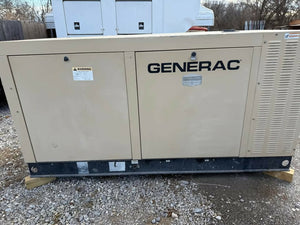
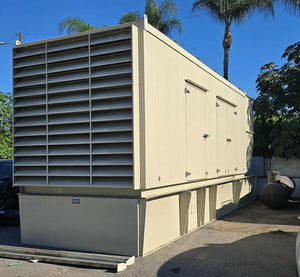
How To Maintain NFPA 110 Records
If your NFPA 110 records are missing, split between vendors, or filled with checkmarks instead of readings, you can get cited fast. I’d keep one onsite record set for the full EPSS, use the same forms every time, log actual test data, track repairs to closeout, and keep at least 36 months of records ready to show in under 60 seconds.
Here’s the short version:
- I’d keep records onsite, even if a contractor does the work.
- I’d document the whole EPSS, not just the generator:
- Generator
- ATS
- Fuel system
- Batteries
- Paralleling gear
- UPS parts, if used
- I’d use standard forms with measured data like:
- kW load
- voltage
- frequency
- transfer time
- battery voltage
- fuel level
- I’d log weekly inspections, monthly tests, annual testing, and 36-month testing.
- I’d track each defect from the day it is found to the day it is fixed.
- I’d file vendor reports inside the facility’s record set, not leave them in a contractor portal.
- I’d organize files by asset, year, and test type.
- I’d keep a current written maintenance program with:
- frequencies
- pass limits
- roles
- storage rules
- revision history
One point matters more than most: NFPA 110 recordkeeping is about proof. For example, a monthly generator test should show at least 30 minutes at no less than 30% of nameplate kW, and a Level 1 Type 10 system should show it picked up load within 10 seconds. Notes like “ran fine” do not prove that.
If I were setting this up, I’d build a simple binder or digital folder for each asset, keep all logs in the same format, and run a file check every quarter. That keeps the record set clean, easy to review, and ready for the AHJ.
This article explains how I’d set up that record system, what I’d put on each form, how I’d store it, and how I’d keep it ready for audits.
Understanding Ratings for Emergency Power Supply Systems in NFPA 110
sbb-itb-501186b
How to Set Up a Compliant NFPA 110 Recordkeeping System
Start with the Annex A template and build your written maintenance program before you log a single test result. That written program needs to spell out the basics: test types, how often each test happens, what counts as a passing result, who handles each task, who can trigger corrective action, where records are kept, and how long they stay on file.
Create Standard Forms for Each EPSS Asset and Task
Set up separate forms for the generator, ATS, fuel system, batteries, and corrective actions. That way, each task is recorded the same way every time, and you don't end up with one tech writing a full report while another leaves two words and a checkmark.
Give each asset a clear ID, like Generator 1 or ATS A, and use that same ID on every log, report, repair note, and deficiency entry. That small step saves a lot of confusion later.
| EPSS Component | Required Log Type | Frequency |
|---|---|---|
| Generator | Weekly inspection log | Weekly |
| Generator | Monthly operational test log | Monthly |
| Generator | Annual load-bank test report | Annually |
| ATS | Monthly transfer/retransfer time records | Monthly |
| Fuel System | Annual fuel quality and consumption log | Annually |
| Batteries | Monthly voltage and electrolyte/load test records | Monthly |
| All Components | Deficiency tracking log | Per event |
Use the same asset ID on every inspection, test, repair, and deficiency record.
Fields Auditors and Technicians Expect to See on Every Form
A simple pass/fail box won't cut it. Every log should include measured data, not just a checkmark. At a minimum, each form should capture the date and time, test type, duration, load, voltage, frequency, transfer time, fuel level, key engine readings, battery readings, and the operator's name or signature.
The written maintenance program should also define what passing looks like. For example, it might say voltage must stay within ±10% of nameplate. Without that, two people can look at the same result and come to different calls.
Choose Controlled Storage for Paper or Digital Logs
You can use paper records, digital records, or a mix of both. What matters is control: records need to be backed up, kept onsite, and easy to pull when someone asks for them.
For many facilities, a hybrid setup works best. Use digital forms for day-to-day entry and trend review, then keep a printed compliance binder with current records sorted by asset and test type. It's simple, fast, and easy to hand over during a survey.
No matter which setup you pick, keep records onsite, limit who can edit them, and make sure staff can produce a full documentation package within 60 seconds of a surveyor's request. If a vendor performs the work, move those reports into the facility's controlled record system instead of leaving them only in the contractor's portal or files.
How to Record Weekly, Monthly, and Annual EPSS Work
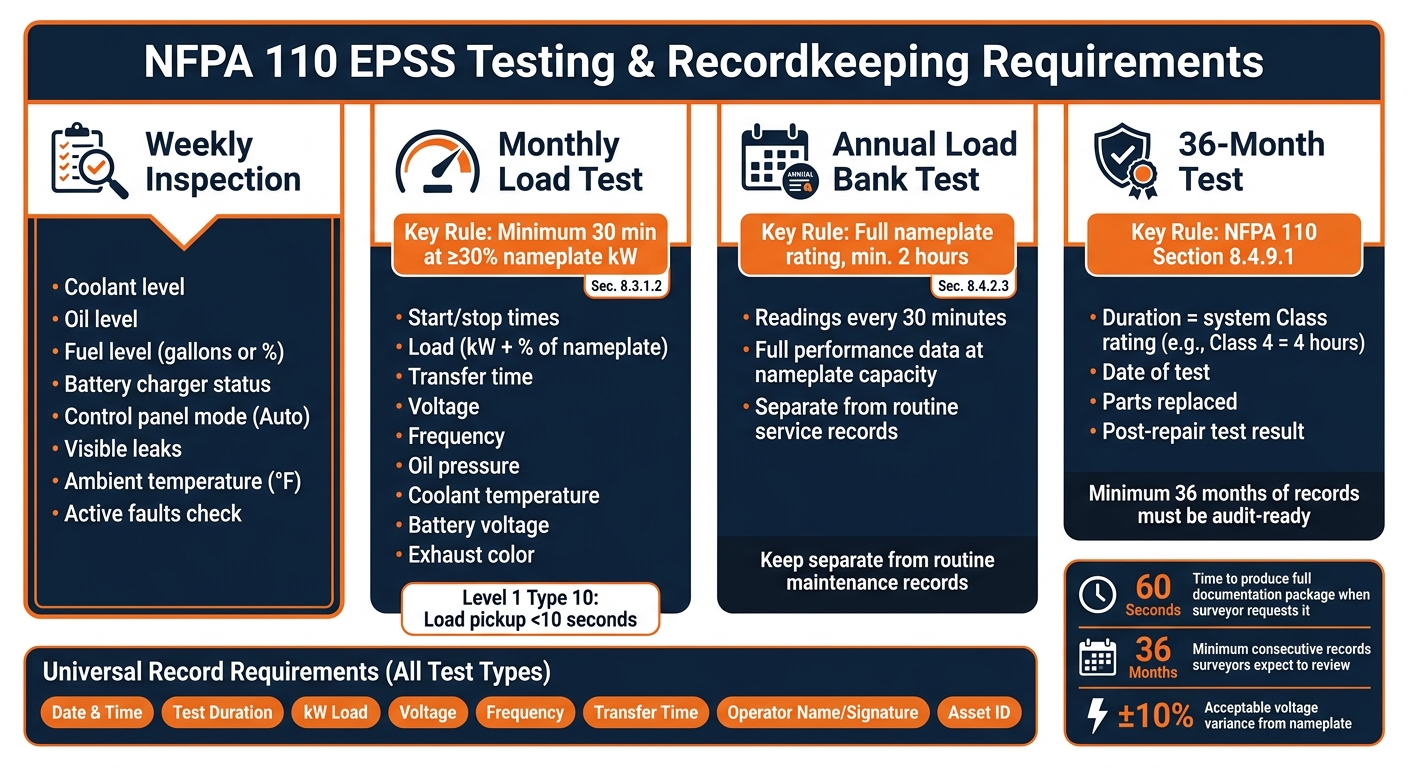
NFPA 110 EPSS Record Requirements at a Glance
Weekly and Monthly Logs for Inspections and Exercising
Once your form is set up, stick with the same format for each recurring EPSS task. That consistency matters. It makes records easier to review, and it cuts down on gaps during an audit.
A weekly inspection log should show the system’s condition at the time of inspection. Each entry needs to include coolant level, oil level, fuel level in gallons or as a percentage, battery charger status, control panel mode, visible leaks, and ambient temperature in °F. For the control panel, confirm the unit is in auto mode and that there are no active faults. Ambient temperature isn’t just filler. It helps explain cold-start problems when they come up.
Monthly load-test logs need more detail. NFPA 110 requires at least 30 minutes of runtime at no less than 30% of the nameplate kW rating. Record the start and stop times, load in kW and as a percentage of nameplate, transfer time, voltage, frequency, oil pressure, coolant temperature, battery voltage, and exhaust color. Take baseline readings after the generator reaches steady state. That way, you’re logging how the system performs under normal test conditions, not just during startup.
For Level 1 (Type 10) systems, which are common in hospitals, the log also needs to show that the system assumed full rated load in under 10 seconds. That point can’t be vague. A note like "started fine" doesn’t show compliance.
Annual and Multi-Year Records for Deeper Testing
Monthly records show routine operation. Annual records show whether the system can hold up under deeper testing.
Keep annual load-bank test records separate from routine service records so auditors can clearly tell the difference between testing and normal maintenance. During the annual test, record readings every 30 minutes to show stable operation across the full test period. These annual load-bank tests are typically documented at full nameplate rating for at least 2 hours.
Then there’s the 36-month test. NFPA 110 Section 8.4.9.1 requires a test every 36 months for a duration that matches the system’s Class rating. So, for a Class 4 system, the run time must be 4 hours. Record the date, any parts replaced, and the post-repair test result. That’s the kind of detail that holds up when someone looks closely at the file.
How to Attach Vendor Reports and Corrective Action Records
When a third-party contractor handles specialized work, like fuel polishing or battery testing, keep that report in your facility’s controlled record system and cross-reference it to the related asset log entry.
Deficiencies need to be tracked from the moment they’re found until they’re closed out. Log what was found, when it was found, what corrective action was taken, which parts were replaced with part numbers, and confirmation that a post-repair operational test was completed under NFPA 110 Section 8.3.2.1. Don’t write "will monitor" unless there’s a clear follow-up plan behind it. Record the follow-up interval, acceptance criteria, and responsible party. Deficiency logs and vendor reports should stay in the same controlled EPSS record set, not in separate contractor files.
| Record Type | Required Information | NFPA 110 Reference |
|---|---|---|
| Deficiency Log | Issue description, date identified, corrective action, resolution date | Section 8.3.7 |
| Repair Closeout | Post-repair operational test results, system readiness confirmation | Section 8.3.2.1 |
| Vendor Reports | Third-party findings cross-referenced to the main asset log | Chapter 8 |
| Maintenance Log | Date, technician name/qualifications, tasks completed, parts replaced with part numbers | Section 8.5.1 |
File these records by asset and year so they’re easy to pull during an audit.
How to Organize, Retain, and Audit NFPA 110 Records
File Records by Asset, Year, and Test Type
Records only matter if you can pull them up fast during an inspection. The simplest way to do that is to organize everything by the specific EPSS asset first, then by year, and then by test type, so each unit has a clear record trail.
Keep each asset’s testing records, written maintenance program, and deficiency tracking logs together in one dedicated compliance binder or digital folder. From there, split the file into clear sections for:
- Weekly inspections
- Monthly load tests
- Annual load tests
- Maintenance and repair records
That setup makes it much easier to spot gaps before a surveyor does.
Set a Retention Schedule That Matches Facility Risk
Once the records are filed, decide how long each one stays active and who can get to it. NFPA 110 says records must be available onsite, but the actual retention period comes from the AHJ and your facility’s own policy.
In practice, surveyors usually want to see at least 36 months of consecutive testing records. That often includes monthly logs, annual load bank reports, and battery and fuel test records.
| Record Type | Recommended Retention | Notes |
|---|---|---|
| Monthly Test Logs | 36 months minimum | Date/time, duration, kW load, %, voltage, frequency, transfer time, battery voltage |
| Annual Load Bank Reports | 36 months minimum | Full performance data at nameplate capacity, not just the invoice |
| Deficiency Tracking Log | Life of asset | Nature of issue, date identified, corrective action taken, verification of resolution |
| Written Maintenance Program | Current with revision history | Scope, protocols, frequencies, acceptance criteria, and responsibilities |
Keep the maintenance program current and signed.
Run Periodic Self-Audits Against Chapter 8 Requirements
After your files are in order, check them on a set schedule. A quarterly self-audit can help you catch missing or incomplete records early, then match each file against Chapter 8 requirements.
Review every asset file for missing test months, blank or partial log fields, missing operator identification, and missing load bank reports. The logs should show actual readings, not just a pass/fail checkmark. That means data like kW load, voltage, frequency, and transfer time should be recorded each time.
Look at deficiency records closely too. Each issue should connect to a corrective action and a resolution date. Notes like “will monitor” don’t say much unless there’s a formal monitoring plan behind them.
Also check that the written maintenance program gets reviewed every year.
How to Connect Asset Data and Equipment Changes to Your Records
Record Complete Asset Data at Installation or Replacement
Once your records are organized, the next step is simple: tie each file to a clear asset baseline.
Start every EPSS file with the baseline asset data recorded at installation or replacement. At a minimum, include the unit number, location, make, model, serial number, capacity, fuel and battery details, and replacement dates. Then add commissioning and acceptance testing results that show stable voltage and frequency within NFPA 110 limits and confirm the 10-second transfer time required for Level 1 systems. You should also file the manufacturer manual with the asset record so maintenance intervals and testing requirements stay easy to track.
That baseline matters because it gives every later test, repair, and deficiency entry a fixed point of reference.
Update Records When the EPSS Configuration Changes
When the equipment changes, the records should change with it. No lag, no loose ends.
Any modification should be updated right away in the asset register, written maintenance program, and single-line diagrams. Those documents need to match the current setup. If a third-party contractor does the work, file their service report in the facility record set at once, including the exact part numbers and quantities replaced. That level of detail can save a lot of back-and-forth later. And during an audit, the duty sits with the facility - not the contractor - to make those records available.
Conclusion: Keep Your Record System Audit-Ready
NFPA 110 compliance depends on keeping the asset record as current as the equipment itself. Good recordkeeping works like a connected chain, running from installation through testing, maintenance, repairs, and corrective actions. That only works when you use standard forms, organized filing, and regular self-audits. Add purchase documents and asset specs from Electrical Trader to the EPSS register as soon as they are received.
FAQs
Who is responsible for keeping NFPA 110 records onsite?
NFPA 110 requires written records of inspections, tests, exercises, repairs, and modifications to be kept onsite where the equipment is installed.
That way, they’re ready for review by the AHJ without any need to pull files from another location. A paper binder or a digital system both work, as long as the records stay accessible during onsite audits.
What happens if my vendor keeps the test reports?
You’re still responsible for making sure test reports are available on-site for inspection. NFPA 110 says records must be kept on the premises and made available to the authority having jurisdiction without pulling them from an off-site system.
If your vendor keeps the records, you still need immediate access to them at your facility. If an inspector shows up and the documents aren’t readily available, that can create compliance gaps.
How should I fix missing or incomplete NFPA 110 logs?
Move fast. Figure out what’s missing, then check with the AHJ about the deficiency. Don’t make up past data, but do your best to retroactively validate as much historical information as you can.
Update your log forms so they include every required field, and retrain operators so future entries are complete, accurate, and kept on-site for at least 36 months.