

EMC Testing and Certification: Buyer Q&A
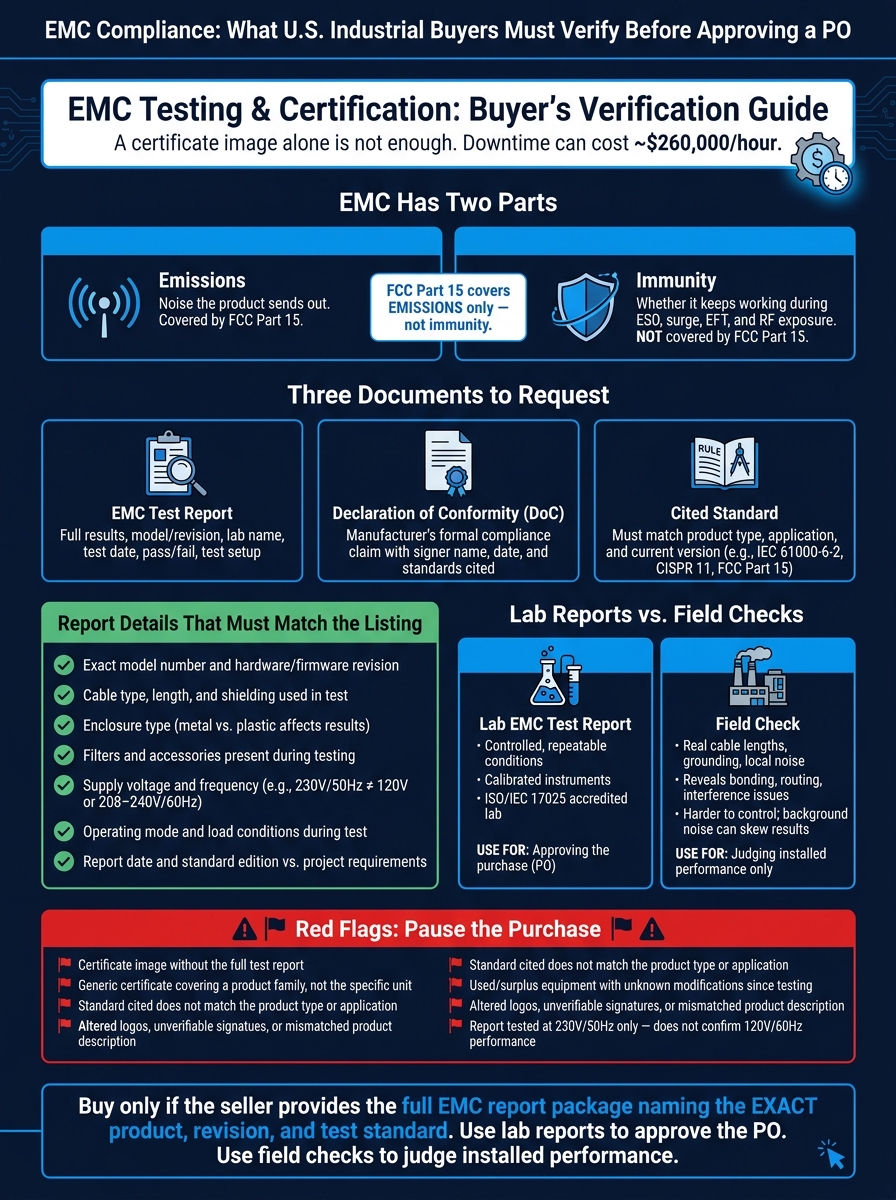
If I’m buying industrial electrical equipment in the U.S., I should not approve the PO based on an EMC label alone. A product can meet FCC Part 15 and still have no proof of immunity in a noisy plant. And that matters when downtime can cost about $260,000 per hour.
Here’s the short version:
- EMC has two parts: emissions and immunity
- FCC Part 15 covers emissions, not immunity
- A certificate image is not enough
- I should ask for:
- the full EMC test report
- the Declaration of Conformity
- the exact standard cited
- I need to confirm the report matches the exact model, revision, cables, filters, enclosure, voltage, and test setup
- Lab tests approve the purchase; field checks only show how the installed unit behaves on site
- If the paperwork is generic, old, altered, or tied to a different model, I stop the purchase
A simple way to think about it: EMC proof only applies to the unit and setup that were tested. If the seller changed the firmware, cables, filters, enclosure, or accessories, the old report may no longer fit what I’m buying.
| What I check | What I need to confirm |
|---|---|
| Emissions | Noise the product sends out |
| Immunity | Whether it keeps working during ESD, surge, EFT, and RF exposure |
| Documents | Full report, DoC, and named standard |
| Product match | Exact model and revision |
| Test setup match | Cables, shielding, filter, enclosure, load, and power conditions |
| U.S. fit | FCC reference for emissions and the right immunity standard for the site |
So before I sign off, I treat EMC as a buying risk, not just an engineering detail.
EMC Compliance Checklist: Lab Reports vs. Field Checks for Industrial Equipment Buyers
Comparing EMC Standards by Karen Burnham
sbb-itb-501186b
What EMC testing and certification actually show
EMC evidence shows that a specific model, hardware revision, and setup met set emissions and immunity rules when it was tested. That’s useful, but it does not mean every unit will act the same way in every plant, panel, or building. A mark on the product, a label, or a sales statement is just the starting point. Buyers should expect paperwork behind it. The first thing to check is simple: what, exactly, did the report test?
Emissions and immunity: the two checks that matter
Emissions testing looks at whether the equipment puts too much electrical noise onto cables or into the air. Immunity testing looks at the other side of the coin: whether the equipment keeps working when outside interference shows up.
Emissions tests check conducted and radiated noise against set limits. Immunity tests expose the unit to ESD, surges, fast transients, and RF fields to confirm stable operation. These are two separate checks, and both matter. A drive can have low emissions and still fail when a surge hits. A PLC can shrug off ESD and still dump noise into a communications network.
Compliance applies to the tested setup, not every jobsite
This is where buyers often get tripped up. An EMC report does not automatically cover a different installation. Results can change based on cable type and length, shielding, grounding, enclosure material, filters, and operating mode.
So if a report shows a drive tested in a metal enclosure with shielded motor cables and a line filter, that does not prove the same result for a setup with a plastic enclosure, unshielded cables, and no filter. The smart move is to line up the tested setup with your planned installation and look for gaps.
| Report element | Why it matters to buyers |
|---|---|
| Model number and hardware revision | Confirms the tested unit matches yours |
| Cable type and length used in test | Cable choices can change results |
| Enclosure type | Affects emissions and immunity |
| Filters or accessories present | Compliance may depend on added parts |
| Operating mode during testing | Load conditions affect results |
Which EMC documents buyers should request
A certificate image in a product listing is not enough to approve a purchase. Before signing off on a PO, buyers should ask for three documents: the EMC test report, a Declaration of Conformity (DoC) or similar compliance statement, and the cited standard behind the claim. If even one is missing, the file has a hole in it. Start with those three.
Core documents that support an EMC claim
The EMC test report is the most detailed document in the set. It shows what the lab tested, how they tested it, and whether the product passed or failed each item. A usable report should list the product name, model number, hardware or firmware revision, test date, the lab that ran the work, and the exact standards used, such as FCC Part 15, IEC 61000-6-2, or CISPR 11. It should also include pass/fail results and the test setup.
The Declaration of Conformity is the manufacturer's formal statement that the product meets the named requirements. It should include the manufacturer name, the product and model, the standards claimed, the issue date, and the name and title of the person who signed it. This is the document people often ask for in bid packages or commissioning records when an owner or AHJ wants proof.
The cited standard tells you which rule the product was tested against and whether that rule fits the job site. If the cited version is old, or if it doesn't line up with your project spec, flag it before purchase.
For FCC-covered products, check whether compliance is based on Certification or SDoC. SDoC records stay with the responsible party and do not appear in a public database.
How to review the document package before approving a PO
Procurement should confirm that the full set of documents is there and that it matches the quote. Engineering should check that the cited standard and the test setup make sense for the site. It’s a simple split: one team checks the paperwork, the other checks fit.
| Document | What it proves | What to verify before purchase |
|---|---|---|
| EMC test report | Actual test results against a stated standard | Exact model/revision, test lab name, test date, standard version, pass/fail results, and test configuration |
| Declaration of Conformity | Manufacturer's formal compliance claim | Product name and model, named standards, signer's name and title, date, and references to the test report |
| Cited standard | The rule the claim is built on | That the standard matches the product type and application, and that the version cited is current enough |
If the seller sends only a certificate image and not the report behind it, stop there. The same goes for documents that point to a different model or a broad product family instead of the exact item being bought. Generic certificates are not primary compliance evidence.
These documents check the paper claim. The next step is to compare the lab setup with the actual installation.
How lab EMC tests differ from field checks
Once you have the document package, split lab evidence from site checks. They do different jobs. The lab report is the main proof for compliance, while field measurements help show whether the product works well in the place where it's installed.
Lab testing provides controlled, repeatable evidence
A formal lab EMC test is run under a named standard in a controlled setup that can be repeated. Cable routing, grounding, operating mode, and load are defined ahead of time. The lab uses calibrated instruments, and ISO/IEC 17025 labs help back up results you can defend if someone looks closely at them.
Field checks show installed behavior but do not replace reports
A field check shows what happens in the actual installation. That means real cable lengths, the building's grounding system, and the local noise around the site all come into play. This kind of check can bring out bonding, routing, or interference problems that may never appear in the lab. It can also point to install issues that call for filters, grounding changes, or cable rerouting.
The catch is that field measurements are much harder to control. Background noise can hide the result unless it stays well below the limit.
So the simple rule is this: use field checks to judge installation fit, not to stand in for the lab report.
Which standards and report details should match the product
Once you have the report, check that the cited standards fit the product you plan to buy.
Common EMC references buyers may see on reports
Most industrial EMC reports cite IEC 61000 for immunity and CISPR for emissions. The exact standard depends on the product type and how it will be used.
For industrial equipment like switchgear, variable-frequency drives, PLCs, or motor control centers, you’ll usually expect to see IEC 61000-6-2 for immunity and CISPR 11 or IEC 61000-6-4 for emissions. If the report points to an older standard, make sure it still lines up with the product and your project requirements. For U.S. sales, check that any FCC Part 15 reference matches the emissions claim. Some reports also cite CISPR 32 Class A or Class B.
Then look past the standard name and confirm the report matches the exact item in the listing.
Report details that must match the listing
A few details need to line up exactly:
- Model and revision: Match the full model number and revision. A report for one suffix does not cover another.
- Filters, cables, and accessories: Make sure the sale includes every item named in the report. This matters a lot for used or surplus equipment, where original EMC parts are often missing or swapped out.
- Supply voltage and frequency: Check that the test conditions match U.S. power. A report tested only at 230 V / 50 Hz does not automatically confirm performance at 120 V or 208–240 V / 60 Hz.
- Report date and standard edition: Compare both against your project requirements. If the report is old or uses a superseded edition, ask for a retest or a gap analysis.
If any of these points don’t match, stop and verify before issuing the PO.
What to verify before you buy
Once you’ve matched the report to the product, do one more pass before you approve the PO.
Pre-purchase checks that reduce compliance risk
Before payment or shipment, verify these items:
- Exact model and revision: Match the exact model and revision shown on the report to the item listed on the quote.
- Full report: Make sure the package includes the full report, setup photos or diagrams, cable list, operating mode, and pass/fail results.
- Lab accreditation: Confirm the lab is ISO/IEC 17025 accredited for the cited standards.
- Maximum-load operation: Confirm the testing covered maximum load and the cable setup you plan to use.
- Documents before payment: Have all of this in hand before funds are released or shipment is authorized.
For critical equipment, have an electrical engineer or EMC specialist review the package before PO approval.
If any item fails, stop the purchase until the seller fixes it.
Red flags that should pause the purchase
Pause the purchase if any of these show up:
- A certificate without the test report. The same goes for generic certificates used across an entire product family without naming the specific unit.
- Reject standards that do not fit the product. If an office-equipment standard is used for an industrial drive, or the standard is old and no longer matches the installation, ask the seller for an immediate explanation.
- Treat used or surplus equipment as suspect if the seller cannot show what changed since testing. Modifications or part swaps made after testing can void the original report.
- Stop if the report has altered logos, unverifiable signatures, or a mismatched product description.
Key takeaways for U.S. buyers
Put the earlier checks together, and the rule for buyers is pretty simple: before you approve the PO, buy only if the seller provides the full EMC report package and that package names the exact product and the exact test standard.
The next step is just as important. Match the report to the exact unit and installation setup you're buying. A report that covers a different version, a different configuration, or a loosely related model isn't enough.
Use lab reports to approve the purchase. Use field checks only to judge installed performance.
If the claim is unsupported, generic, or fails to name the exact model, pause the purchase. If any of those checks fail, stop the PO until the documentation is corrected.