How to Test GFCI and RCD Devices Safely
GFCIs (Ground Fault Circuit Interrupters) and RCDs (Residual Current Devices) are lifesaving electrical devices that prevent shocks by detecting small current leaks and shutting off power instantly. Regular testing ensures they work effectively when needed. Here's a quick guide:
- What They Do: Detect electrical imbalances as small as 4–6 mA and trip to prevent harm.
- Where They're Used: Bathrooms, kitchens, garages, basements, and other moisture-prone areas.
- How to Test: Press the "TEST" button monthly. If it doesn’t trip or reset, replace the device.
- Safety Tips: Wear rubber gloves, keep the area dry, and use a multimeter to confirm power is off before inspecting wiring.
- Lifespan: Typically lasts around 15 years; replace older or malfunctioning devices promptly.
Testing is simple but critical. Follow these steps to ensure your safety and keep your devices functioning properly.
How to test a GFCI device
sbb-itb-501186b
Safety Precautions Before Testing
Testing a GFCI or RCD device may seem simple, but it’s essential to take proper safety steps to avoid risks. Electrical work always carries some danger, particularly the chance of accidental contact with live current if the device is faulty or if you’re checking internal wiring. Here’s how to get ready for a safe testing process.
How to Prepare for a Safe Test
Start by wearing rubber gloves and safety goggles. These will protect you from potential shocks, sparks, or flying debris. Make sure the area around the outlet is completely dry, especially if you’re working in places like bathrooms or kitchens where moisture is common.
You’ll only need to cut power if you’re planning to inspect the wiring. If that’s the case, turn off the power supply before removing the faceplate. Use a multimeter set to 120V AC to confirm the circuit is de-energized. Wait for a zero voltage reading before continuing. As Deirdre Sullivan points out:
"GFCI outlets benefit from periodic testing to ensure they're working as intended".
Check Your Device Specifications
Once you’ve ensured your safety, take a moment to verify the device’s specifications. Look for the rating label on the device, which will indicate its trip threshold. In North America, this is typically around 5 mA, while in other regions, it’s often 30 mA.
Next, confirm that the black (hot) wire is connected to the "line" terminal and the white (neutral) wire to the "load" terminal. Incorrect wiring can create a false sense of security, making the device seem functional while it’s not providing proper protection. If the reset button is already popped out and won’t click back into place, the device is likely defective and should be checked by a professional.
Tools You'll Need for Testing
You don’t need an extensive electrician’s toolkit to check if your GFCI or RCD is functioning correctly. For basic monthly checks, the easiest approach is to use the built-in test button on the device. This button simulates a ground fault, cutting off power to confirm the device is working. To double-check, plug in a simple appliance like a lamp or radio. If the device loses power when you press the test button, your GFCI or RCD is operating as it should. Always follow the safety procedures mentioned earlier.
Basic Testing Tools
The built-in test button is a quick option, but additional tools can help ensure everything is wired correctly and fully de-energized. A receptacle tester is a great next step. These small, plug-in devices cost about $5.99 and can confirm proper wiring polarity while also checking if the GFCI trips as expected.
For more detailed checks, a multimeter (set to AC voltage, typically 120V in the U.S.) and a non-contact voltage detector are essential. These tools allow you to confirm that power is completely off after a trip. Retailers like Electrical Trader (https://electricaltrader.com) offer a variety of quality tools suitable for both professionals and DIY enthusiasts.
Advanced Testing Equipment
If you need deeper insights, professional-grade tools can provide detailed diagnostics. For example, digital RCD/GFCI testers are commonly used by electricians to measure precise trip times and current levels. These tools offer high accuracy, with trip time measurements down to 1ms and an accuracy of ±2ms.
Popular models include the Hoyt 1113 EL, priced at around $489, and the Kewtech KT500, which costs about $375 USD (approximately £299.90). These testers can simulate fault currents ranging from 10mA to 300mA and perform ramp tests to determine the exact leakage current that triggers a trip.
For even more detailed troubleshooting, circuit analyzers are invaluable. They can detect bootleg grounds and measure voltage drops under load - helpful for diagnosing devices that seem fine but keep tripping unexpectedly. When choosing professional equipment, prioritize features like a CAT IV 600V safety rating, IP53 dust and water resistance, and drop protection of at least 9.8 feet.
How to Test GFCI and RCD Devices
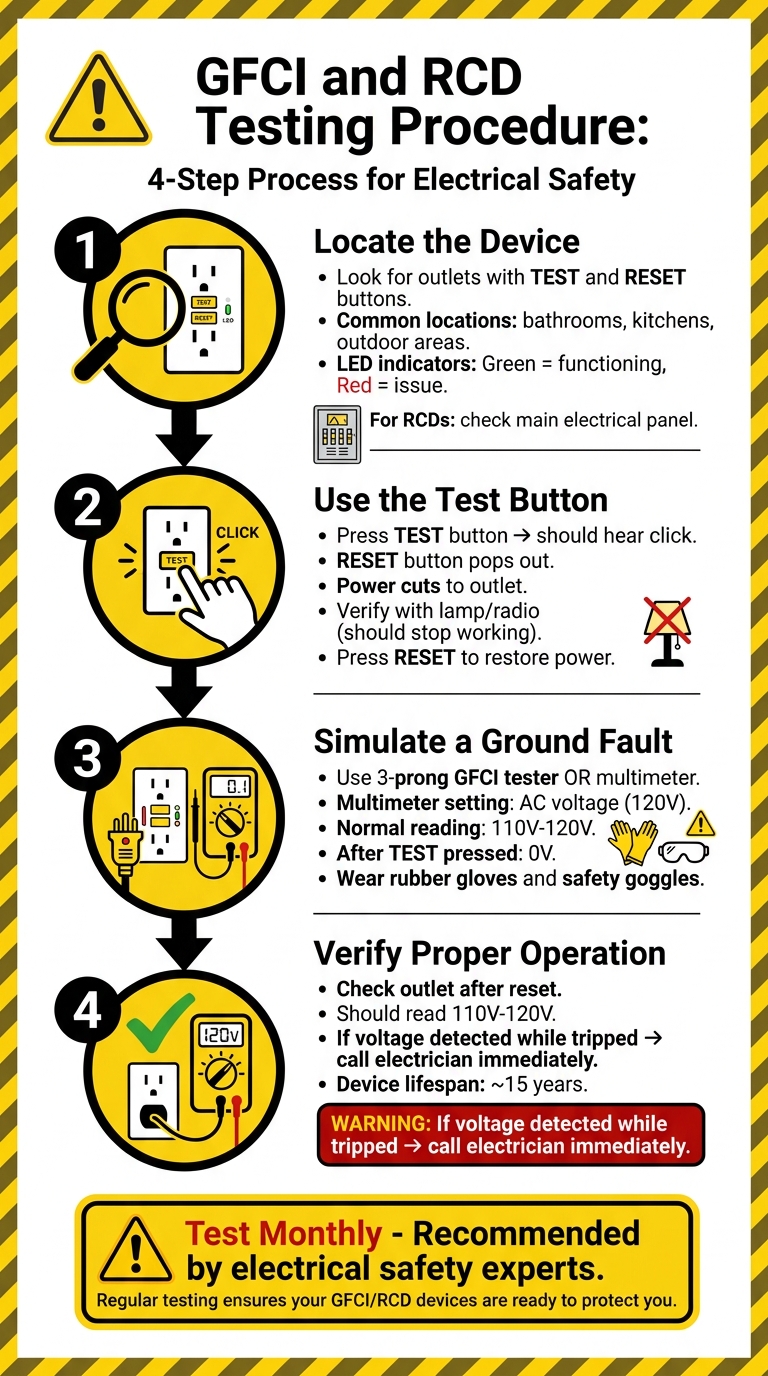
4-Step Guide to Testing GFCI and RCD Devices Safely
Testing your GFCI (Ground Fault Circuit Interrupter) or RCD (Residual Current Device) is quick, straightforward, and essential for ensuring safety. It’s recommended to perform this test monthly to catch issues before they become hazards. As Deirdre Sullivan, Contributing Writer at Angi, advises:
"It's recommended that you test GFCI outlets monthly with the test and reset buttons."
Here’s how to check these devices step by step.
Step 1: Locate the Device
GFCI outlets are easy to recognize - they feature "test" and "reset" buttons right in the center of the outlet. You’ll typically find them in areas prone to moisture, like bathrooms, kitchens, or outdoor locations, as required by the National Electric Code. Some models even include an LED indicator: green means it’s functioning, while red signals an issue.
For RCDs, head to your main electrical panel. In homes, RCDs often protect entire circuits, while in commercial buildings, they may be installed at various points throughout the system.
Step 2: Use the Test Button
Start by pressing the "test" button on your GFCI outlet or RCD breaker. You should hear a click, and the "reset" button will pop out, cutting power to the outlet. To confirm the power is off, plug in a device like a lamp or radio - it should stop working. Once you've verified this, press the "reset" button until it clicks, restoring power.
If the reset button won’t stay in or click, check your main circuit breaker to ensure it’s on. If everything seems in order but the outlet still won’t reset, the device may need to be replaced.
Step 3: Simulate a Ground Fault
To test the device’s responsiveness further, use a three-prong GFCI tester. Plug it into the outlet and press the tester’s button to simulate a ground fault - the GFCI should trip immediately.
Alternatively, you can use a multimeter. Set it to measure AC voltage (around 120V). With rubber gloves and safety goggles on, place the red probe in the hot slot (the smaller one) and the black probe in the ground slot (rounded). A functioning outlet should show a reading between 110V and 120V. When you press the test button, the reading should drop to 0V, confirming the power is off.
Step 4: Verify Proper Operation
After resetting the device, check the outlet again with a multimeter. A reading between 110V and 120V confirms that power has been restored. If you detect voltage while the device is tripped, stop testing immediately and call a licensed electrician, as this indicates a serious malfunction.
Keep in mind that GFCI outlets typically last around 15 years. As Chris Deziel, Author at Hunker, notes:
"A GFCI outlet has an expected lifespan - typically about 15 years - after which there's a possibility of failure, so GFCIs in older homes are often suspect."
If your outlet is nearing this age or shows signs of inconsistent performance, replacing it may be the safest option.
Fixing Common Testing Problems
What to Do When a Device Won't Trip
If pressing the test button doesn't trip the GFCI or RCD, start by confirming there’s power in the circuit. Check the main breaker or fuse box to see if the circuit is live. Without power, these devices can’t function, and a tripped breaker is often the reason behind this issue.
Next, unplug all appliances connected to the circuit and try testing again. Sometimes, a faulty appliance can cause an electrical imbalance, preventing the device from operating as it should. If the device still doesn’t trip after unplugging everything, it’s possible the internal sensor has failed.
Don’t forget to inspect the buttons themselves. If the test button doesn’t activate the reset function, the device is likely defective and should be replaced immediately. If these steps don’t resolve the problem, it’s best to call a licensed electrician to avoid potential hazards.
When troubleshooting doesn’t fix the issue, it may be time to consider replacing the device.
When to Replace Your GFCI or RCD
Replace the device right away if you notice any physical damage. Signs like cracks, melted plastic, discoloration, or a burning smell are serious fire hazards and require immediate attention. Additionally, if electrical plugs no longer fit snugly and slide out easily, it means the internal contacts are worn, making the outlet unsafe.
Even if there’s no visible damage, persistent malfunctions indicate the device needs replacement. Shakir Williams from HomElectrical highlights this point:
"If the light does not turn off when you press the test button, your GFCI outlet is not working properly and should be replaced immediately".
If your GFCI or RCD keeps tripping with nothing plugged in and the wiring is confirmed to be in good condition, the internal circuitry has likely failed and the device should be replaced.
For replacement options, Electrical Trader provides a variety of GFCI outlets and RCD breakers, offering both new and used components to match your system needs at competitive prices.
Conclusion
Wrapping up your safety checks, it's essential to remember that testing GFCI and RCD devices is straightforward but requires consistent attention. The process involves three simple steps: pressing the Test button, confirming power disconnection with a voltage tester, and then pressing Reset to restore functionality. This routine should be performed monthly to reduce risks and prevent internal components from sticking. If you’re using testing tools from Electrical Trader, ensure they adhere to UL standards for safety and reliability.
Any unexpected tripping of these devices should never be ignored. As marine consultant Steve D'Antonio points out:
"At 30 milliamps there are no 'nuisance trips', any trip is a real threat to the vessel's equipment and crew and must, therefore, be investigated and corrected".
This advice is just as critical for residential and commercial setups as it is for marine environments.
If a device shows signs of damage or malfunction, replace it immediately. For outdoor installations, use weather-rated enclosures to avoid premature wear. Persistent problems should always be addressed by a licensed electrician - DIY fixes can lead to further hazards.
For quality replacement devices and testing tools, Electrical Trader offers a range of UL-compliant GFCI outlets and RCD breakers from reputable manufacturers, catering to different budget needs.
Regular testing is a small effort with a big payoff - it ensures these devices trip at the vital 5-milliamp threshold that prevents electrocution. Incorporate these checks into your routine electrical maintenance to safeguard lives and stay in line with safety regulations.
FAQs
What’s the difference between a GFCI outlet and an RCD breaker?
A GFCI outlet and an RCD breaker serve the same purpose: protecting against ground faults and reducing the risk of electrical shock. However, they differ in how and where they’re installed, as well as the range of protection they offer.
A GFCI outlet is installed directly at the outlet itself, providing localized protection. These are commonly found in areas like kitchens and bathrooms, where water increases the risk of electrical hazards.
On the other hand, an RCD breaker is installed in the main electrical panel. Instead of protecting a single outlet, it safeguards entire circuits, offering broader coverage.
Both devices work by detecting leakage currents, which can help prevent electrocution and even electrical fires. The key difference lies in the scale of protection: GFCI outlets focus on specific points, while RCD breakers cover larger areas.
How do I know my GFCI is wired correctly (line vs load)?
To make sure your GFCI is wired properly, verify that the incoming power wires (hot and neutral) are attached to the LINE terminals. If you're using the GFCI to protect additional outlets, ensure the downstream wires are connected to the LOAD terminals. Test the GFCI by pressing the Test button - this should cause it to trip and shut off power. If you're uncertain about any step, it's best to reach out to a licensed electrician for safety and accuracy.
Why does my GFCI/RCD trip randomly with nothing plugged in?
Your GFCI (Ground Fault Circuit Interrupter) or RCD (Residual Current Device) might trip unexpectedly due to things like electrical noise, slight wiring problems, or small ground faults. These unexpected interruptions, often referred to as "ghost trips", can occur even when no devices are plugged in. Routine inspections are a good way to spot and fix these problems.