

IEC 61850 Security Testing: Scope And Steps
If I had to boil this down to one point, it’s this: don’t energize a substation until I’ve tested protocol behavior, access control, and logging against clear pass/fail rules.
Here’s the plain-English version:
- I define scope before equipment is ordered.
- I check the actual assets in play: IEDs, relays, gateways, HMIs, engineering workstations, network paths, local ports, remote access paths, and key/certificate functions.
- I test the three IEC 61850 traffic types that matter most: MMS, GOOSE, and Sampled Values.
- I run both normal and bad-traffic tests, including malformed frames, replay attempts, spoofed packets, and sample-loss cases.
- I verify that only the right users can make changes, with role-based access, lockout after failed logins, idle session timeout, and secure remote sessions.
- I check logs across the full system and make sure events line up within ±1 second.
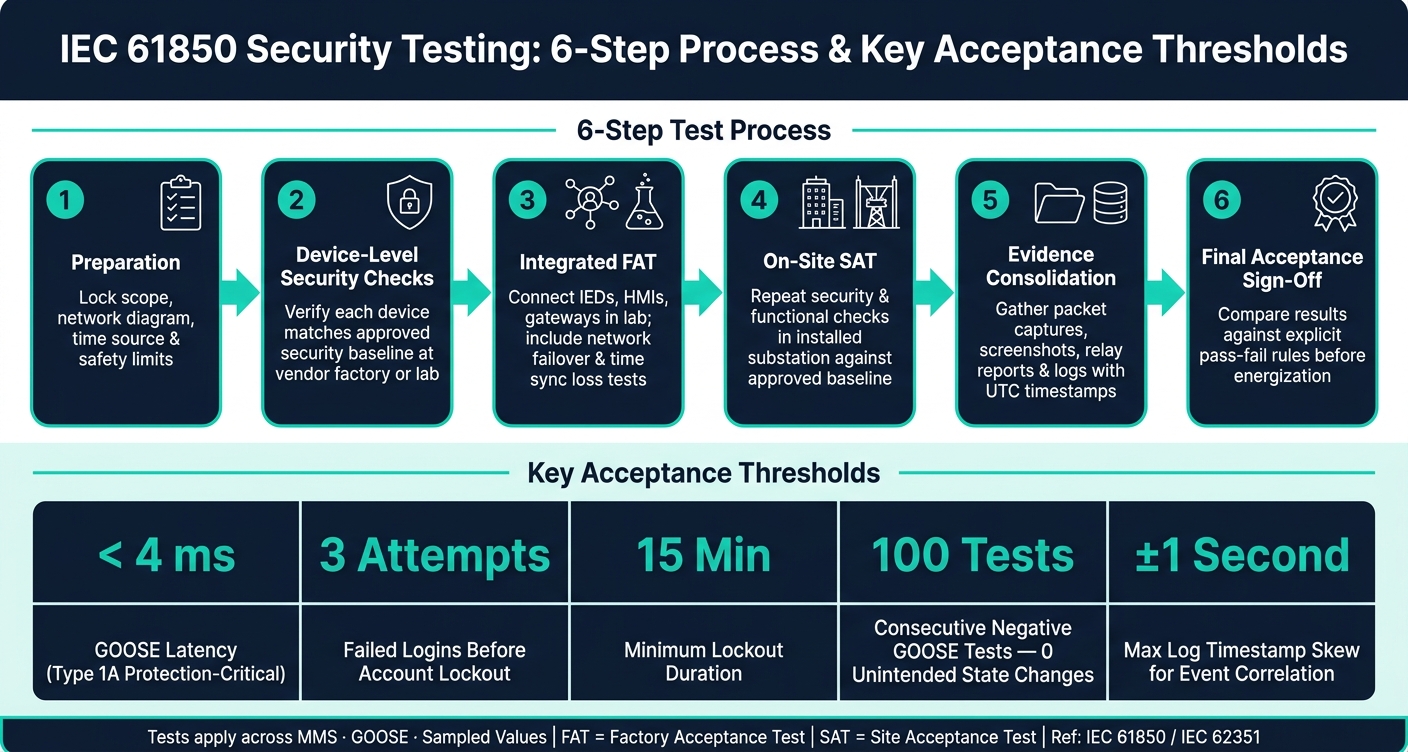
- I set hard acceptance targets, such as Type 1A GOOSE latency under 4 ms, 3 failed-login attempts triggering a 15-minute lockout, and 0 unintended status changes across 100 negative GOOSE tests.
In other words: this is not just a standards check. It’s a pre-energization test plan for proving that the system rejects bad messages, blocks the wrong users, and leaves a usable audit trail.
A few numbers from the article stand out:
- 4,096 audit events before overwrite in one example gateway requirement
- 25 user ID/password combinations in that same procurement example
- ±1 second max log skew for event correlation
- < 4 ms GOOSE latency target for protection-critical traffic
- 3 failed logins leading to 15 minutes of lockout in the sample threshold
- 100 consecutive negative GOOSE tests with no unintended state change
If I’m setting this up, I split the work across procurement, lab validation, FAT, and SAT. That way, I catch support gaps early, test device behavior in the lab, then confirm the installed system still matches the approved baseline on-site.
| Area | What I check | What failure looks like |
|---|---|---|
| Scope | Devices, protocols, interfaces, risk areas | Missing paths like remote access or local maintenance ports |
| Message security | MMS, GOOSE, SV behavior under valid and bad conditions | Replayed or spoofed traffic is accepted |
| Access control | Role limits, account setup, lockout, secure remote login | Wrong role can change settings or issue controls |
| Logging | Login events, changes, commands, timestamps, forwarding | Key actions have no trace or time records don’t line up |
| Acceptance | Measurable FAT/SAT thresholds | No hard rule for pass/fail before energization |
So if you want the shortest possible answer: scope the right assets, test live IEC 61850 traffic under good and bad conditions, verify role limits and logs, and document hard acceptance criteria before the site goes live.
IEC 61850 Security Testing: 6-Step FAT & SAT Process with Key Thresholds
IEC 62351 for the cybersecurity of IEC 61850 substations and interactions with DER systems
sbb-itb-501186b
2. Define the test scope for IEC 61850 systems
Once testing starts early, the next step is to set clear boundaries. You need to spell out exactly which assets and interfaces will be checked. Scope should be based on the assets, interfaces, and risks that could affect protection, control, monitoring, and time-critical messaging.
Protocols, assets, and interfaces in scope
The test plan should name the exact protocols and systems under review. On the protocol side, that includes MMS for client/server data exchange, GOOSE for fast event messaging, and Sampled Values for process-bus measurements. Use IEC 61850-10 to check protocol behavior and IEC 62351 to check security controls.
On the asset side, scope should cover IEDs, protection relays, gateways, bay controllers, HMI/SCADA hosts, engineering workstations, and the network path that links them. That also includes the pieces people sometimes overlook:
- Local maintenance interfaces
- Remote access channels
- Certificate and key management functions
If any of those paths can touch protection settings or station traffic, they belong in the plan.
Security objectives and scope tailoring
Each test area should tie back to a clear security goal. That keeps the scope focused and stops the plan from turning into a random checklist.
Integrity testing looks at whether MMS reports or GOOSE events can be changed or replayed. Availability testing looks at how the system handles malformed traffic or denial-of-service conditions. Authentication and authorization testing checks whether only approved users can reach engineering functions and change protection settings. Traceability testing checks whether logs record who changed what, when, and from where.
Scope should also match the type of project. A greenfield substation may be able to test the full set of security controls. A retrofit site is different. There, the scope often needs to follow a risk-based approach so teams avoid tests that the equipment does not support or that could affect service.
Those same objectives should also be used to screen vendor claims before equipment is ordered.
Equipment procurement checks
Procurement review should confirm that the chosen devices can support the required tests in practice, not just on paper. Before buying, verify that vendor documentation shows support for the needed IEC 61850 functions and IEC 62351-related security features.
Ask for the datasheet, security guide, protocol implementation statement, firmware notes, logging documents, and third-party test reports. Then check for RBAC, unique user accounts, configurable passwords, logs and audit trails, secure remote access, and log forwarding.
A DER gateway spec is a good example. It may require Syslog for remote log forwarding, support for up to 4,096 audit trail events before overwriting, and at least 25 unique user ID/password combinations. Those are the kinds of concrete capabilities worth checking line by line.
Conformance claims still need manufacturer documentation and test evidence before any device is accepted into a protected substation network.
3. Test message validation and protocol security
With scope and procurement checks done, the next step is to validate live traffic against the approved design under valid, invalid, stale, and spoofed conditions. This is where you confirm the IEDs still work together safely when security controls are in place.
Validate MMS, GOOSE, and Sampled Values behavior
Start with a simple check: does each message type match the approved SCL configuration?
For MMS, verify the configured data model, dataset membership, and reporting behavior. For GOOSE, check the multicast frame structure, application identifier, dataset contents, and sequence number behavior (stNum/sqNum) for both new events and retransmissions. For Sampled Values, confirm that the sampling stream, frame format, synchronization behavior, sampling rate, and channel mapping line up with the IED configuration.
If IEC 62351 protections are part of the design, verify that authentication and integrity controls are enforced. This matters a lot because GOOSE and SV have no built-in authentication by default, so the test has to show that any added protection is actually working.
Replay resistance is another must-check item. Capture a valid GOOSE frame and resend it later. The receiving IED should detect stale state information, or an expired freshness window, and discard the frame. Verify that the receiver applies the configured freshness window the same way every time. If any subscriber accepts the replayed frame without logging the event, that test fails.
Run negative and robustness tests
Once normal traffic checks out, move into adverse conditions. Inject malformed frames such as corrupted headers, bad lengths, or invalid field values and watch how the IED responds. It should discard the frames or return an error without crashing or losing its protection function. Protocol-aware fuzzing can help expose weak points in MMS, GOOSE, and SV stacks.
Spoofing tests matter just as much. Craft a GOOSE packet with a valid structure but a changed source MAC address, or one with an stNum higher than the current value and sqNum reset to 0. On paper, that may look fine. In practice, a subscriber that checks only frame structure might accept the spoofed packet as valid. The test needs to prove that no unintended relay operation occurs under any of these conditions.
Weak retransmission and sequence settings can still leave gaps, even when IEC 62351 controls are present. That's why implementation-level testing matters more than a standards compliance checkbox.
Set message pass-fail criteria
Pass-fail criteria should be explicit and tied to the protection scheme's actual requirements, not generic network benchmarks. The table below gives a practical baseline for acceptance decisions.
| Test Area | Pass Condition | Fail Condition |
|---|---|---|
| MMS control access | Control accepted only from an authenticated, authorized session | Any control accepted without valid credentials |
| GOOSE replay resistance | Replayed frame discarded; event logged | Replayed frame accepted by subscriber |
| GOOSE spoofing | Spoofed frame rejected; no relay operation | Unintended trip or breaker operation occurs |
| Malformed frame handling | Frame discarded; device stays operational | Device crashes, resets, or loses valid communications |
| SV packet loss detection | Alarm triggered above the configured missing-sample threshold | No alarm despite sustained sample loss |
| End-to-end latency | End-to-end delay stays within the project's specified limit | Latency exceeds the protection scheme requirement |
Each criterion should map straight to a test case in the procedure, with packet captures, device logs, and relay event reports kept as supporting evidence. If a failure can be repeated, record it before remediation.
Use these protocol results as the baseline for access-control and logging tests.
4. Verify access control and review security logs
With the protocol checks done, the next step is simple: who can do what, and can you prove it later? Access control limits what a person or device is allowed to do. Logging shows what they actually did. You need both.
Test local and remote access controls
Start by listing every account on each IED, HMI, gateway, and network device. Each account should be unique, named, and tied to a role. Shared logins like "engineer" or "admin" fail this check. So do factory-default credentials that are still active or were never changed.
IEC 62351-8 defines role-based access control for roles such as Viewer, Operator, Engineer, and Security Administrator. Test each role by trying actions it should NOT be able to complete. An Operator may switch breakers but should not change protection settings. An Engineer may change configuration but should not manage user accounts. If a lower-privileged role can carry out a task meant for a higher one, that's a failure.
For remote access, confirm that access to IEDs and gateways uses secure channels such as TLS VPN or SSH, with certificate-based authentication where required. Then test lockout behavior. Enter the wrong credentials several times and confirm the account or source IP is locked for a defined period. After that, test session timeout: sign in, leave the session idle, and make sure it closes on its own without allowing any more commands.
Review log sources and event quality
Once access checks are done, move to the audit trail. Every permitted action should leave behind a clear record.
Security-relevant events need to be captured across IED logs, HMI/SCADA security logs, gateway logs, switch and firewall logs, VPN logs, and time synchronization records. IEC 62351-14 defines the content and semantics of security logs for IEC 61850 environments, so use it as the reference point when checking what each device should record.
The most important events include:
- Successful and failed logins
- Configuration changes
- Firmware updates
- Certificate issuance or expiration
- Commands that change breaker or protection state
- Unusual traffic flagged by firewalls
To test completeness, perform a small set of known actions - for example, a failed login, a configuration change, and a breaker command. Then check whether each action appears in the right log with a clear description, a username or device ID, a source IP, and an accurate timestamp. Logs that store codes with no plain meaning are a problem. If you can't tell what happened without decoding vendor-specific values, incident review gets messy fast.
Timestamp accuracy matters just as much. Compare log entries from several devices for one known event and confirm they line up within an acceptable skew - less than ±1 second for security event correlation. If a device loses time sync, it should raise an alarm, and the drift should be visible. Use UTC or clear timezone offsets so daylight-saving changes don't muddy the timeline.
Set access and logging pass-fail criteria
Use the table below to turn the checks into pass-fail decisions.
| Test Area | Pass Condition | Fail Condition |
|---|---|---|
| Account uniqueness | Every account is unique, named, and role-based | Shared, default, or undocumented accounts exist and are active |
| Role-based access | Unauthorized actions blocked and logged | Lower-privileged role completes a restricted action |
| Remote access authentication | MFA or certificate-based authentication enforced; insecure services disabled | Telnet, HTTP, or unauthenticated access accepted |
| Failed-login lockout | Account or source IP locked after defined attempts; event logged | No lockout occurs or no log entry generated |
| Log completeness | Every critical action appears in a traceable log entry | Any critical action lacks a corresponding log record |
| Timestamp accuracy | All logs correlate within ±1 second for a known event | Logs cannot be correlated due to drift or missing timezone data |
| Logging performance impact | GOOSE latency stays within protection scheme limits under logging load | Protection or control functions delayed due to logging activity |
Any action that can affect power system state must tie back to an authenticated user or device. That includes control commands, setting changes, firmware uploads, and certificate events. Low-privilege users should not be able to disable or clear logs, and any attempt to do so should generate its own audit entry.
Set retention and review cadence to match project compliance requirements, then verify both during SAT.
5. Build a step-by-step test procedure and final acceptance criteria
Once access and logging are confirmed, move the rest of the work into FAT and SAT. A clear test procedure keeps the job moving and makes sure the owner, integrator, and vendor all agree on what “done” means.
For U.S. substation projects, this six-step flow works well:
- Preparation: Lock the test scope, network diagram, time source, and safety limits. Match the tests to the project specification and cybersecurity standard before anything is connected.
- Device-level security checks: At the vendor factory or integration lab, verify that each device matches the approved security baseline. When needed, confirm that test and simulation modes work as intended so the system uses simulated messages only during testing.
- Integrated FAT: Connect IEDs, HMIs, gateways, and network gear in a lab setup that mirrors the field as closely as possible. Include network failover and time sync loss in the MMS, GOOSE, and SV test sequences.
- On-site SAT: Repeat the main security and functional checks in the installed substation against that same approved baseline. This includes switch setup, VLANs, port security, and remote access paths.
- Evidence consolidation: Gather procedures, checklists, packet captures, screenshots, relay reports, and logs with both local and UTC timestamps. Store each file under its test ID in a controlled repository.
- Final acceptance sign-off: Compare results against explicit pass-fail rules. Final acceptance should happen only after priority tests pass, or after deviations are formally accepted.
Document each test case and required evidence
Each test case needs enough detail that another engineer can run it without filling in the blanks. At a minimum, include a unique test ID such as SEC-GOOSE-001, a clear objective, prerequisites like device firmware versions and network topology, a step-by-step procedure, the expected result, a pass-fail rule with measurable limits, and the evidence that must be kept.
Store packet captures, logs, screenshots, and SCL/SCD extracts under the matching test ID.
The tables below help standardize thresholds and responsibilities across projects.
Use tables to keep FAT and SAT decisions clear
Table 1 - Test categories, IEC references, tools, and pass-fail thresholds
| Test Category | IEC Reference(s) | Example Tools | Pass-Fail Threshold |
|---|---|---|---|
| MMS over TCP/TLS | IEC 61850-8-1, IEC 62351-3 | Packet analyzer, TLS test scripts, vendor config tool | Plain MMS attempts rejected and logged |
| GOOSE behavior | IEC 61850-8-1, IEC 62351-6 | GOOSE test set, simulator, packet analyzer | Zero unintended status changes across 100 consecutive negative tests; Type 1A latency < 4 ms |
| Sampled Values | IEC 61850-9-2, IEC 62351-6 | SV analyzer, PTP test set | SV stream within ±1 sample of nominal rate over a 10-minute window; quality flags change correctly on time sync loss |
| Access control | IEC 62351-8 | IED config tool, credential test scripts | Account lockout triggers after 3 failed attempts for at least 15 minutes; event logged with username, source IP, and timestamp |
| Security logging | IEC 62351-14 | Syslog server, log analysis tool | Central log forwarding and retention verified in the integrated test environment |
Table 2 - FAT vs. SAT responsibility split
| Test Area | FAT (Integrator Lab) | SAT (On-Site) |
|---|---|---|
| MMS / GOOSE / SV message validation | Full positive and negative test suite against the project SCL profile | Spot-check key subscriptions and reports |
| Access control | Verify RBAC roles, password policy, and lockout behavior on all device types | Confirm remote access paths match the FAT-tested design |
| Security logging | Validate log completeness and timestamp accuracy across the integrated system | Confirm field devices forward events to the central log server and verify retention settings |
| Network security | Test VLAN segregation, port security, and approved network controls in the lab topology | Verify switch and network settings match the FAT baseline and retest any field changes |
Conclusion: Key points for substations and power systems
Define the scope before any device is ordered. Protocols, assets, interfaces, and security objectives need to be fixed early. Test MMS, GOOSE, and Sampled Values with both positive and negative cases, and set measurable limits, such as GOOSE latency below 4 ms for protection-critical messages.
Check access control with role-based tests, and confirm that lockout and remote access authentication behave as specified. Review logging across every device type, and verify that critical events reach the central log server within the defined window. Apply pass-fail rules tied to project requirements at both FAT and SAT. Do not energize until priority tests pass or deviations are formally accepted.
FAQs
When should IEC 61850 security testing start?
IEC 61850 security testing should start before commissioning, during procurement and integration planning. It should then be finished in the pre-energization phase after installation and wiring are in place, but before the substation or power system is energized.
That timing matters for a simple reason: it lets teams check message validation, access control, and logging or audit evidence early, when fixes usually cost less and startup records can still be reviewed and confirmed before operations begin.
Which devices and interfaces should be in scope?
Include substation control and marshalling/control panels, along with protection relays and scheme components. This also covers bay controllers, IEDs, RTUs, and PLCs, plus SCADA/HMI points with their event and state mappings.
Also include IEC 61850 station-bus and process-bus communications, time-sync interfaces, upstream SCADA/EMS and legacy serial links, and protocol gateways. On top of that, cover discrete I/O for alarms, interlocks, and permissives, as well as AC/DC auxiliary power feeds for protection, control, and communications.
What should fail a FAT or SAT security test?
A FAT/SAT security test should fail if the vendor can't show required IEC 62351/62443-aligned controls working in practice, not just sitting in a document.
That means the test should flag issues like weak or missing access control and authentication, missing required encryption or digital signatures, thin logging or audit trails, or a lack of documented, logged, and verifiable configuration.