How Remote Diagnostics Improve Generator Maintenance
Remote diagnostics help me catch generator problems before they turn into outages, rush repairs, and high service bills. Instead of waiting for the next inspection, I can watch live data like battery voltage, oil pressure, coolant temperature, fuel status, and load output and act when readings start to drift.
Here’s the short version:
- Most generator failures build over time, not all at once.
- 24/7 remote visibility helps me spot early warning signs.
- Alerts by text or email tell me when readings move outside limits.
- Predictive maintenance lets me service equipment based on wear, not just the calendar.
- Remote checks before dispatch help cut wasted trips and shorten repair time.
- Emergency service can cost about 2x more than planned maintenance.
In plain terms, remote diagnostics connect the generator’s sensors, controller, and communications gateway to a cloud dashboard. From there, I can review trends, verify alarms, and decide whether to inspect, schedule, or replace a part. That shift helps lower downtime, trim after-hours labor, and make maintenance planning easier.
What matters most is simple: monitoring shows me the numbers, but diagnostics helps me understand what those numbers may mean. A low battery reading alone is just data. A low battery reading plus weak charger output and slow cranking points to a likely start problem.
For sites like healthcare, data centers, and manufacturing, that early warning can mean the difference between a controlled service visit and a costly outage. And when a field visit is still needed, I can send a technician with the right parts instead of sending someone out just to find the issue.
If I had to sum it up in one line, it’s this: remote diagnostics turns generator maintenance from reactive repair into planned action.
How Remote Diagnostic Systems Connect to a Generator
A remote diagnostic setup connects sensors, a controller, and a gateway. The sensors send readings to the generator controller. The controller then passes that data through a communication gateway to a cloud dashboard. If you're working with an older unit, you may need a field module or relay interface to bridge that gap.
That data path is what turns basic generator readings into maintenance action.
Key Data Points the System Tracks
The system pulls signals from four main subsystems:
- Engine: oil pressure (psi), coolant temperature (°F), runtime hours, and vibration patterns
- Electrical output: voltage, frequency (Hz), load output, and alternator stability
- Starting system: battery voltage, charger status, and cranking speed
- Fuel system: fuel level, consumption rate, and fuel quality indicators
Taken together, these signals show more than whether the generator is running. They help show whether the unit is drifting toward failure. That's what remote diagnostics looks for: early warning signs before a breakdown hits.
How Data Reaches the Maintenance Team
Once the gateway collects data from the controller, it still needs a route to the cloud. The best connection method depends on the site setup.
| Connection Method | Best Use Case | Key Benefit |
|---|---|---|
| Cellular | Remote or isolated sites | Fast deployment; bypasses internal IT restrictions |
| Ethernet | Facilities with strict security | High reliability; integrated into secure OT networks |
| Wi-Fi | Indoor commercial facilities | Cost-effective; uses existing building infrastructure |
| Satellite | Off-grid or extreme locations | Global coverage where other networks fail |
Web dashboards let technicians check a single site or a full fleet from a phone, tablet, or desktop. Once the data reaches the dashboard, the software can compare current readings against past behavior.
Monitoring vs. Diagnostics
Monitoring shows current readings like fuel level, oil pressure, and battery voltage as raw data. Diagnostics goes a step further. It connects those readings to flag likely faults.
For example, a drop in battery voltage, paired with slow cranking speed and low charger output, can point to a probable start failure.
That gap matters. Monitoring tells you what's happening now. Diagnostics helps explain what those signals may mean and why they matter. Those patterns then become the basis for alert thresholds and service triggers.
How Remote Diagnostics Support Predictive Maintenance
Once live data is coming in, the next step is simple: use those readings to make service calls at the right time. Predictive maintenance does that by tying service to actual wear, not a fixed calendar.
Using Trends and History to Spot Early Warning Signs
Historical data gives meaning to single readings. One engine temperature reading might look fine on its own. But if that temperature keeps inching up over days or weeks, it starts to point to a problem. The same goes for battery voltage that slowly drops over time, or vibration patterns that shift bit by bit before a fault shows itself.
The clearest early signs are usually battery voltage, engine temperature, oil pressure, and vibration. For example, if oil pressure drops while RPM stays steady, that can point to pump wear or a lubrication issue before a breakdown happens.
Setting Alert Thresholds and Service Triggers
Once the system has a baseline, thresholds show when action is needed. In most cases, a tiered alert setup works better than a simple yes-or-no trigger. A small temperature increase might send a warning. Hitting the top operating limit sends a critical alert that needs fast action.
Those thresholds should tie straight to service decisions. If battery voltage stays low, the system can trigger a replacement order before the unit fails to start during an outage. If fuel use starts climbing, that may point to a load imbalance or an efficiency issue. Each alert should lead to a clear next step:
- Inspect
- Schedule
- Replace
Building a Predictive Maintenance Workflow
Data by itself doesn't do much. It needs to feed a clear process. A practical workflow usually looks like this:
1. Collect
Sensors continuously track engine, electrical, fuel, and operating data in real time.
2. Review trends
Technicians look at historical patterns to catch slow changes before they set off an alarm.
3. Verify, plan, and prepare
Remote diagnostics let the team verify the fault from a distance, schedule service based on what the data shows, and make sure parts are on hand before dispatch.
That prep cuts remote troubleshooting time and helps reduce dispatch delays.
sbb-itb-501186b
How Technicians Troubleshoot Remotely and Reduce Downtime
When predictive alerts fire, technicians use remote data to check if service is needed right away. Instead of sending a truck the moment an alarm shows up, they verify the issue first from a distance.
Remote Review Before Dispatch
The first move is usually simple: pull up the fault code and compare it with runtime hours and recent maintenance history. If that unit was serviced a short time ago, the alarm might be tied to that visit instead of a new problem. After that, technicians look at live readings like oil pressure, coolant temperature, battery voltage and charging performance, and fuel level.
In practice, they tend to focus on a small group of signals that help sort real faults from false alarms:
| Telemetry Signal | Remote Verification Action | Result |
|---|---|---|
| Low Battery Voltage | Check 12-month voltage trend | Separate battery failure from a charging issue |
| High Engine Temp | Compare with current load output | Tell fault-driven overheating from load-driven overheating |
| Fault Code | Cross-reference with recent maintenance history | Identify if the alarm was triggered by a recent service or a real component failure |
| Fuel Level Alarm | Check fuel tank sensors vs. runtime hours | Verify if fuel was actually consumed or if a sensor is stuck |
Some systems also let technicians run a remote start/stop or a built-in test to check the alarm. If the issue clears, the unit can stay online. If it doesn’t, the team can line up the right parts and tools before anyone heads to the site.
That extra check helps cut wasted dispatches and makes repair calls move a lot faster.
Fewer Site Visits and Faster Repairs
Remote diagnostics reduce site visits because teams can verify alarms before dispatch and spend more time on higher-priority work. And when a field visit is still needed, the fault history already points to the likely cause. That means shorter repairs and less downtime.
Cost Impact, Downtime Reduction, and Key Takeaways
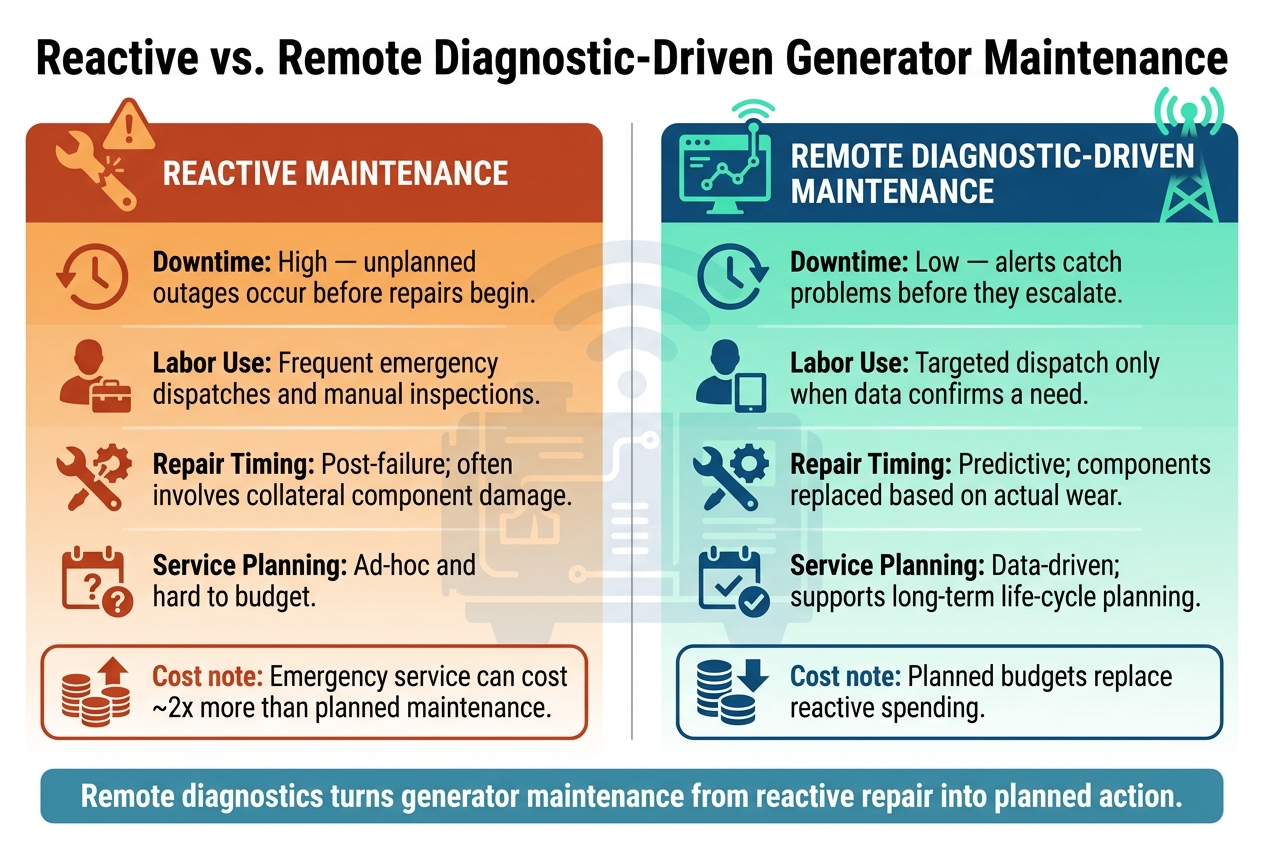
Reactive vs. Remote Diagnostic-Driven Generator Maintenance
Once diagnostics speed up response time, cost becomes the next big issue. Remote diagnostics help cut costs by spotting faults before they turn into full failures. Those early-warning alerts mentioned earlier don’t just help avoid breakdowns. They also help avoid emergency labor rates, rush parts orders, and extra damage to nearby components that often comes with an unplanned failure.
They also trim labor, fuel use, and equipment wear. Better load management can lower fuel consumption and reduce wear, while service intervals based on actual conditions can slow component aging. When a fault is checked in advance, repair teams spend less time diagnosing the problem on-site, which helps shorten outages.
You can see the gap most clearly in downtime, labor, repair timing, and planning.
| Factor | Reactive Maintenance | Remote Diagnostic-Driven Maintenance |
|---|---|---|
| Downtime | High; unplanned outages occur before repairs begin | Low; alerts catch problems before they escalate |
| Labor Use | Frequent emergency dispatches and manual inspections | Targeted dispatch only when data confirms a need |
| Repair Timing | Post-failure; often involves collateral component damage | Predictive; components are replaced based on actual wear |
| Service Planning | Ad-hoc and hard to budget | Data-driven; supports long-term life-cycle planning |
The biggest change is financial. Maintenance shifts from reactive spending to planned budgets. Remote diagnostics give maintenance teams a way to forecast service needs, extend asset life, and avoid the unplanned outages that tend to cause the highest costs.
FAQs
Can older generators use remote diagnostics?
Yes. Older generators can use remote diagnostics, but they usually share less information than newer units.
Newer generators may send detailed digital data through protocols like RS-485. Older models, by contrast, often rely on simple contact closures that report basic alarms for minor or critical faults.
Even with that lighter data set, remote oversight still helps move maintenance from reactive to proactive. That means less downtime and lower emergency repair costs.
What alerts matter most for early failure detection?
The most important alerts for early failure detection are battery voltage, engine temperature, oil pressure, fuel level, and abnormal vibration.
Battery health matters most here. Low voltage is one of the top reasons equipment won’t start, so it’s often the first thing teams watch.
More advanced systems can also catch smaller changes that are easy to miss at first glance. A slight bump in temperature or a minor shift in vibration can point to mechanical trouble days or even weeks before it turns into a bigger failure.
How secure is generator remote diagnostic data?
Generator remote diagnostic data can be very secure when you protect it in layers. Good systems use SSL-encrypted outbound-only data transmission, which means you don't need to open inbound firewall access.
What should you look for? A setup with:
- Multi-level authentication
- Two-step verification
- Network segmentation
- Certificate-based authentication
- Restricted API access
- Detailed access logs
- Isolated cellular or satellite connectivity
That kind of setup works like a series of locked doors, not just one. If one control fails, others are still in place.