

SCADA System Selection: Brand Comparison Guide
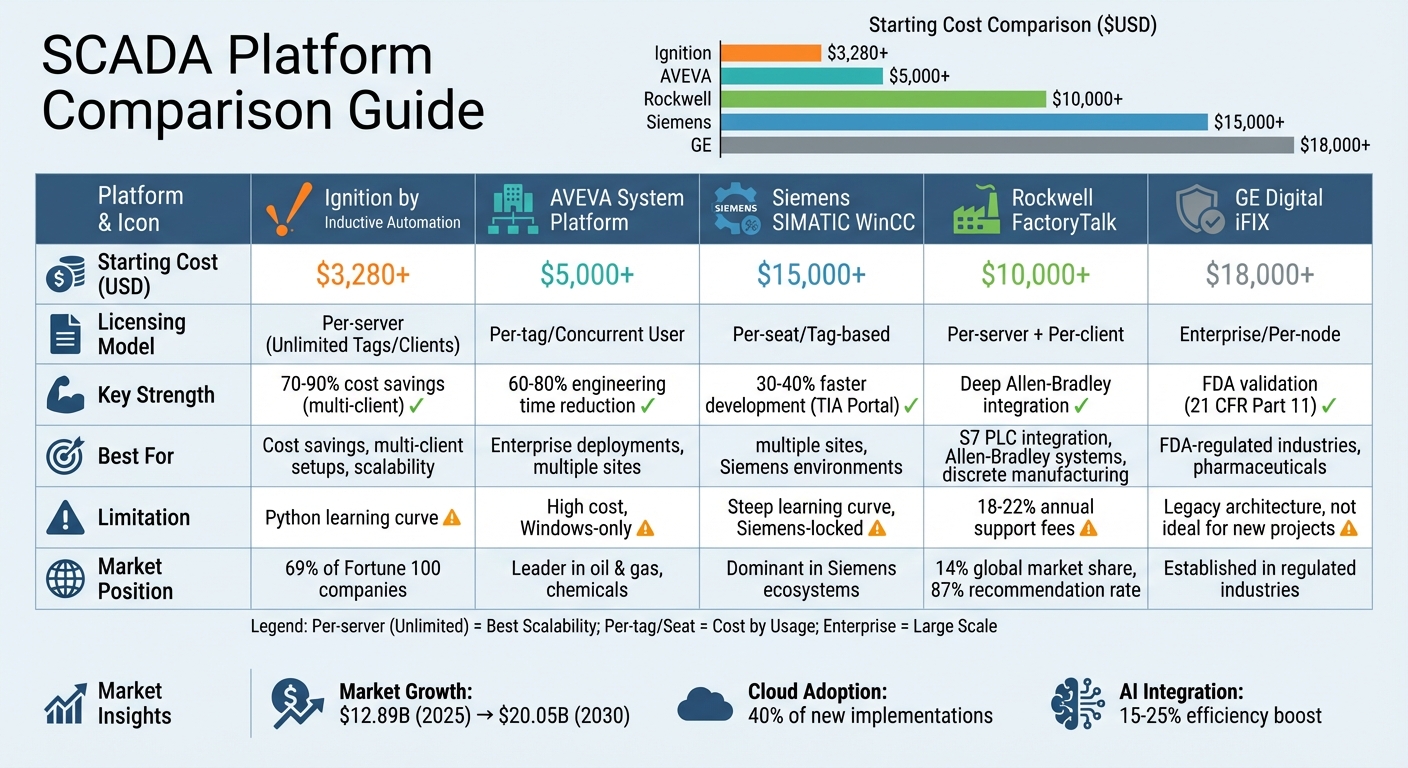
Choosing the right SCADA system can significantly impact your operations. Here's a breakdown of the most popular SCADA platforms and what they offer:
- Ignition by Inductive Automation: Known for its unlimited tag licensing, it’s cost-effective for multi-client setups. Starting at $3,280, it supports Python scripting and is compatible with Windows, Linux, and macOS. Ideal for businesses prioritizing scalability and budget savings.
- AVEVA System Platform: Built for enterprise-level deployments, it uses a template-based design to reduce engineering time. While powerful, it’s more expensive and Windows-only.
- Siemens SIMATIC WinCC: Best for Siemens-dominated environments, offering seamless integration with Siemens PLCs. However, it’s less flexible for non-Siemens hardware and has a steeper learning curve.
- Rockwell FactoryTalk: Perfect for Allen-Bradley systems, with tight integration and unified tag databases. High per-client licensing costs can make it pricey for larger setups.
- GE Digital iFIX: Strong in FDA-regulated industries, with robust validation protocols. It’s reliable but relies on a legacy architecture and is less appealing for new projects.
Quick Comparison
| Platform | Licensing Model | Starting Cost | Best For | Limitation |
|---|---|---|---|---|
| Ignition | Per-server (Unlimited) | $3,280+ | Cost savings, multi-client setups | Python learning curve |
| AVEVA System Platform | Per-tag/User | High | Enterprise deployments | High cost, Windows-only |
| Siemens SIMATIC WinCC | Per-seat/Tag-based | $15,000+ | Siemens environments | Limited flexibility |
| Rockwell FactoryTalk | Per-server + Client | $10,000+ | Allen-Bradley systems | High ongoing costs |
| GE Digital iFIX | Per-node | $18,000+ | FDA-regulated industries | Legacy architecture |
When selecting a SCADA system, focus on your operational needs, hardware compatibility, and budget. For cost-effective scalability, Ignition is a standout. For enterprise-level deployments or specific hardware ecosystems, consider AVEVA, Siemens, or Rockwell. GE Digital iFIX remains a strong choice for compliance-heavy industries.
SCADA Platform Comparison: Pricing, Features, and Best Use Cases
Five Most Popular SCADA Systems in Factory Automation 2025
sbb-itb-501186b
1. Ignition by Inductive Automation
Ignition by Inductive Automation stands out for its distinct licensing approach. It offers a single server license that eliminates per-tag and per-client fees, resulting in 70–90% cost savings for multi-client deployments compared to platforms like FactoryTalk View SE. This pricing structure moves away from traditional models, making it an attractive option for businesses. Ignition is already trusted by 69% of Fortune 100 companies and is deployed in over 140 countries.
Pricing
Ignition provides modular packages that allow for tailored configurations. Here’s a breakdown of the pricing:
- Starter Package: Begins at $3,280.
- Basic Package: Priced at $15,925, this includes PLC communication, historical data logging, and HMI building.
- Pro Package: Costs $24,370 and adds reporting and alarm notifications.
- Ultimate Package: Available for $34,990, offering a complete enterprise suite.
Annual support typically ranges between $900 and $1,500. A free trial is also available, running on a two-hour resettable timer, which allows full development and testing before committing to a purchase [4,9,12]. These transparent options make it easier for organizations to pick a package that aligns with their operational goals.
Key Features
Ignition is Java-based and supports deployment across Windows, Linux, and macOS. It includes built-in drivers for major PLC brands like Allen-Bradley, Siemens, and Modbus, while also supporting open standards such as OPC UA and MQTT for seamless IT/OT integration.
Other standout features include:
- Hot deployment: Enables real-time changes without shutting down or restarting the system.
- SQL-centric design: Incorporates a relational database historian, reducing reliance on costly third-party middleware.
- Python scripting: Allows for custom solutions, while rapid development tools speed up project timelines [4,10].
These capabilities make Ignition a versatile platform, ready to meet the demands of various industries.
Industry Applications
Ignition is designed to adapt to a wide range of industrial environments. It performs exceptionally well in mixed PLC settings, making it a popular choice for industries such as:
- Automotive: Enterprise-wide SCADA and MES integration.
- Data Centers: Efficient monitoring and control.
- Manufacturing: Real-time production tracking with OEE modules.
- Energy Storage: Solar and battery systems.
- Water/Wastewater: Ensures regulatory compliance.
The unlimited tag model is particularly advantageous for operations involving large-scale data management.
Scalability
Ignition’s modular architecture allows businesses to start small and grow as needed. For example, organizations can begin with a single local HMI using the free Panel Edition or Edge version and later expand to global enterprise systems by adding modules and gateways.
- Ignition Edge: Offers unlimited tags at a lower price for smaller installations, though it has a 35-day SQL history limit.
- Cloud Edition: Available on AWS and Azure, this version supports pay-as-you-go computing and storage for large-scale data analysis. Bulk discounts for Edge licenses range from 10% for 10–24 units to 40% for 500 or more units.
These scalable options ensure that Ignition can grow alongside the needs of any organization, whether small or enterprise-level.
2. AVEVA System Platform
AVEVA System Platform is an enterprise-level SCADA solution built on the Archestra architecture. It features a centralized repository, known as "Galaxy", which stores standardized object templates to simplify deployments across multiple sites. Borg Manufacturing, for instance, reported a 400% increase in efficiency while also cutting down on waste through its implementation.
Pricing
AVEVA System Platform falls on the higher end of the pricing spectrum, with SCADA implementations starting at over $5,000. The company offers the AVEVA Flex subscription model, which uses a credit-based system to provide flexibility. This allows users to assign multiple single-engine licenses to a single platform. The pricing structure clearly positions System Platform as the enterprise solution, while Indusoft Web Studio serves as a more affordable option for smaller HMI applications. Licensing includes runtime, development, and Galaxy management tools, with the full repository requiring around 4.5 GB of installation space.
Key Features
One standout feature is the Operations Management Interface (OMI), which provides cross-platform, context-aware visualization. The platform includes a high-fidelity historian capable of analyzing an entire year of historical data in under a second, offering quick access to process trends. It also supports collaborative multi-user development, allowing engineering teams to work on the same application simultaneously, whether on-premise or in the cloud. For advanced users, .NET scripting support enables complex logic development, far beyond the capabilities of basic HMI software.
Industry Applications
The platform is particularly well-suited for large-scale enterprises that require standardization across multiple sites. Its object-oriented design is ideal for complex manufacturing operations, as reusable templates help enforce engineering standards and cut development time by up to 80%. Additionally, it bridges the gap between plant floor data and enterprise systems through plug-and-play contextualized apps, making it a strong choice for IT/OT integration. Results from implementations show a 40% improvement in operator effectiveness and response times that are five times faster.
Scalability
The platform is designed to grow with organizational needs. Companies can start with a single-box deployment and scale up to multi-tiered, distributed server setups without having to re-engineer the system. The Galaxy repository simplifies centralized management across large enterprises, while distributed processing ensures high uptime even as data demands increase. With support for unlimited tag counts, the system is well-suited for large industrial environments. However, the platform's complexity means formal training is essential before diving into development - it’s not a system you can learn overnight.
This scalability and robust feature set make AVEVA System Platform a strong contender as we move forward to compare other SCADA solutions.
3. Siemens SIMATIC WinCC
Siemens SIMATIC WinCC is designed specifically for Siemens environments, offering seamless integration with SIMATIC controllers. This native S7 integration significantly cuts down on configuration time compared to using third-party platforms. By being part of the TIA Portal, it creates a unified workspace where PLCs, HMIs, and SCADA systems can be developed within the same environment.
Pricing
WinCC uses a modular licensing model, requiring individual licenses for components like Runtime, Server, Client, and optional add-ons such as Web Navigator or WinCC Audit (for compliance with 21 CFR Part 11). Pricing is based on quotes and varies by region. Licensing is also tag-based, offering tiers for 512, 2,048, 8,192, 32,768, and 65,536 tags. For specific pricing details, Siemens should be contacted directly.
Key Features
The platform’s modular licensing is paired with a wide range of features. WinCC supports both VBScript and ANSI-C scripting, delivering better performance compared to systems restricted to VBA. The enterprise-level WinCC V7.x supports up to 262,144 external tags, while WinCC Professional enables distributed architectures with up to 32 clients per server. Additionally, the platform offers long-term support and stable releases, making it a dependable choice for industries that require audit-ready functions and redundancy. For modern deployments, WinCC Unified provides HTML5-based visualization, suitable for both panels and PC runtimes.
Industry Applications
WinCC’s versatile features make it a strong contender in manufacturing and discrete industries, particularly where order execution, traceability, and track-and-trace are priorities. In food and beverage operations, it streamlines automated recipe management and batch reporting while ensuring compliance with safety standards. Water and wastewater facilities benefit from its ability to handle distributed systems with high availability through redundancy. The platform also excels in managing complex traffic and infrastructure systems, such as urban traffic coordination, tunnels, and public transit networks, through its redundant and geographically distributed setups.
Scalability
WinCC comes in different versions to suit operations of various sizes. WinCC Advanced is tailored for single-user PC runtimes with up to 512 tags, while WinCC Professional is ideal for medium-to-large operations, supporting multi-client distributed architectures and scaling up to 64,000 tags. For enterprise-level demands, WinCC V7.x scales to 262,144 tags with options for multi-redundant server configurations.
The system is particularly efficient in Siemens-centric environments. When paired with S7-1200 or S7-1500 controllers, its native addressing and TIA Portal integration save significant configuration time. However, it does require specialized Siemens expertise, and integrating non-Siemens PLCs can introduce additional complexity and cost. This adaptability makes it a strong choice for industries needing flexible SCADA systems to meet evolving demands.
4. Rockwell FactoryTalk

Rockwell FactoryTalk is tightly integrated with Allen-Bradley systems, making it a great fit for setups already using ControlLogix or CompactLogix. Its direct tag referencing cuts down on scripting needs. Plus, its connection with Studio 5000 creates a unified engineering environment where PLCs and SCADA share the same tag database. This close integration can help streamline commissioning within Allen-Bradley systems. Let’s take a closer look at its pricing, features, and applications.
Pricing
FactoryTalk follows a tiered, per-client licensing approach. Here’s how the costs break down:
- A single-server, single-client View SE setup ranges from $10,000 to $15,000 in the first year.
- Server licenses typically cost $8,000 to $12,000.
- Adding a client license costs an extra $1,500 to $2,500 per client. For example, a 10-client system would add $15,000 to $25,000.
- Annual support contracts are priced at 18–22% of the total license cost.
- For full MES functionality, subscriptions start around $35,000 per year.
Key Features
FactoryTalk’s modular design allows users to start with basic monitoring and grow into advanced tools like Historian, Analytics, or AssetCentre. While it enforces consistent standards through built-in guardrails, this can limit customization options.
Customer feedback shows an 87% recommendation rate, with users appreciating its user-friendly interface and reporting tools. However, some users mention a steep learning curve for less tech-savvy teams and find the licensing structure more complicated than newer alternatives .
Industry Applications
FactoryTalk shines in specialized industrial environments. Here’s how it performs across key sectors:
- Discrete Manufacturing: It’s widely used in automotive, electronics, and packaging industries, boasting a 14% global market share, especially in North America.
- Pharmaceuticals: Offers tools tailored for 21 CFR Part 11 compliance and batch management .
- Food & Beverage: Helps track production performance and overall equipment effectiveness.
- Heavy Industries: Metals, mining, and pulp & paper sectors rely on FactoryTalk for large-scale process monitoring and asset management.
Scalability
FactoryTalk is versatile, scaling from small HMI applications (View ME) to large, distributed systems (View SE) that support multiple operator stations . However, its per-client licensing model can make larger deployments more expensive compared to platforms offering unlimited client access for a flat server fee. Despite this, FactoryTalk View SE has earned an 8.6/10 rating for its distributed client-server architecture, making it a strong choice for facilities expanding monitoring across multiple sites.
5. GE Digital iFIX
GE Digital iFIX is built with a fault-tolerant architecture that ensures alarms and data collection stay operational, even if custom components fail. Lars Peter Larson, a System Specialist at Copenhagen Airport, highlights the platform's reliability:
iFIX has done an excellent job over the years and remains one of the most solid and flexible SCADA platforms on the market.
The platform has proven its strength in industries like water and wastewater treatment, pharmaceuticals, consumer packaged goods, food and beverage, and power transmission and distribution.
Pricing
iFIX falls into the medium pricing range. Its iPower add-on is available for a one-time cost of $15,000, and annual support contracts provide access to technical updates.
Key Features
iFIX stands out with its high-performance graphical engine and model-based navigation, which help operators respond faster. Its zero-deployment web clients, designed with responsive HTML5, allow seamless visualization on any device without requiring complex installations. By avoiding Java, the system minimizes security risks often tied to Java environments.
Additionally, iFIX integrates with GE's Proficy software suite, including Proficy Historian and Proficy CSense, enabling AI-driven predictive maintenance. The platform has delivered tangible results, such as a 30% productivity boost in paint manufacturing and supporting production at a scale of one billion bottles annually.
Industry Applications
Designed for distributed environments, iFIX offers robust alarm management and data collection capabilities, making it ideal for industries with strict regulatory requirements, like pharmaceutical manufacturing. It supports large-scale operations in water treatment plants, pipelines, and power distribution systems, with built-in remote access for monitoring multiple sites.
Scalability
For facilities with legacy FIX deployments, iFIX provides a straightforward migration path to modern standards. Its iPower solution can scale from automating individual substations to managing entire control room networks for electric utilities. The platform’s model-based design also allows for quick development as operations grow. However, its moderate learning curve may require additional training. These features make iFIX well-suited to meet the evolving demands of SCADA systems, balancing legacy support with modern capabilities.
Advantages and Disadvantages
After diving into the detailed features of each SCADA platform, let’s break down the key benefits and drawbacks of each option. This overview highlights how factors like deployment costs, engineering time, and scalability can vary between platforms, making it easier for decision-makers to weigh their options.
Ignition shines with its unlimited tag and client licensing model, offering significant cost savings for both standalone and multi-client setups. Its compatibility with Windows, Linux, and macOS, combined with modern Python scripting, makes it ideal for IT/OT integration. However, advanced customization requires a solid understanding of Python, which may pose a challenge for some teams.
AVEVA System Platform is tailored for large, enterprise-level deployments. Its ArchestrA architecture, which uses an object-oriented and template-based approach, can cut engineering time by as much as 60–80%. On the flip side, its high licensing costs and reliance on Windows-only support increase the overall expense. Additionally, mastering its complex architecture often requires specialized training.
Siemens SIMATIC WinCC stands out in Siemens-dominated settings, thanks to its seamless integration with Siemens S7 PLCs via TIA Portal. This integration can reduce development time by 30–40%. However, its reliance on a legacy architecture based on VBA limits flexibility, and it’s less open to non-Siemens hardware. The steep learning curve can also be a hurdle for new users.
Rockwell FactoryTalk is a go-to choice for plants centered around Allen-Bradley hardware, offering deep integration and unified tag databases. Despite these advantages, it comes with high configuration demands and expensive per-client licensing. Annual support fees, which range from 18–22% of the license cost, further add to the ongoing expenses. Additionally, its limited native object library may necessitate custom VBA scripting.
GE Digital iFIX has earned its reputation for stable performance in FDA-regulated industries, thanks to its established 21 CFR Part 11 validation protocols. That said, it relies on a legacy architecture and has a smaller pool of integrators. With a starting price of around $18,000, it’s less appealing for new greenfield projects.
Here’s a quick comparison to help summarize these points:
| Platform | Pricing Model | Est. Entry Cost | Key Strength | Primary Limitation |
|---|---|---|---|---|
| Ignition | Per-server (Unlimited Tags/Clients) | ~$3,280+ | 70–90% cost savings for multi-client setups | Python/Jython learning curve |
| AVEVA System Platform | Per-tag / Concurrent User | Variable (High) | 60–80% engineering time reduction | High licensing costs; Windows-only |
| Siemens WinCC | Per-seat / Tag-based | ~$15,000+ | 30–40% faster development with TIA Portal | Steep learning curve; Siemens-locked |
| Rockwell FactoryTalk | Per-server + Per-client | ~$10,000+ | Deep Allen-Bradley integration | 18–22% annual support fees |
| GE Digital iFIX | Enterprise / Per-node | ~$18,000+ | FDA validation protocols | Legacy architecture; not for new installs |
This table offers a clear snapshot of the platforms' pricing, strengths, and limitations, making it easier to identify the right fit for your specific needs.
Conclusion
Selecting the right SCADA platform hinges on aligning it with your specific operational needs and system capabilities. For businesses managing multiple sites or anticipating growth, Ignition's unlimited licensing model stands out. Its modern web-based architecture not only cuts costs by 40–60%, but also contributes to a projected 25% market share growth between 2020 and 2025. This option is particularly appealing for those prioritizing scalability and budget efficiency.
For operations with established hardware ecosystems, native solutions can simplify the process. For example, Siemens SIMATIC WinCC reduces engineering time by 30–40% in Siemens setups, while Rockwell FactoryTalk ensures smooth integration for Allen-Bradley users. The choice here often comes down to balancing the convenience of native integration against the cost advantages of third-party platforms.
Meanwhile, AVEVA System Platform remains a leader for large-scale enterprise applications, especially in industries like oil and gas, chemicals, and pharmaceuticals, where its capabilities justify the higher upfront investment. On the other hand, GE Digital iFIX continues to excel in FDA-regulated environments, thanks to its robust validation protocols that ease compliance efforts.
The SCADA market is poised for growth, jumping from $12.89 billion in 2025 to $20.05 billion by 2030. Key trends like cloud adoption - already part of 40% of new implementations - and AI integration, which boosts efficiency by 15–25%, are driving this expansion. When choosing a platform, think beyond immediate needs. Focus on scalability, regulatory compliance, and open architectures that leverage OPC UA and MQTT Sparkplug B to avoid vendor lock-in.
Finally, ensure your SCADA system is supported by dependable electrical hardware. Electrical Trader (https://electricaltrader.com) offers a centralized source for both new and used industrial electrical equipment, including transformers, breakers, and power distribution components. A solid hardware foundation is just as important as the software platform you select.
FAQs
How do I estimate total SCADA cost over 3–5 years?
To figure out SCADA costs over a 3–5 year period, you need to evaluate the total cost of ownership (TCO). This includes several key components:
- Initial costs: Expenses for hardware, software licenses, and installation.
- Support and maintenance: Annual fees for updates, troubleshooting, and general upkeep.
- Operational costs: Energy consumption, monitoring expenses, and any potential upgrades.
- Licensing models: Costs can differ depending on the type of system and licensing agreements.
By adding up these expenses over your chosen timeframe, you can get a clear picture of the total cost.
What should I check to avoid vendor lock-in?
When selecting a SCADA system, it's smart to focus on open standards and interoperability. Why? These features ensure the system can work seamlessly with your existing setup and adapt to future needs. Choose a system that integrates easily with different hardware and software, supports modular and scalable designs, and comes with reliable vendor support. This approach minimizes dependence on proprietary technologies, makes upgrades or expansions easier, and keeps your options open for the long haul.
When is cloud SCADA a better fit than on-prem?
Cloud SCADA works best when you need scalability, remote access, and fast deployment. It allows you to monitor and control systems from anywhere, integrates seamlessly with IIoT and AI technologies, and minimizes the need for on-site hardware. On the other hand, on-premises SCADA is a better choice for environments with strict cybersecurity requirements, unreliable internet connections, or specific data residency regulations. For many organizations, cloud SCADA provides the adaptability and cost savings needed to manage operations spread across multiple locations.