7 Factors for Choosing EMS Vendors
I’d choose an EMS vendor based on five-year cost, system fit, scale, support, reporting, security, and rollout proof - not the sales demo. U.S. commercial buildings waste about 30% of their energy, and a good EMS can cut that by 15% to 30%. But the wrong vendor can turn those savings into extra fees, bad data, and rollout delays.
If I were shortlisting vendors, I’d check these 7 factors first:
- Cost and lifecycle value: model a 3- to 5-year TCO, not just year-one price
- Scalability: make sure adding sites doesn’t mean custom setup every time
- Integration: confirm support for BACnet, Modbus, MQTT, and open APIs
- Support and training: get SLA terms, response times, and training scope in writing
- Data visibility: check dashboards, alerts, interval data, and export access
- Security and compliance: verify SSO, RBAC, MFA, encryption, and audit logs
- Implementation fit and vendor proof: ask for references, rollout timelines, and a paid pilot
The big takeaway is simple: pick the vendor that gives you the best fit over five years, not the lowest quote today.
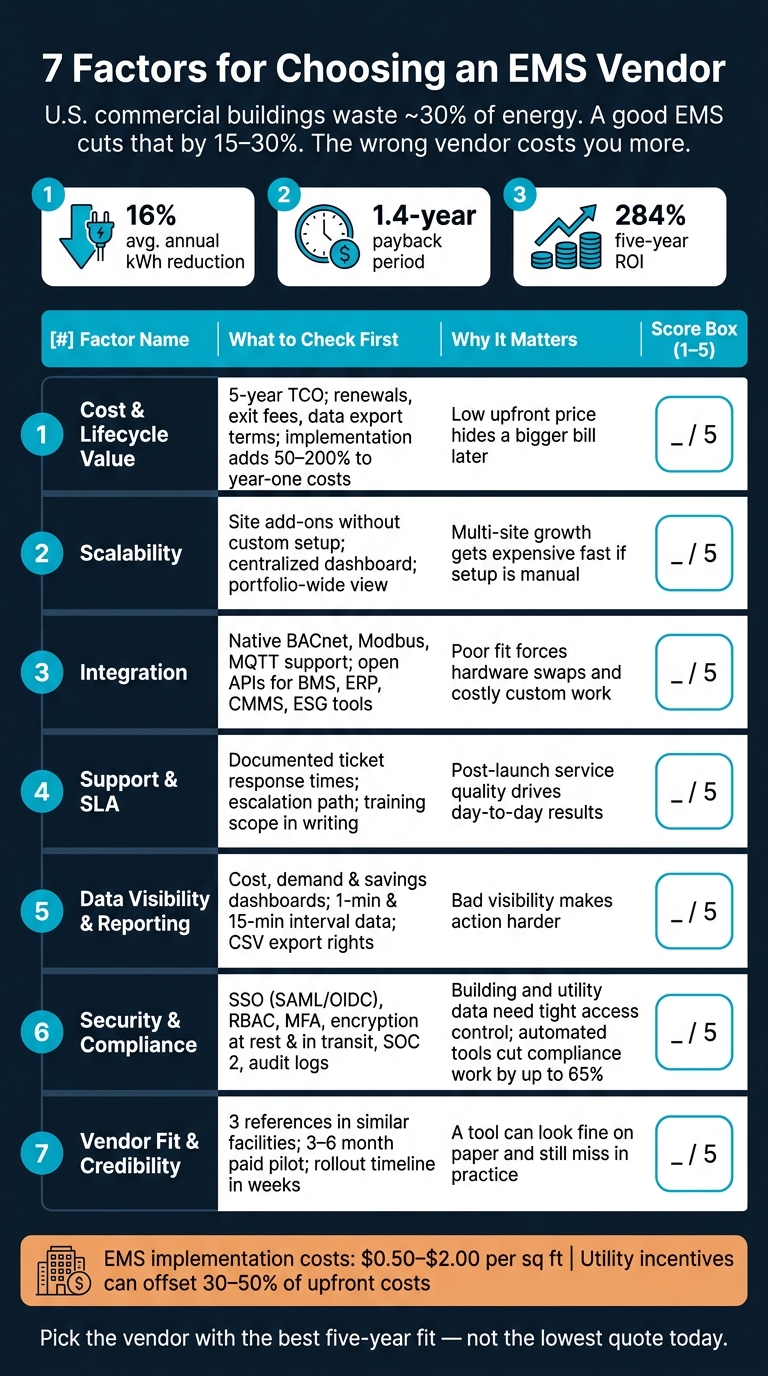
7 Factors for Choosing an EMS Vendor: Scorecard & Key Checks
Quick Comparison
| Factor | What I’d check first | Why it matters |
|---|---|---|
| Cost | 5-year TCO, renewals, exit fees, data export terms | Low upfront price can hide a bigger bill later |
| Scalability | Site add-ons, centralized setup, portfolio view | Multi-site growth gets expensive fast if setup is manual |
| Integration | BACnet, Modbus, MQTT, APIs, schema access | Poor fit can force hardware swaps and custom work |
| Support | SLA, escalation path, updates, training | Post-launch service affects day-to-day results |
| Reporting | Cost, demand, savings views, 1-minute/15-minute data | Bad visibility makes action harder |
| Security | SSO, MFA, encryption, backups, incident plan | Building and utility data need tight access control |
| Vendor fit | References, pilot, rollout timeline, use-case match | A tool can look fine on paper and still miss in practice |
If I were comparing EMS vendors today, this is the checklist I’d use before asking for final proposals.
sbb-itb-501186b
1. Cost and Total Lifecycle Value
The quoted price rarely tells the whole story. If you want the real number, build your TCO around everything that comes with the purchase: hardware, installation, configuration, training, subscriptions, storage, and analytics. That total cost should be the lens you use for every vendor claim in this section.
Implementation can add 50% to 200% to first-year license costs. That’s a big jump, and it’s one reason side-by-side quote comparisons can mislead you. A better move is to model a 5-year total cost of ownership (TCO) instead of focusing on year-one pricing alone.
Commercial Transparency
Ask each vendor for a 3- to 5-year cost breakdown that covers renewals, termination fees, support, and software updates. If the pricing feels fuzzy or the vendor won’t spell out what’s included, treat that as a red flag.
Also, get it in writing that you own your data and can export it as CSV at the end of the contract without extra fees.
System Compatibility
Compatibility matters because it can change retrofit cost in a big way. If the platform works with your current BMS or BAS, you may avoid expensive hardware replacement.
Multi-Site Scalability
Scale can hit the budget just as hard as feature set. If you manage multiple sites, check that pricing and onboarding stay predictable as new locations come online.
Before you commit, test the full cost picture in the field. A 3- to 6-month paid pilot across 3 to 5 sites can help you measure ROI, integration effort, and support quality under normal operating conditions.
2. Scalability and Future Expansion
After cost, the next test is scale. A platform that works for one site can fall apart at ten. You need to know whether it can grow across locations, systems, and support needs without rework.
Multi-Site Scalability
Some vendors need site-specific setup every time you add a new location. That slows deployment and adds cost fast. For teams running multiple sites, that kind of model can turn expansion into a slog.
By contrast, multisite operators using a scalable EMS can achieve an average 16% annual kWh reduction and a 1.4-year payback period. But those numbers don’t happen by magic. They depend on the system staying consistent as your portfolio grows.
The big idea is simple: scale comes from open standards, not one-off setup at every site.
System Compatibility
Scale also means you shouldn’t have to swap out existing hardware each time you add a new facility. Look for platforms that support open communication standards like BACnet, Modbus, and MQTT, along with open APIs that connect to your current BMS, SCADA, or PLC layers.
If a vendor needs proprietary hardware at every site, expansion costs can get murky in a hurry. That makes budgeting harder and can lock you into more vendor spend than you planned.
Expansion Pricing
Get the pricing details early. Ask for:
- Site-count pricing
- Onboarding fees
- Integration charges
- Any API or data-access costs tied to new locations
Either pricing model can work. What matters is seeing the structure upfront.
It also helps to ask for API documentation and the underlying data schema before you sign. That gives you a way to check whether the system can connect to future ERP or ESG reporting tools without costly custom work.
3. Integration and Interoperability
An EMS that doesn't connect well with your current systems will only take you so far. Once you've sorted out cost and scale, this is the next gut-check: will the EMS fit into your stack, or will it push you into expensive patchwork fixes?
System Compatibility
The main question is simple: which systems does the EMS support, and how does it move data? Start with open standards like BACnet, Modbus, and MQTT. Those standards help the EMS read data from equipment you already have, without forcing hardware replacement.
You should also ask for open APIs. That's what lets the EMS share data with tools like BMS, ERP, CMMS, and ESG platforms without custom coding work. Before you sign anything, get the API documentation and the data schema. If a vendor gets vague here, that's usually a bad sign.
Commercial Transparency
A lot of integration costs don't show up until after the contract is signed. That's why it's smart to ask vendors to break out every charge line by line:
- hardware
- installation labor
- configuration fees
- whether API integrations cost extra as add-ons
Data rights matter just as much. Make sure the contract gives you full data ownership, CSV export, and a documented schema at contract end. If the vendor uses a closed data schema, switching later can become far more painful - and more expensive - than the gap in license price first made it seem.
For multi-site portfolios, centralized management helps keep data and reporting aligned across locations.
When integration is clean, rollout gets easier and the service load drops. That puts support quality under the spotlight next.
4. Support, Training, and Service Model
Before you sign, get a clear view of support after go-live, not just what shows up in the sales deck. Cost and integration matter, of course. But once the system is live, support is what decides whether the EMS keeps working well day to day.
Service Responsiveness
Use the SLA as a reality check on vendor claims. Ask for documented ticket response times, escalation procedures, and maintenance coverage in writing. Then run a 3- to 6-month paid pilot at one site so you can see how the vendor handles technical issues and data quality problems before a full rollout.
Vendor timelines also tend to sound shorter in sales conversations than they do in practice. Ask for the actual number of delivery weeks from similar deployments, not rough estimates.
Fast responses matter. So does the fine print in the support contract.
Commercial Transparency
Make sure you know what is included and what costs extra. Confirm whether technical support, software updates, and proactive monitoring are part of the contract or billed separately. Also ask for a full breakdown of recurring fees and add-ons.
A couple of items need extra attention:
- Support scope: technical support, software updates, and proactive monitoring included or extra
- Training scope: onboarding sessions and materials bundled or billed separately
Multi-Site Scalability
If you manage multiple sites, check that support, training, and account management can work across all locations without site-by-site reconfiguration. Training should also fit both corporate managers and field teams, not just one group or the other.
Once the support terms are clear, the next step is to compare how each vendor shows performance data and reporting.
5. Data Visibility and Reporting
After service quality, the next thing to check is simple: Can the EMS make performance easy to see and act on? Good reporting turns raw energy data into decisions. Kilowatt-hours by themselves don't tell the full story. Managers also need to see cost, waste, and savings. The best vendors turn that data into clear reports that show all three.
Dashboard Clarity and Portfolio Views
Ask whether cost, demand, and savings reporting comes with the base platform or sits behind a paid analytics add-on. A good dashboard should turn technical data into business terms, like demand charges, savings in U.S. dollars, and cost breakdowns by site or system.
If you're managing more than one location, one-site-at-a-time reporting gets old fast. The dashboard should let you compare sites, regions, and time periods in a single view.
Data Quality, Alerts, and Access
Even the best-looking report falls apart if the data is messy. Reporting only helps when the EMS pulls clean data from meters, BMS, and ERP systems without data errors. For cost reporting, use 15-minute intervals. For equipment-level troubleshooting, use 1-minute intervals.
Alerts matter too. Real-time alerts and role-based dashboards should show the right information to the right people, whether that's a technician in the field or an executive watching spend. Also check data rights. You should keep ownership of your data and be able to export it in standard formats like CSV at any time, without vendor approval.
Once reporting is clear, the next step is to look at how each vendor protects the data behind it.
6. Security and Compliance
Once you know what data your EMS collects and how it reports that data, the next step is simple: who gets access, and how is that access protected? An EMS pulls utility, building, and operating data into one place across your portfolio. If security is weak, the risk isn’t just technical. It can hit IT, compliance, and your budget too. At this stage, security is the last hard check before you weigh vendor fit and rollout risk.
Commercial Transparency
Get data ownership, retention, and export rights in writing. That includes CSV exports and API access.
Multi-Site Scalability
Check that teams can manage access from one central place, push synced updates, and avoid site-by-site rework every time settings change.
System Compatibility
Your EMS should exchange data safely with the BMS, ERP, and maintenance systems you already use. That helps cut custom integration work and lowers the chance of rollout gaps.
Service Responsiveness
Ask the vendor what happens when there’s a security issue or data privacy problem across more than one site. You’ll also want audit logs and a written incident response plan, not just a verbal promise.
Use these checks to compare vendors fast.
| Security Area | What to Verify |
|---|---|
| Access Control | SSO (SAML/OIDC), role-based access control (RBAC), multi-factor authentication |
| Data Protection | Encryption at rest and in transit, data ownership clauses, regular backups |
| Certifications | ISO standards, SOC 2 or similar attestations, cybersecurity certifications |
| Compliance | Audit-ready ESG data, Scope 2 emission tracking, regulatory reporting templates |
On the compliance side, look for audit-ready ESG data and carbon accounting that support GRESB and GRI reporting. This matters because automated tools can cut compliance work by up to 65%.
After security and compliance, the next test is more practical: can the vendor set up the system well in your actual environment?
7. Implementation Fit and Vendor Credibility
A vendor can look great on paper and still hit a wall in your facility. What matters is whether the rollout process, staffing, and timeline fit your setup, not some polished demo or generic case study. These checks help you see if the vendor can deliver in your plant, building, or campus as it exists today.
Commercial Transparency
Ask for a five-year TCO in U.S. dollars. It should include implementation, integration, internal labor, and renewal increases.
A cheap year-one price can hide a much bigger bill later. If the vendor can't show the full cost over five years in a clear way, that's a warning sign.
Multi-Site Scalability
Confirm the platform can add sites without custom reconfiguration or manual rebuilds.
That sounds simple, but it matters a lot. A system that works for one site can become a headache fast if every new location needs its own custom setup.
System Compatibility
Confirm the EMS works with your existing BMS, SCADA, or PLC stack and fits your use case. A platform built for benchmarking can behave very differently from one built for industrial process optimization, even when the feature list looks almost the same.
In plain terms, two tools can check the same boxes in a sales deck and still perform very differently once they touch live systems.
Service Responsiveness
This is where proof beats promises. Ask for three customer references from vendors that match your industry, facility size, and control stack - then speak with at least two of them.
Run a 3- to 6-month paid pilot at one site before you commit to a broader rollout. That gives you time to spot integration gaps and see how the vendor reacts when something goes wrong.
Also ask for rollout timing in weeks for a similar deployment, including data integration, since vendor estimates are often optimistic by a factor of 1.5x to 3x. For a mid-sized single-site deployment, plan on 4 to 9 months from contract signature to go-live.
Cost Comparison Snapshot
Once you've compared fit and features, use this snapshot to compare the actual cost. It helps level out vendor quotes before you build a shortlist. Most quotes don't show the full picture, so model each bid on a 3- to 5-year TCO basis.
EMS implementation costs usually fall between $0.50 and $2.00 per square foot. Utility incentives can reduce upfront costs by 30% to 50%. When you compare bids, subtract those incentives from upfront CapEx first.
Here are the main EMS cost buckets to review:
| Cost Category | Expense Type | What to Include | Watch Out For |
|---|---|---|---|
| Hardware & Devices | One-time | Sensors, meters, gateways, controllers | Replacement costs in years 3–5 |
| Installation & Setup | One-time | Labor, wiring, initial configuration | Operational downtime during rollout |
| Software Subscription | Recurring | Platform access, data storage, analytics modules | Renewal price increases |
| Integration Work | One-time/Recurring | Middleware, custom mapping, API labor | Proprietary interfaces increase cost |
| Training & Onboarding | Recurring | Staff time for initial and ongoing training | Budget line often overlooked in TCO |
| Data Export & Access | Recurring | Retrieving or moving historical data | Hidden exit fees |
| Utility Incentives | Offset | Rebates and incentive programs | Deduct from upfront costs to calculate net CapEx |
These buckets make it easier to spot hidden fees before the final vendor comparison.
One cost buyers often miss is internal labor. That includes staff hours for monitoring, review, and day-to-day administration. Ask each vendor to estimate how many internal hours a facility your size will need.
Also, confirm data ownership in writing before you sign. Your contract should say that you keep ownership of your data and can export it without added fees after the contract ends.
What to Check Before Shortlisting Vendors
Before you ask for final proposals, put every vendor through the same checks. That keeps the process objective and helps you spot cases where a polished demo hides a poor technical match. After you compare price, integration, and support, use this last screen to separate strong options from vendors that just don’t fit.
Portfolio benchmarking platforms and industrial process-energy optimization platforms may look alike at first glance. In practice, they can perform very differently.
On the contract side, get renewal rates, termination terms, and post-expiration data access rules in writing. And if a vendor makes you request an export instead of giving you self-service CSV export, take that as a lock-in red flag.
For technical fit, verify native BACnet, Modbus, or MQTT support. Also confirm that the EMS can read data from your current BMS or PLC setup without forcing a hardware replacement. Ask for three reference customers in similar U.S. facilities - same general facility type, size, and control stack - and speak directly with at least two of them.
Use the same scoring method for every vendor so a slick presentation doesn’t skew the shortlist.
| Factor | Key Checkpoint | Score (1–5) |
|---|---|---|
| 1. Cost & Lifecycle Value | 5-year TCO includes hardware, installation, subscription, training, and implementation | |
| 2. Scalability | Proven unified dashboard across multiple sites without reconfiguration | |
| 3. Integration | Native BACnet, Modbus, and MQTT support; open APIs for ERP and CMMS | |
| 4. Support & SLA | Documented ticket response times, uptime percentages, and dedicated account support | |
| 5. Data Visibility | 1-minute equipment-level data for major loads | |
| 6. Security & Compliance | SSO (SAML/OIDC), RBAC, encryption at rest and in transit, SOC 2 or equivalent | |
| 7. Vendor Credibility | Verified U.S. references in similar facilities; pilot available |
Use this scorecard to narrow the field before the final contract review.
Conclusion
Choose the vendor that gives you the best five-year value, connects cleanly with your systems, scales without headaches, and doesn’t trap you in lock-in.
Those outcomes matter. High-performing EMS solutions have delivered an average 16% annual kWh reduction, a 1.4-year payback period, and a 284% five-year ROI. But numbers like that don’t happen by accident. They depend on clean integration, smooth rollout at scale, and steady day-to-day performance.
Look at technical fit and contract terms side by side. If a vendor can’t back up its answers on the scorecard with documented proof, take it off the shortlist.
Use the scorecard for every shortlisted vendor.
FAQs
How do I compare EMS vendors fairly?
Compare EMS vendors with clear, measurable criteria instead of glossy sales claims. The goal is simple: figure out what the system will cost, what it can do, how well it fits your current setup, and whether the vendor has a track record you can verify.
Start with total cost of ownership, not just the sticker price. A lower monthly fee can look good at first, then get expensive once setup, training, hardware, add-ons, and support fees show up. Look at the full picture.
Then dig into the product itself. Review:
- Features
- Integration with existing systems
- Scalability
- Vendor credibility
That last point matters more than many teams expect. A polished demo is one thing. A vendor with documented customer results, stable uptime, strong support, and a clear product history is something else entirely.
It also helps to check a few practical details that often get buried in the sales process: pricing transparency, documented savings, support quality, uptime, cybersecurity certifications, and data ownership. If a vendor is vague about any of those, that’s a signal worth paying attention to.
Before making the final call, run a pilot project. It’s one of the best ways to confirm that the platform performs well in your setting and works for your team day to day.
What hidden EMS costs should I watch for?
Watch for indirect costs such as:
- training
- downtime during installation
- integration costs
- maintenance and support fees
- scaling costs
These can have a big effect on total cost of ownership over 3 to 5 years.
How can I tell if an EMS will fit my sites?
Check whether the EMS fits with the systems you already use, such as BAS, IoT sensors, HVAC, and lighting controls. It should work well with your current equipment and data sources without turning setup into a headache.
It also needs to scale across multiple sites, support your energy goals, and deliver data you can trust. Before rolling it out everywhere, test it at a few representative sites. A pilot can show how easy the system is to use, how well it connects with your setup, and whether it delivers measurable energy savings.