Checklist for Choosing Energy Analytics Software
Choosing the right energy analytics software can save money, improve efficiency, and help meet sustainability goals. But with so many options, how do you decide? Here's a quick breakdown:
- Understand Your Needs: Define clear goals like cutting energy costs, improving equipment reliability, or meeting compliance standards.
- Evaluate Features: Look for real-time monitoring, predictive analytics, and automation tools that reduce peak demand costs.
- Integration Matters: Ensure the software works with your existing systems (e.g., smart meters, IoT devices) and supports open APIs to avoid vendor lock-in.
- Security and Compliance: Opt for platforms with strong encryption, audit logs, and certifications like NERC CIP or SOC 2.
- Cost and ROI: Consider total ownership costs (licensing, integration, training) and potential savings (e.g., 15-30% energy reduction or faster ROI).
- Pilot Testing: Test software in a limited rollout to ensure it meets your real-world needs before full deployment.
Key takeaway: Start with your goals, focus on integration and security, and only commit after a successful pilot test.
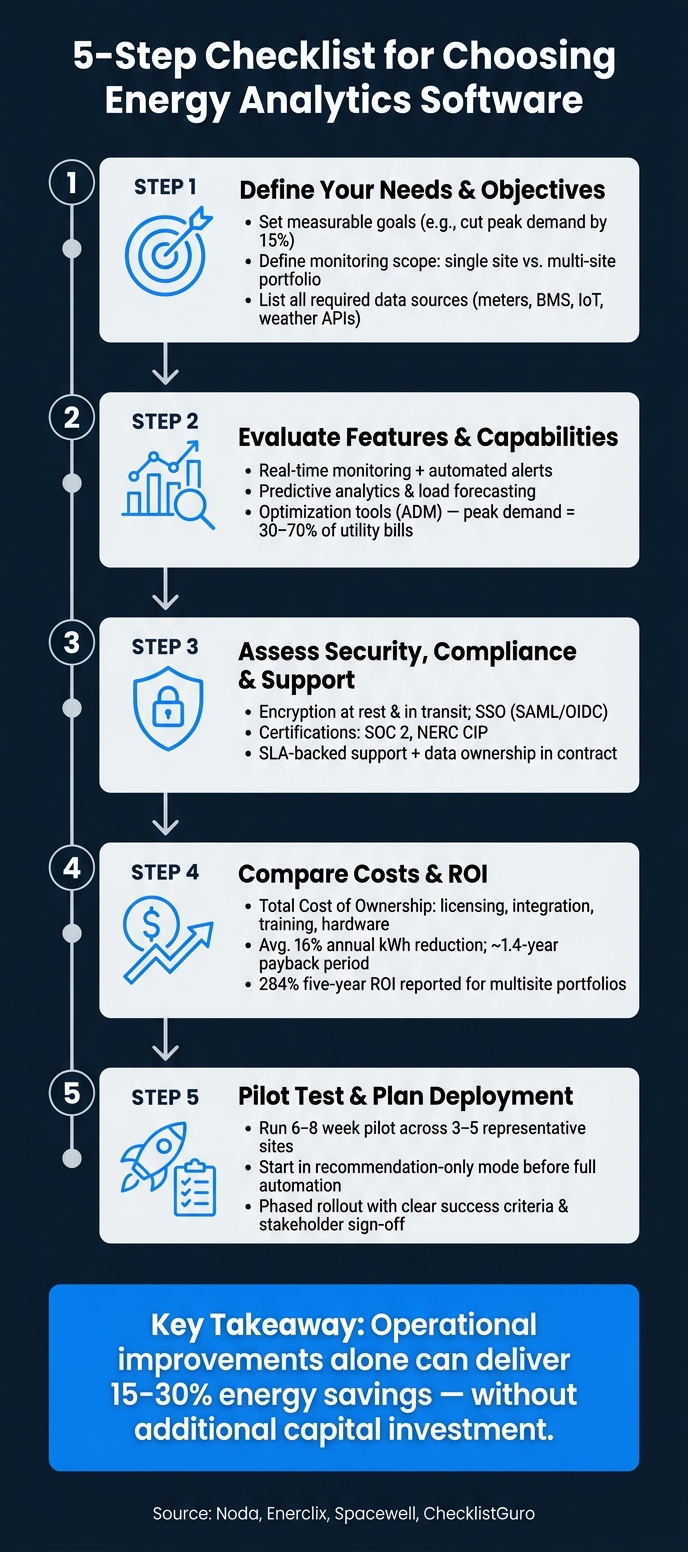
5-Step Checklist for Choosing Energy Analytics Software
7 Best Energy Management Software: Transform Your Energy Use!
sbb-itb-501186b
Step 1: Define Your Needs and Objectives
The first step in this process is all about pinpointing your needs. Before diving into vendor demos, take a moment to map out exactly what you want the software to accomplish. Without clear objectives, you risk being swayed by flashy presentations that don’t address your actual challenges.
Set Your Key Business Goals
Your goals will guide every decision you make from here on out. Most organizations aim to achieve one or more of the following: lower energy costs, hit sustainability benchmarks, enhance equipment reliability, or ensure compliance with reporting standards.
Be as specific as possible. For example, instead of saying "reduce energy costs", set a measurable target like cut peak demand charges by 15% within a year or create auditable emissions data for annual ESG reporting. Research highlights that operational improvements alone - such as fixing scheduling issues or resolving control conflicts - can lead to energy savings of 15% to 30% without requiring additional capital investment. That’s a solid goal to work toward.
"The question is no longer just 'how do we use less energy?' but 'when do we use it, and at what cost?'" - Noda
Involve stakeholders early on to ensure everyone’s priorities align. Once that’s done, define the monitoring scope to support these specific objectives.
Determine the Scope of Use
What exactly are you monitoring? Is it a single building, a regional network of facilities, or a combination of different asset types like offices, warehouses, and retail spaces? The scope of your monitoring will determine the features you need. For instance, a platform designed for a single campus might not scale efficiently to a 50-site portfolio. Similarly, software tailored for office buildings may not handle the operational demands of a manufacturing plant or a hotel.
For portfolios with diverse assets, opt for cloud-based platforms. These systems can scale easily and consolidate data from various systems without a hitch.
Identify Required Data Sources
Before committing to a platform, list every data source you’ll need to integrate. Common sources include utility meters, submeters, Building Management Systems (BMS), SCADA systems, weather APIs for data normalization, and energy market pricing feeds. If your setup includes solar panels, battery storage, or EV charging stations, make sure they’re included too.
| Category | Examples |
|---|---|
| Meters | Utility meters (electricity, gas, water), submeters |
| Operational Systems | BMS, SCADA, smart panels |
| IoT & Sensors | Occupancy sensors, temperature sensors, smart plugs |
| External Data | Weather APIs, electricity market pricing, fuel pricing |
| Renewables & DERs | Solar PV, battery storage, EV charging stations |
Here’s a key tip: choose hardware-neutral software. Proprietary systems often lock you into their ecosystem, requiring expensive consultants for every new data source you want to add. Instead, look for platforms with open APIs (REST) and webhook support. These features give you the flexibility to adapt your infrastructure without incurring high integration costs.
Step 2: Evaluate Software Features and Capabilities
Your objectives and data sources set the groundwork, but now it’s time to dig deeper into how each platform performs in action. Demos might look impressive, but they often showcase ideal scenarios. The real challenge is determining whether the software can deliver what you need when it matters most. This step connects your specific requirements to the software’s practical functionality, ensuring it’s not just good on paper but effective in real-world use.
Core Features to Look For
A robust energy management system (EMS) should provide real-time monitoring for electricity, gas, and water consumption. Automated alerts are essential for flagging when usage exceeds predefined thresholds. Another critical feature is Measurement and Verification (M&V), which allows you to establish baselines adjusted for weather and occupancy, ensuring you can accurately measure the success of energy-saving initiatives. Without M&V, you’re left making assumptions instead of relying on data.
"The foundation of any effective EMS lies in its ability to collect comprehensive and accurate energy consumption data." - Enerclix
Role-based access control (RBAC) is another must-have. Different team members - whether it’s your facilities team, sustainability manager, or CFO - require tailored views of the data. A one-size-fits-all dashboard can create unnecessary friction and hinder adoption.
Advanced Analytics Capabilities
Beyond the basics, most platforms provide descriptive analytics, offering dashboards and summaries of historical data. However, the real game-changer lies in predictive analytics, which can forecast load curves, anticipate equipment failures, and project costs under varying utility rates. The most advanced systems go a step further with optimization tools like ADM (Automated Demand Management), which use machine learning to shift energy loads during peak pricing periods proactively.
This is especially important because peak demand charges can account for 30% to 70% of a commercial utility bill. Tools that help you manage these peaks - not just report them - can significantly impact your bottom line. When evaluating AI-driven features, be direct with vendors: ask whether their tools are descriptive, predictive, or optimization-level. Their answer will reveal the platform’s true capabilities.
Here’s a quick breakdown of capability tiers:
| Capability Tier | What It Does | Business Value |
|---|---|---|
| Descriptive | Real-time monitoring, benchmarking, anomaly detection | Helps identify current inefficiencies |
| Predictive | Load forecasting, equipment failure anticipation | Improves risk management and budgeting |
| Optimization | ADM, automated setpoint adjustments, FDD | Drives cost savings and operational efficiency |
A practical tip: start using optimization features in "recommendation-only" mode before enabling full automation. This allows your team to evaluate and trust the system’s logic without immediately relinquishing control.
Integration and Interoperability
Seamless integration with your existing systems is non-negotiable. The software should work smoothly with SCADA, IoT sensors, and enterprise tools like accounting or property management systems. Avoid platforms that rely heavily on proprietary connectors, as they can introduce delays whenever you need to add new data sources.
"A platform that pulls from only one or two of those data streams will always be working with an incomplete picture." - Noda.ai
Ask vendors about their approach to data normalization - the ability to standardize data labels across different systems into a single, unified format is crucial. Also, confirm that data updates happen in real time. While hourly or daily updates might suffice for reporting, they’re inadequate for effective demand management and immediate decision-making.
Step 3: Assess Security, Compliance, and Support
Once you've evaluated the platform's data and analytics capabilities, it's time to focus on its security measures, compliance features, and the reliability of vendor support.
Cybersecurity and Data Protection
Energy data is highly sensitive. It can reveal operational patterns, equipment schedules, and facility usage, making it a potential target for cyber threats. To safeguard this data, the software should provide encryption both at rest and in transit. Additionally, it should support Single Sign-On (SSO) using protocols like SAML or OIDC.
Beyond basic access controls, the platform should include audit logs to track who accessed data and when, along with alerts for any unusual activity. Look for third-party security attestations such as SOC 2 and NERC CIP certifications, which indicate strong security practices.
"Reputable cloud service providers prioritize data security, employing robust encryption, authentication protocols, and regular backups to ensure the protection and integrity of energy data." - Facilio
Ask vendors about their incident response processes, including timelines for breach notifications and recovery. If their answers lack clarity, it could be a warning sign.
While robust security is a must, dependable vendor support is just as important for a seamless experience.
Vendor Support and Training
Support levels can vary significantly depending on your plan. Don’t leave this to chance - request a Service Level Agreement (SLA) that outlines guaranteed response times for different types of issues, especially emergencies.
"Verify the support level and energy domain expertise provided in the SLA." - Spacewell
Find out what training resources the vendor offers. Look for options like on-demand videos, role-specific documentation, and live onboarding sessions to help your team get up to speed quickly.
A helpful tip: during the pilot phase (discussed in Step 5), test the vendor's support responsiveness. Submit both a non-urgent question and a simulated urgent issue to see how quickly and effectively they respond.
Finally, think about how the platform handles your data over the long term.
Data Ownership and Reporting
Your evaluation of security and support should extend to data governance. Ensure the contract explicitly states that you retain ownership of your data. Historical energy data holds long-term value for benchmarking, compliance reporting, and future analytics projects. Confirm that the platform allows you to export your data in a usable format if you decide to switch providers.
"Your historical energy data has long-term value. Make sure you can take it with you." - Noda
When it comes to reporting, the platform should enable you to create custom, audit-ready reports without requiring additional manual work. For companies pursuing ISO 50001 certification, the software should naturally generate compliance documentation - such as energy reviews, corrective actions, and performance records - as part of daily operations, not as an added project.
| Data Governance Area | What to Confirm |
|---|---|
| Data Ownership | Contract states client retains rights to all historical data |
| Data Portability | Full export available in standard formats upon contract end |
| Retention Policies | Clear timelines for how long data is stored and under what conditions |
| Custom Reporting | Ability to generate compliance and audit-ready reports on demand |
Step 4: Compare Costs and ROI
Now it’s time to determine if the software is worth the investment. This means looking past the subscription price to build a clear understanding of what you’ll spend - and what you’re likely to save.
Break Down All Costs
"The initial license fee is often the first thing businesses consider... but it's just the tip of the iceberg." - ChecklistGuro
The upfront price rarely tells the whole story. To get a complete picture of the Total Cost of Ownership (TCO), you’ll need to account for all expenses over the first three to five years:
| Cost Category | Type | What to Include |
|---|---|---|
| Licensing/Subscription | Upfront or Recurring | SaaS monthly fees or one-time perpetual license |
| Implementation | Upfront | Data migration, system configuration, BMS/IoT integration |
| Hardware | Upfront | Smart meters, sensors, or dedicated local servers |
| Training | Upfront/Ongoing | Initial onboarding and periodic refresher courses |
| Maintenance & Support | Recurring | Bug fixes, security updates, and tiered technical help |
| Internal Resources | Recurring | Staff time for data management, reporting, and user administration |
Don’t forget to factor in integration costs. Connecting the software to your existing utility meters, IoT devices, or building management systems can vary widely between vendors. Platforms with open APIs often keep these expenses lower and more predictable.
Once you’ve outlined all costs, the next step is to estimate the financial benefits.
Estimate Financial Benefits
With expenses mapped out, it’s time to calculate the potential returns. Energy analytics software can lead to measurable savings. For instance, users of advanced energy management systems have reported an average 16% annual reduction in kWh usage, with a typical payback period of around 1.4 years. For multisite retail and restaurant portfolios, data reveals a 284% five-year ROI.
The savings go beyond lower utility bills. Predictive maintenance reduces unexpected repair expenses and extends the life of equipment, delaying the need for costly replacements. Automated utility bill audits can catch errors and duplicate charges, eliminating the need for third-party audits. When estimating ROI, include these indirect benefits alongside direct energy cost reductions.
Here’s a key tip: don’t settle for theoretical ROI claims. Ask vendors to explain how they calculate their projections. Reputable platforms rely on normalized baselines that account for variables like weather, occupancy, and seasonal usage patterns - not just simple before-and-after comparisons.
Side-by-Side Cost Comparison Table
Once you’ve gathered cost and benefit data from each vendor, organize it into a side-by-side comparison. This makes it easier to see trade-offs and evaluate options objectively.
| Cost/Benefit Factor | Software Option A | Software Option B | Software Option C |
|---|---|---|---|
| Upfront Costs | License/setup fees | Implementation/hardware | Integration costs |
| Recurring Costs | Monthly subscription | Maintenance/support SLAs | Data overage fees |
| Internal Effort | Estimated staff hours | Training requirements | Manual data entry needs |
| Direct Savings | Reduced energy bills | Peak demand reduction | Carbon tax avoidance |
| Indirect Benefits | Billing error detection | Extended equipment life | Regulatory compliance |
| ROI Metrics | Payback period (months) | Estimated 3-year ROI | Total cost of ownership |
If you’re planning to scale, consider adding a row for scalability. Costs can shift as you expand to additional sites or extend data retention. The objective isn’t to pick the cheapest solution but to choose the one that offers the best value for what you’ll spend.
Step 5: Validate Your Choice and Plan Deployment
Once you've set clear objectives and tested your analytics capabilities, it's time to confirm your platform choice with a real-world pilot before committing to a contract.
Pilot Testing and Feedback
Start with a pilot program lasting 6–8 weeks, involving 3–5 representative sites (or 5–10 for larger portfolios). Select locations that showcase a variety of building types, BAS (Building Automation System) vendors, and system ages. This ensures the software is tested in scenarios that go beyond controlled demos.
Initially, run the pilot in a "recommendation-only" mode, where the software flags issues for manual review. Before launching, set clear success criteria, such as:
- Energy savings percentages
- Accuracy of alerts
- Integration reliability
- Workflow compatibility
Also, confirm that all historical data can be exported in standard formats, allowing for flexibility if you decide to switch platforms later.
"The most effective implementations aren't about removing humans from the loop, but rather seek to reduce the volume of low-stakes, repetitive decisions your team has to make manually, so their attention can go where it's actually needed." - Noda
Involve key stakeholders from departments like facilities, IT, sustainability, and finance. This collaborative approach helps identify potential issues early and ensures a smoother transition to full deployment. During the pilot, ask about the vendor's future plans to confirm their ability to adapt to evolving needs.
Vendor Stability and Product Roadmap
Evaluate the vendor's reliability by looking at their years in business, financial health, and track record in energy management (not just general software). A strong product roadmap is essential, especially one that moves beyond basic descriptive analytics to predictive and optimization capabilities. Here's how these tiers compare:
| AI Capability Tier | What It Does | Why It Matters |
|---|---|---|
| Descriptive | Reports trends and benchmarks | The baseline for understanding performance |
| Predictive | Forecasts load curves and equipment failure | Helps anticipate risks and costs |
| Optimization | Automatically adjusts systems | Reduces manual effort and boosts ROI |
Be cautious of "black box" systems that lack transparency. Reputable vendors will clearly explain how their recommendations are generated. Additionally, ensure the platform supports open communication protocols like BACnet, Modbus, or MQTT to avoid vendor lock-in.
Final Decision and Rollout Plan
Use the insights from your pilot to finalize your decision and plan a phased deployment. Document the decision and assign clear responsibilities for each stage of implementation. A phased approach - starting with a few sites before scaling up - helps mitigate risks and gives your team time to adapt.
Provide tailored training for both corporate managers and on-site staff. For automated features, establish guardrails by defining which zones or equipment can be automated and setting manual override thresholds. This strikes a balance, allowing operators to maintain control while benefiting from efficiency improvements.
"Picking the right platform starts with your goals and data. Prioritise fit and time‑to‑value over feature checklists." - Edward Mellor, SmartSensor Insights
Finally, use the software to model your deployment plan. Map out the sequence and costs to align with long-term energy goals, such as achieving a 2030 energy intensity target. This approach turns your rollout plan into a living roadmap rather than a static checklist.
Conclusion: Making an Informed Decision
Picking energy analytics software isn’t just about the initial purchase - it’s about committing to a tool that supports your long-term operations. Following each step in the checklist - from identifying your needs to conducting pilot tests - helps ensure the software you choose aligns with both your operational and strategic goals. Skipping any step could lead to picking a platform that looks great in a demo but underdelivers when it matters.
The key takeaway? Your final decision should hinge on how well the software’s features align with your specific energy objectives. Whether your focus is on reducing peak demand charges or automating fault detection across multiple sites, the right match can drive real results. Research highlights this potential: operational improvements alone, without heavy capital investment, can deliver energy savings of 15–30% across a building portfolio. That’s a significant impact, and it all starts with selecting the right tool.
Make sure to secure written agreements about data ownership and insist on transparency in how the software generates its recommendations. If a vendor can’t clearly explain their system’s logic, consider it a red flag. Look for platforms offering demand flexibility, open APIs, and scalable AI capabilities - they tend to outperform static dashboards.
Switching from simply cutting energy use to managing it intelligently requires the right software. Treat this checklist as a living document, revisiting it as your energy goals and operational needs change over time.
FAQs
What data do I need before I buy energy analytics software?
To make the most of energy analytics software, start by clearly defining your project goals. Are you aiming to reduce energy costs, tackle peak demand charges, or improve overall efficiency? Knowing your objectives will help you choose the right tool.
Next, compile a comprehensive list of data sources you'll need. These might include utility meters, sub-meters, building management systems (BMS), IoT sensors, or even weather APIs. Ensuring you have access to accurate and relevant data is essential for meaningful analysis. Don't forget to plan for data quality management, such as addressing gaps in data or resolving time-zone mismatches.
Lastly, verify hardware compatibility to ensure the software integrates smoothly with your existing systems. If you need equipment to support your setup, companies like Electrical Trader provide a range of solutions to meet these requirements.
How can I tell if a platform is predictive or just reporting?
To tell the difference, take a close look at the platform’s analytical features. Reporting tools are all about past data - they highlight trends, benchmarks, and any anomalies. On the other hand, predictive platforms go a step further by using machine learning to forecast what might happen next, like predicting equipment failures, energy needs, or potential cost scenarios. The key is to find features that offer forward-thinking insights, helping you make proactive decisions instead of just reviewing past performance.
What should I prove in a pilot before signing a contract?
Before committing to a contract, it's a smart move to run a 6–8 week pilot program across 3–5 sites. This approach lets you validate the software in real-world conditions. During the pilot, focus on a few key areas:
- Quantified energy savings: Confirm the software delivers measurable results.
- Alert accuracy: Check how reliable and actionable the alerts are.
- Workflow compatibility: Ensure the software integrates smoothly with your existing processes.
- Data integration: Test how well it handles your data and systems.
Make sure to use your own data to test usability and functionality. This gives you a clear picture of how well the software aligns with your specific needs. Lastly, set clear success criteria upfront to evaluate the pilot's results objectively.